New PayPal scam uses real emails to trick you

There’s a new PayPal phishing scam making the rounds, and it’s so convincing that even security-conscious users are getting caught in it. Unlike typical scams riddled with typos and fake domains, this one uses PayPal’s own email system to send you an alert that looks 100% real. You might get a message like:
You added a new address. This is just a quick confirmation that you added in your PayPal account.
Except… you didn’t. And what if you don’t even have a PayPal account? Here’s what this scam entails, why it works, and how to protect yourself.

Why the latest PayPal phishing scam is so convincing
Most phishing scams try (and fail) to impersonate big companies. You’ve probably seen the classics: weird grammar, suspicious email addresses, Microsoft spelled with a “k”. They’re laughably bad. But this scam flips the script because it uses PayPal against you. Here’s how the scam operates:
Exploiting real features: Scammers abuse PayPal’s “add address” or “money request” tools. By entering your email, they can trigger real emails from PayPal’s real domain. And this works even if you don’t have a PayPal account.
Bypassing filters: Because these emails come directly from PayPal’s servers (service@paypal.com), they pass all security checks and appear legitimate in your inbox.
Lack of suspicion: Some versions contain no phishing links at all, just a scammer’s phone number, making them even harder to detect.
Panic bait: The message often claims a new address was added or a large payment is being processed, getting your attention and provoking a quick reaction.
Follow-up attacks: After the initial email, scammers may later contact you pretending to be PayPal support. Some urge you to click a link to “secure your account”, which leads to a fake login page designed to steal your credentials.
THE DARK SIDE OF PAYPAL AND HOW TO STAY SAFE
Real examples of the PayPal phishing scam in action
This scam has been reported by dozens of users on Reddit and cybersecurity forums. One Reddit user posted a detailed thread in r/Scams showing screenshots of phishing emails that look like they came straight from PayPal’s official address.
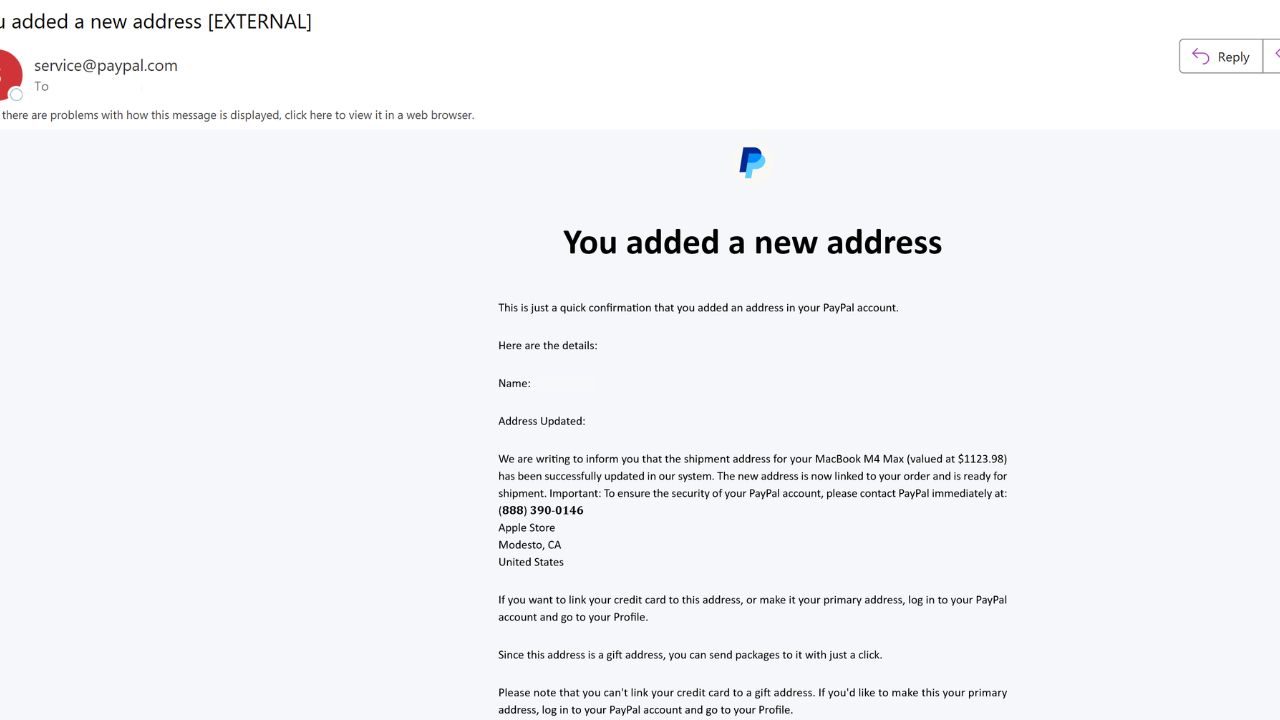
Credit: Reddit
In a newer and more sophisticated twist, scammers are removing links altogether. Instead, they include a phone number and ask you to call. Once you do, you’re connected with a fake PayPal representative who says they need to verify your identity. They then instruct you to download what appears to be a PayPal-branded support tool, but really it’s a customized remote access app hosted on a different server. And once it’s installed, it gives the scammer full access to your device.

Credit: Reddit
NEW PHISHING SCAM OUTSMARTS SECURITY CODES TO STEAL YOUR INFO
How scammers are hijacking PayPal’s system to send fake alerts
This part is still a bit of a mystery. With typical PayPal invoice scams, content is tightly controlled, which means you normally can’t change the email structure or messaging. However, these new emails suggest that scammers may be exploiting internal features, like business tools or API fields, to sneak custom content into PayPal-generated alerts. It’s not just phishing, it’s weaponizing a legitimate system to create trust and evade detection.
Why this PayPal phishing attack is so dangerous
This scam is especially effective and dangerous because the emails come directly from PayPal’s official servers, making it extremely difficult to distinguish them from legitimate messages. Since the sender address and branding are authentic, recipients are more likely to trust the communication without suspicion.
The scammers also use urgent language that creates a sense of panic, such as warnings about unauthorized activity or large charges. This pressure encourages people to act quickly and often before fully considering whether the alert is genuine.
Additionally, the scam often involves follow-up contact through calls or texts from individuals posing as PayPal personnel, further exploiting the initial confusion and increasing the chances of victims giving up sensitive information.

How to protect yourself from the PayPal phishing scam
Even if you’re vigilant, you can still be targeted. Here’s how to stay safe:
1) Don’t click links in suspicious emails, even if they look real, and use strong antivirus software: If you receive a PayPal alert you didn’t expect, go to PayPal by typing paypal.com into your browser or using the official app. Never click links or dial phone numbers provided in the email.
The best way to safeguard yourself from malicious links that install malware, potentially accessing your private information, is to have antivirus software installed on all your devices. This protection can also alert you to phishing emails and ransomware scams, keeping your personal information and digital assets safe.
- Strong real-time protection against viruses, malware, ransomware and hacking attempts
- AI-powered scam protection to help identify suspicious emails, texts and websites
- Built-in password manager to securely store and manage logins
- 2 GB PC cloud backup to help protect important files from ransomware or hardware failure
- Smart firewall and phishing protection
- Protection for 1 or 5 devices
- Protects 1 or 5 devices
- Available for Windows, macOS, Android and iOS
- Includes real-time threat protection, smart firewall and phishing protection to guard against online attacks
2) Enable two-factor authentication (2FA): Adding 2FA to your PayPal and email accounts gives you a second layer of defense even if your password gets compromised.
3) Use a password manager: Using a password manager is the best way to ensure every login you use has a unique, strong password. No repeats means no chain reaction if one site gets hacked.
- Unlimited password storage
- Secure sharing
- Password health reports
- Auto-fill and emergency access
- Data breach monitoring to alert you if your credentials have been exposed
- A Security Dashboard with tools like the Data Breach Scanner and Password Health Checker to identify weak, reused, or compromised passwords
CyberGuy Exclusive Deal: Save 52% now with CyberGuy’s exclusive NordPass offer – Get 1 extra month FREE with a 2-year plan. Try 30 days risk-free for only $1.43 per month!
4) Check your account manually: If you’re ever in doubt, just log into your PayPal account directly. Review recent activity, and see if anything looks off— there is no need to rely on alerts alone.
5) Report the scam: Forward suspicious PayPal messages to phishing@paypal.com. You can also report phishing attempts to the FTC.
6) Use a personal data removal service: Since phishing scams like the recent PayPal scam often target personal information that scammers gather from data brokers and people search sites, using a reputable data removal service can help reduce your exposure.
Incogni, a service I trust 100% and use myself, helps automate the process by submitting removal requests to hundreds of data brokers and people-search sites on your behalf.
Incogni automatically contacts data brokers on your behalf and requests the removal of your personal information. It also continues monitoring those sites and submits new removal requests if your data reappears.
- Incogni currently removes personal data from 420+ data broker and people-search websites, and its Unlimited plan allows you to request removals from as many additional sites as you need.
- Incogni has also received third-party assurance from Deloitte, validating its marketing claims.
- The goal is simple: make it much harder for strangers, scammers, and cybercriminals to find your personal information online.
CyberGuy readers get 60% off Incogni’s annual plans using the links in this article.
The service also includes a 30-day money-back guarantee, so you can try it risk-free and see how much of your information is exposed online.
Is your personal information exposed online?
Run a free scan to see if your personal info is compromised. Results arrive by email in about an hour.
Kurt’s key takeaways
This phishing scam is dangerous because it uses real PayPal emails sent from service@paypal.com. Scammers exploit PayPal’s built-in features to send real notifications that look legitimate. What makes it especially sneaky is the absence of links; instead, these emails include a phone number, making them more likely to pass through spam filters. When you call, you’re connected to a fake PayPal rep who pressures you into downloading a remote access tool disguised as support software. The safest move? Don’t click, don’t call, just go straight to PayPal.com and check your account manually.
If you’ve seen a version of this scam (or nearly fell for it), let us know by commenting below.
FOR MORE OF MY TECH TIPS & SECURITY ALERTS, SUBSCRIBE TO MY FREE CYBERGUY REPORT NEWSLETTER HERE
Copyright 2025 CyberGuy.com. All rights reserved. CyberGuy.com articles and content may contain affiliate links that earn a commission when purchases are made.