Preserve loved ones’ voicemails on iPhone

Preserving the voices of loved ones can be a profoundly comforting way to keep their memories alive, especially during times of loss. For many, hearing a familiar voice can evoke powerful emotions and provide solace. Recently, Laura from Silver Spring, MD, reached out with a heartfelt question:
My Mom passed away unexpectedly, and I still have some voicemails from her that I would like to preserve. Can you recommend a quality voice recorder that I could use to record her messages? I’m not a sound engineer, just an average person who wants to purchase a voice recording device that will provide a realistic recording of my Mom’s voice that I can keep forever.
Thank you for your heartfelt question, Laura. First, let me say I’m deeply sorry for your loss. It’s beautiful that you want to preserve your mom’s voice. I know what you are going through, as I, too, have experienced the pain of losing my dad, and I wanted to preserve the voicemails he left for me. Below are some practical steps and recommendations for saving his voicemails and recording them for safekeeping. (Android users click here)

Step 1: How to forward or save the voicemails on iPhone
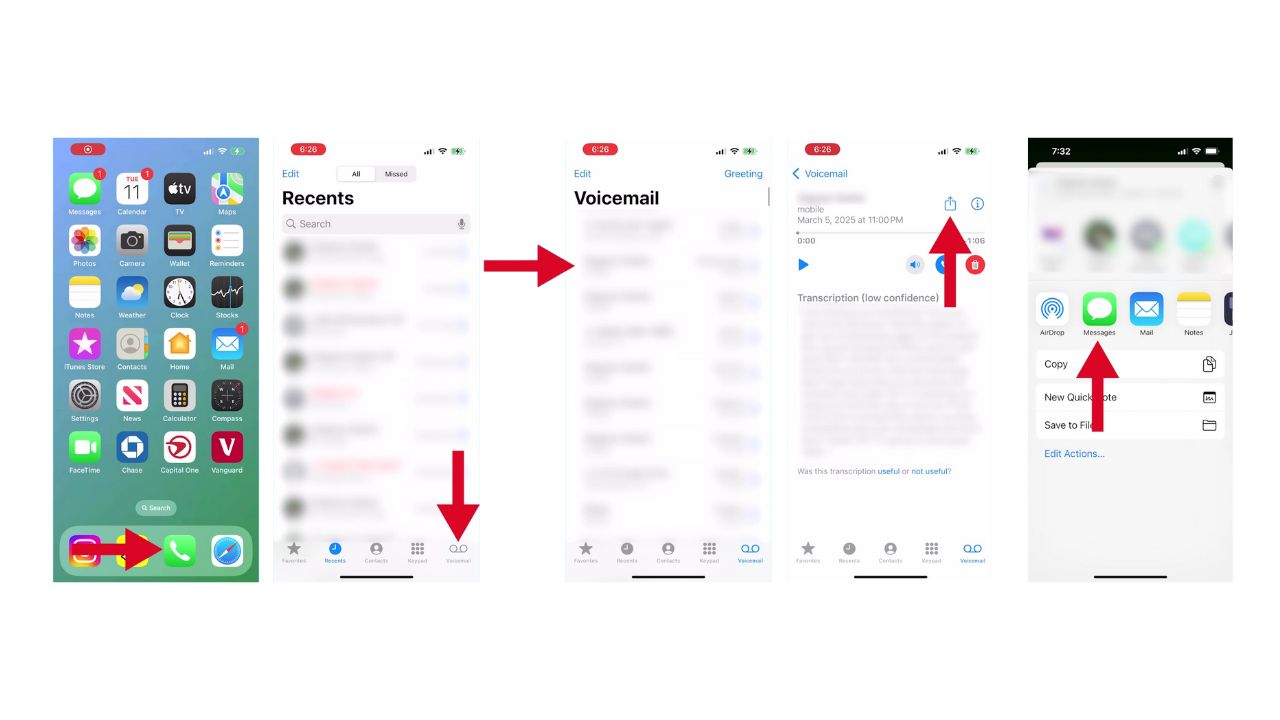
If the voicemails are stored on your iPhone, here’s how you can save them:
- Open the Phone app and go to Voicemail.
- Select the voicemail you wish to save.
- Tap the Share icon (arrow pointing up out of a square).
- Choose an option like Mail, Messages, or Save to Files to export the voicemail as an audio file.
HOW TO PROTECT YOUR IPHONE & IPAD FROM MALWARE
Step 2: How to record the voicemail on another device
If the voicemail is on another device, like a phone, computer, laptop, or tablet, you could use your iPhone to record it. Here’s how to do it using the Voice Memos app on your iPhone:
- First, you’ll need another device to play the voicemail—this could be a phone, computer, laptop, or tablet.
- On that other device, open the voicemail you saved earlier in ‘your messages,’ ‘your mail,’ or ‘your saved files.’

-
-
- Open the voice memos app on your iPhone (you’ll find it in the Utilities folder or by searching for it).
- Tap the red record button at the bottom of the screen.
-

- Then, you’ll need to play the voicemail on speaker from that other device and record it on your iPhone.
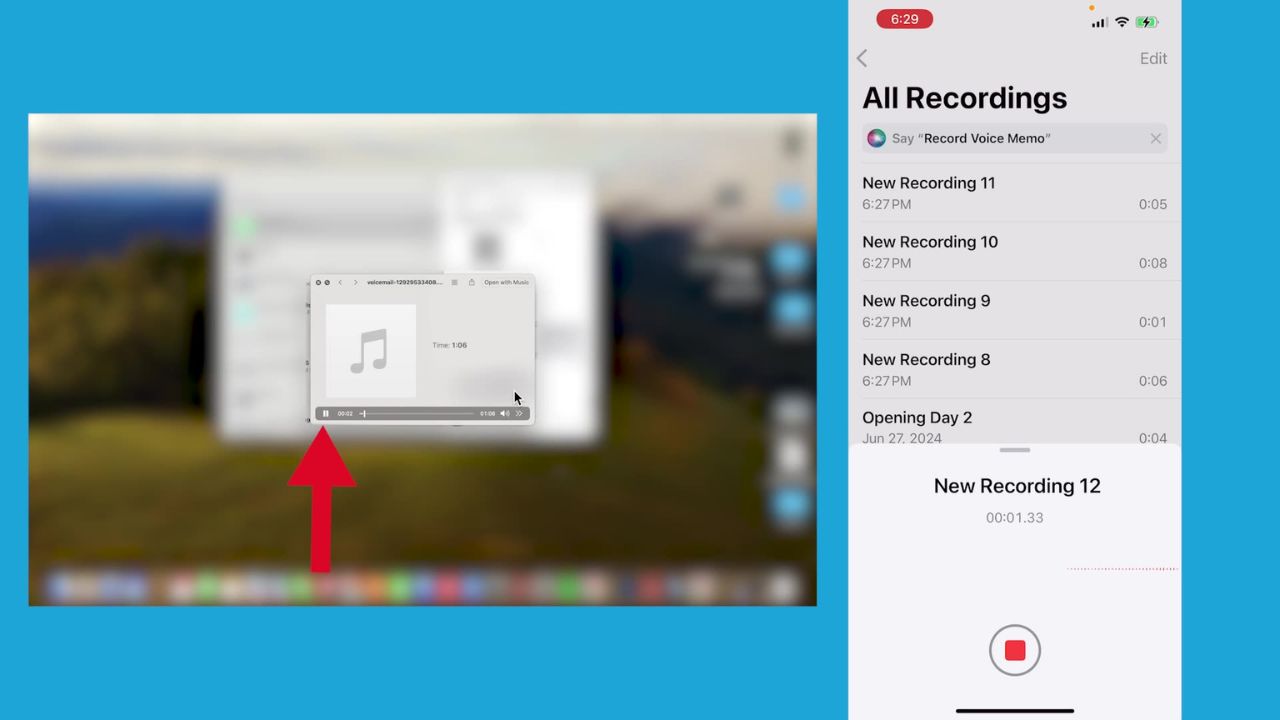
- Once finished, tap the red stop button on your iPhone.
- Your recording will be saved automatically.

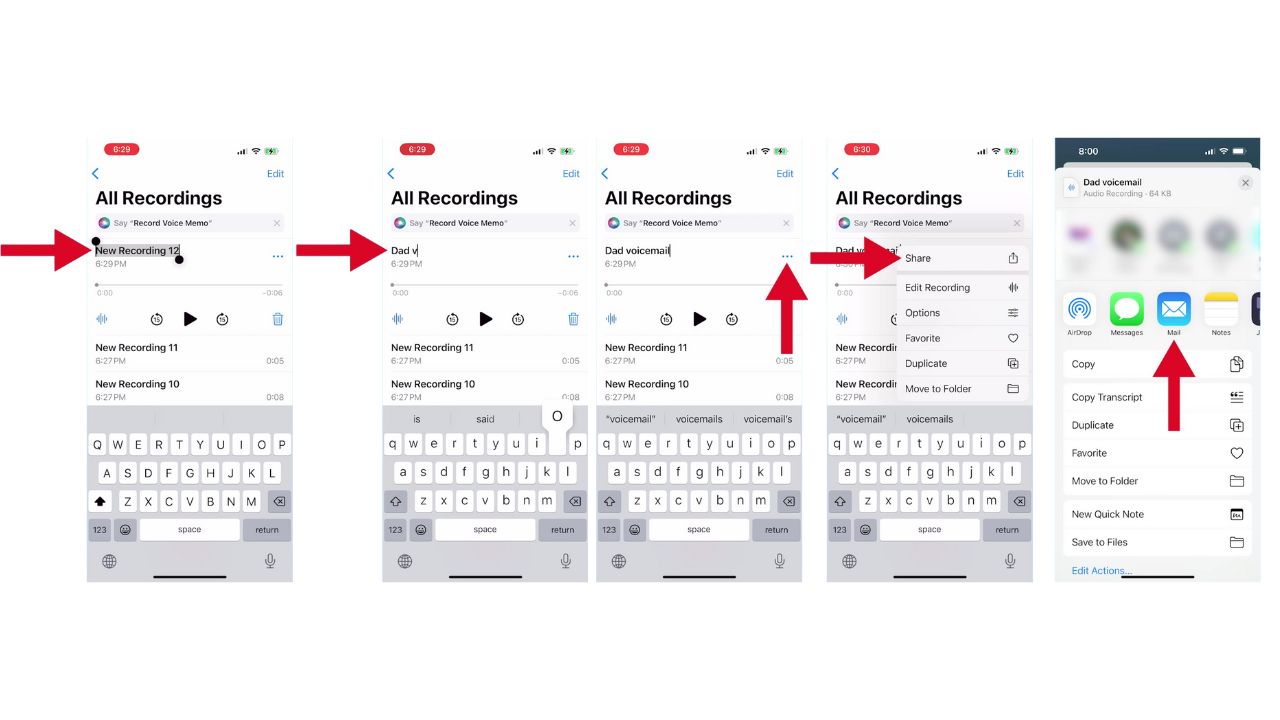
- To organize it better, tap on your recording
- Go ahead and rename it by clicking where it says ‘new recording.’
- If you’d like to share or back it up immediately, tap the three horizontal dots next to your recording
- Select ‘share,’
- Then, send it via email or save it to cloud storage.
HOW TO RECORD VOICE NOTES ON IPHONE AND ANDROID
Step 3: Store and backup
Once you’ve saved or recorded the voicemails:
- Transfer them to your computer or cloud storage (e.g., Google Drive, Dropbox) or your hard drive.
- Consider creating multiple backups on external drives or USB sticks.
- Label files clearly with dates or descriptions for easy access later.
HOW TO TRANSFER PHOTOS AND VIDEOS FROM YOUR EXTERNAL HARD DRIVE AND APPLE DEVICES
Kurt’s key takeaways
Preserving the voices of loved ones is a beautiful way to keep their memories alive, offering comfort and solace during difficult times. For Laura and anyone else who has experienced loss, these recordings can become treasured possessions. Remember, there’s no rush in this process – take your time and be gentle with yourself. While it might be emotional to listen to these messages now, in time, they may become a source of comfort and joy, allowing you to hear the love and warmth of those who are no longer with you. Cherish these moments, and know that your efforts to preserve their voices are a wonderful tribute to your relationships.
Have you ever used technology to preserve a special moment or voice? What was your experience like? Let us know in the comments below.
FOR MORE OF MY TECH TIPS & SECURITY ALERTS, SUBSCRIBE TO MY FREE CYBERGUY REPORT NEWSLETTER HERE