Fake Evite emails trigger phishing warning

I recently got an email from a friend with the subject “Special Celebration of Life.” It looked like a genuine Evite invitation. But when I clicked the “View Invitation” button, my TotalAV WebShield blocked the site, flagging it as a phishing attempt.
It was one of the most convincing scam emails I’ve seen lately, complete with Evite branding, realistic design, and a personal touch. If I didn’t have strong antivirus protection, I might have walked right into it.

How this Evite phishing scam works
Scammers send fake Evite messages with emotionally charged subjects, such as a “Special Celebration of Life,” to lure you into clicking. These emails mimic Evite’s design so they appear to come from someone you know, lowering your guard.

Clicking the malicious link can:
- Steal your personal information
- Capture your login credentials
- Install malware on your device
Because these invitations feel personal and urgent, they can bypass skepticism. Always verify sender details before opening event links, especially for sensitive occasions.

Steps to protect yourself from fake Evite phishing scams
Even the most convincing invitation can be a trap, as the fake Evite email I received proved. By following these steps, you can lower your chances of falling for similar scams and keep your personal information safe.
1) Use strong antivirus software for real-time protection
Strong antivirus software like TotalAV WebShield can stop you from landing on dangerous sites. In my case, TotalAV blocked the fake Evite link and flagged it as phishing before any damage was done. Choose antivirus software with phishing detection and automatic blocking to protect against threats you might not spot yourself.
The best way to safeguard yourself from malicious links that install malware, potentially accessing your private information, is to have strong antivirus software installed on all your devices. This protection can also alert you to phishing emails and ransomware scams, keeping your personal information and digital assets safe.
TotalAV is easy to set up and offers real-time protection for paid users, keeping your devices safe around the clock. It includes tools to block phishing scams, remove ransomware and spyware, and clean up adware and junk files. The software also features a browser manager, system tune-up tools, and protects across Windows, Mac, Android, and iOS devices.
GET MY EXCLUSIVE CYBERGUY TOTALAV DEAL:
Please note:
1) If you're having difficulty seeing either of the above deals, do this:
- If you're on a mobile device, hold down the link above, "Copy Link", and then paste it into a private or incognito browser.
- If you're on a laptop or desktop, right click the link, "Copy Link", and then paste it into a private or incognito browser.
2) During registration you may see optional upsells you can decline. Our top pick is the core antivirus product.
3) If you need help after your purchase, you can reach TotalAV directly through their official support page here.
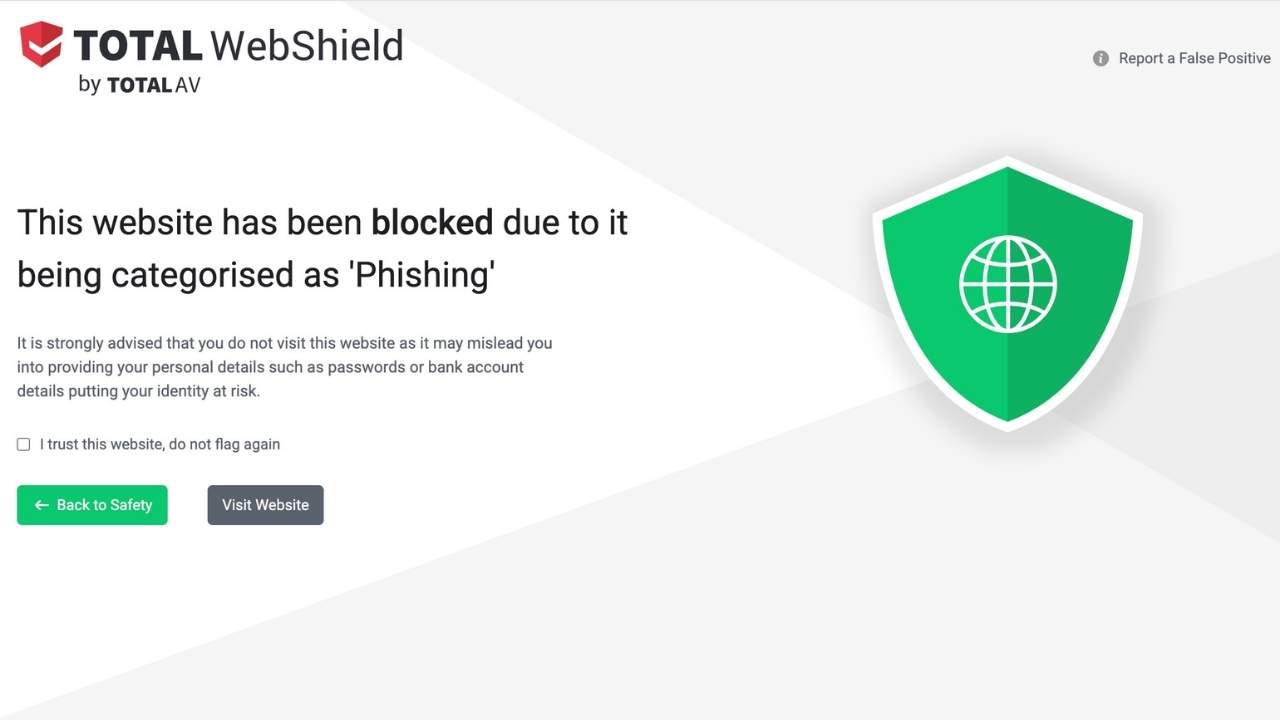
This is the screen that popped up when I tried to click the malcicious link in the fake Evite invitation
2) Check the sender’s email address carefully
Scammers often use email addresses that look almost identical to legitimate ones, but with tiny changes, like an extra letter, a missing character, or a different domain extension. In my fake Evite example, the branding looked perfect, but the sender’s address didn’t match Evite’s official domain. Always double-check before trusting an email.
3) Hover over links before clicking
Before you click “You’re Invited!”, “View Invitation” or “RSVP Now,” hover your mouse over the link. Your email client will usually display the destination URL. In the phishing email I received, the link pointed to a suspicious domain, not Evite.com. In the phishing email I received, the link pointed to a suspicious domain, not Evite.com. If you look closely, you’ll see it was misspelled as “envtte.” If the address looks odd or unfamiliar, don’t click.

4) Use a personal data removal service to limit your exposure
The less personal information scammers can find about you online, the harder it is for them to target you. A personal data removal service can scrub your personal details, such as your phone number, home address, and email, from public databases. This reduces the risk of scammers crafting convincing, personalized phishing attempts like the fake Evite email I received.
Incogni, a service I trust 100% and use myself, helps automate the process by submitting removal requests to hundreds of data brokers and people-search sites on your behalf.
Incogni automatically contacts data brokers on your behalf and requests the removal of your personal information. It also continues monitoring those sites and submits new removal requests if your data reappears.
- Incogni currently removes personal data from 420+ data broker and people-search websites, and its Unlimited plan allows you to request removals from as many additional sites as you need.
- Incogni has also received third-party assurance from Deloitte, validating its marketing claims.
- The goal is simple: make it much harder for strangers, scammers, and cybercriminals to find your personal information online.
CyberGuy readers get 60% off Incogni’s annual plans using the links in this article.
The service also includes a 30-day money-back guarantee, so you can try it risk-free and see how much of your information is exposed online.
Is your personal information exposed online?
Run a free scan to see if your personal info is compromised. Results arrive by email in about an hour.
5) Verify with the sender directly before clicking
If an invitation appears to come from a friend, don’t assume it’s real. Scammers often spoof the names of people you know. Send a quick text or make a phone call to confirm they actually sent the invite. In many cases, they’ll be just as surprised as you are to hear about it.
What this means for you
Phishing scams are evolving to look more authentic than ever. Even if the message seems to come from someone you trust, one careless click can put your personal data at risk. Having strong cybersecurity tools in place and knowing how to spot a scam is your best defense.
Related links:
- How scammers exploit your data for “Pre-Approved” retirement scams
- QR code scams rise as 73% of Americans scan without checking
- Facebook crypto ads lead to dangerous malware scams
Kurt’s key takeaways
I was lucky my antivirus software blocked this attack before any damage was done. But not everyone has that safety net. The next time an unexpected invitation or urgent message lands in your inbox, take a few extra seconds to verify before you click.
Have you ever almost fallen for a fake event invite? What happened? Let us know in the comments below.
FOR MORE OF MY TECH TIPS & SECURITY ALERTS, SUBSCRIBE TO MY FREE CYBERGUY REPORT NEWSLETTER HERE
Copyright 2025 CyberGuy.com. All rights reserved. CyberGuy.com articles and content may contain affiliate links that earn a commission when purchases are made.