Fake Booking.com travel credit scam targets travelers
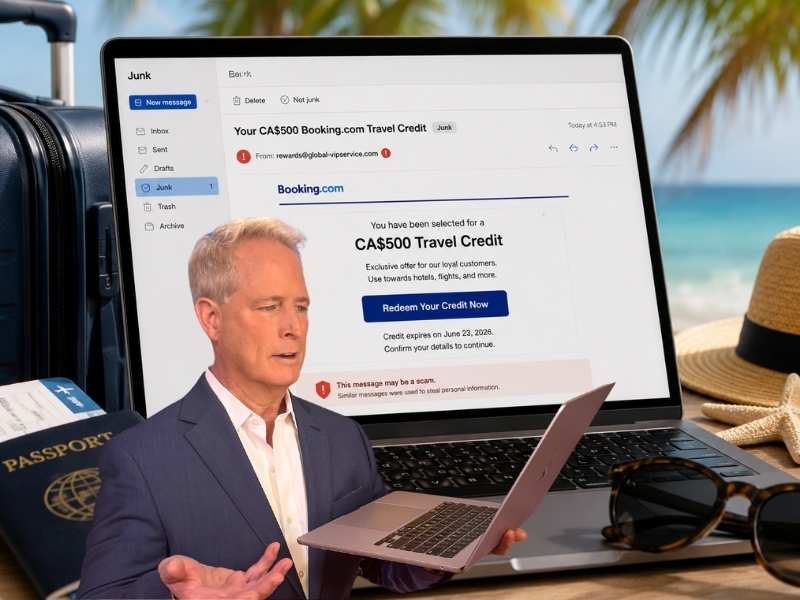
- A fake Booking.com email promises a $500 travel credit to lure people into clicking.
- The sender address does not appear to relate to Booking.com, which is a major red flag.
- The message uses urgency, loyalty language and a “Redeem Now” button to push a fast response.
- The safest move is to skip the email link and check your account through the official app.
Summer travel already costs enough. So, an email promising a $500 Booking.com travel credit can feel like a lucky break.
That is exactly why this message we received deserves a closer look. It uses a familiar travel brand, a big reward and a deadline to push you toward a blue “Redeem Now” button. The email also uses my real name in three places, which makes the message feel more personal and convincing.
However, the details in this email raise several red flags. The sender address does not even appear to relate to Booking.com. The subject line feels vague. The reward sounds broad. The deadline adds pressure.
Scammers know people are booking flights, hotels and last-minute trips right now. A fake travel credit can catch someone at the perfect moment.
Before you click anything, let’s break down what makes this email look suspicious.

Fake Booking.com email starts with pressure
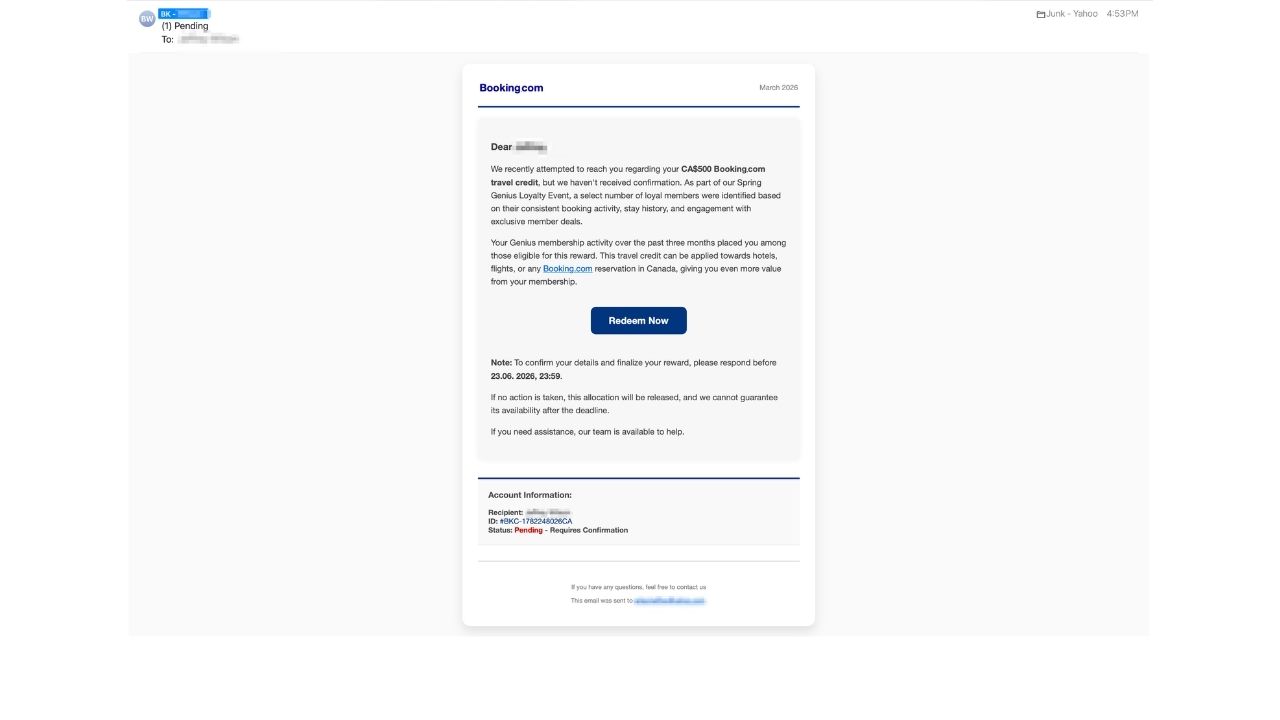
The subject line says “(1) Pending.” That wording is a red flag. It sounds urgent, but it does not clearly explain what is pending.
Scammers often use vague subject lines because they spark curiosity. You may open the message just to find out what needs your attention.
Also, the number “(1)” makes the email feel like an account alert. It hints that one item needs action. That can push you to click faster.
A real travel reward email should explain the offer clearly. It should not rely on mystery to get your attention.
Sender address does not match Booking.com
The biggest giveaway is the sender address. The display name uses a Booking. com-style label. However, the actual email address does not appear to relate to Booking.com at all. That is a major warning sign.
Scammers can copy a logo, brand colors and a button. Still, the sender address often exposes the fake. Always open the full sender details before clicking. Look past the display name. If the real address uses a strange domain, random letters or an unrelated company name, stop. That one detail can save you from a stolen password or a fake payment page.
Fake Booking.com email uses your real name
One detail makes this scam feel more personal: the email uses my real name in three places. That can make a fake message feel more legitimate.
Scammers use names, account-style details and fake customer IDs to lower your guard. They want you to think, “Well, they know who I am, so this must be real.”
But a real name does not prove an email is legitimate. Your name may already appear in old breaches, data broker lists, leaked marketing databases or public records. That personal touch should make you more cautious, not less.
Booking.com email shows a suspicious date mismatch
Another strange detail appears near the top of the message. The email itself shows “March 2026,” but it was actually sent to us on June 23, 2026.
That mismatch matters because real travel reward emails usually have consistent dates, campaign timing and account details. A March label on a June email can suggest a reused template, a sloppy scam setup or a copied brand-style message.
Scammers often move fast and recycle old layouts. So, when the date inside an email does not match when it arrived, treat that as another reason to pause before clicking.
Fake Booking.com credit uses a tempting reward
The message says you are eligible for a CA$500 Booking.com travel credit. That amount feels big enough to matter. It also feels believable enough to make you curious.
That combination is dangerous. Scammers do not always use wild dollar amounts. They often choose a number that feels exciting but still possible.
The email also says the credit can be applied toward hotels, flights or a Booking.com reservation in Canada. That broad wording makes the offer sound useful to almost anyone planning travel.
However, real travel rewards should be easy to confirm inside your official account. You should not need to click an email button to find out if a credit exists.
Booking.com scam email borrows loyalty language
The message mentions a Spring Genius Loyalty Event. That sounds official because Booking.com has used the Genius name for its loyalty program. Scammers use familiar program names because they make fake emails feel more believable.
Still, the email does not give enough proof. It does not explain real terms. It does not tell you to verify inside your account. It mainly pushes you toward the “Redeem Now” button.
That is another red flag. Real rewards usually appear in your official account, app or wallet area. A surprise email should never be your only proof.
Fake travel email uses flattery
The message says your activity placed you among a select number of loyal members. That line tries to make the reward feel personal. It suggests you earned something special because of your booking history.
However, the wording stays broad. It could apply to almost anyone. Scammers often use flattery to lower your guard. When a message makes you feel chosen, you may spend less time checking the details. That is exactly what the scammer wants.
Booking.com scam creates deadline panic
The message says you must respond before 23.06.2026, 23:59. That exact deadline adds pressure. It makes the credit feel like it could disappear at midnight.
Then the email says the allocation will be released if you take no action. In other words, it wants you to move quickly before you inspect the sender, links or account details.
Urgency is one of the most common scam tactics. When an email mixes a reward with a deadline, slow down. A real company will let you verify rewards by logging in safely through the official app or website.
“The ‘Redeem Now” button is the danger zone
The blue “Redeem Now” button is the part to avoid. A scam link can take you to a fake Booking.com sign-in page. From there, scammers may try to steal your email address, password, payment details or verification codes.
Some fake pages look convincing. They may use the same colors, fonts and logo style as the real site. However, the link behind the button tells the real story. Since you cannot fully trust a button in a suspicious email, do not click it. Open Booking.com through the official app instead. You can also type the website into your browser.
Junk folder warning should not be ignored
This email landed in our junk folder, and that is worth noting. Spam filters can flag suspicious sender patterns, bulk messages, strange links or known scam behavior. They are not perfect, but they can give you a useful warning.
So, when a reward email appears in junk, treat it with extra caution. Do not click first and investigate later. The safer move is to delete the message and check your account directly.

Booking.com responds to phishing concerns
Booking.com responded to CyberGuy after we reached out about the suspicious email. The company did not specifically verify this email, but said cybercrime and online fraud are not new or unique to Booking.com or the travel industry.
“At Booking.com, the security and data protection of our partners and travelers is a top priority. We have dedicated teams and employ machine learning tooling to monitor, detect and block suspicious activity around the clock and continuously work to enhance the robust security measures we have in place,” Booking.com said.
Booking.com also advises travelers to keep communication and payment on its platform, watch for unusual host requests or last-minute listing changes and report suspicious messages through its official customer service channels.
How to stay safe from Booking.com travel scams
A fake travel credit can look convincing at first, but a few quick checks can help you avoid a stolen login, fake payment page or follow-up scam.
1) Check the sender address first
Do not trust the display name alone. A scam email can say Booking.com, while the real sender address has nothing to do with the company. Open the sender details and look closely. Strange domains, random letters or unrelated addresses are clear warning signs.
2) Be cautious when an email uses your real name
Do not assume an email is safe because it knows your name. Scammers can get names from data breaches, people-search sites and marketing lists. If a message uses your name while pushing a deadline, reward or login link, treat it as suspicious.
3) Skip email links and open the app
Do not click “Redeem Now” from the email. Instead, open the Booking.com app or type the website into your browser. Then check your account for rewards, wallet credits or official messages. If the credit is real, it should appear there. Booking.com also advises travelers not to move communication or payment outside its platform because scammers often use that tactic to avoid platform protections.
4) Watch for pressure words
Words like Pending, Confirm, Final notice and Limited time can push you to act fast. Slow down when an email adds a deadline. Scammers use urgency because it keeps you from checking the facts.
5) Protect your login details
Never enter your password, payment details or verification codes from an email link. Also, use a password manager. It can help you avoid fake sign-in pages because it usually will not autofill your saved password on the wrong site.
6) Turn on two-factor authentication
Turn on two-factor authentication (2FA) or passkeys for your Booking.com account, email account and payment accounts. That extra step can help block a scammer who steals your password. Never share a one-time code with anyone who contacts you by email, text or phone.
7) Use strong antivirus software
Use strong antivirus software such as Norton Antivirus Plus (CyberGuy Deal: 58% off) on your devices to help detect malicious links, fake websites and suspicious downloads. That extra layer can help stop a scam before it steals your information or infects your device.
8) Use a data removal service
Scammers can use your exposed personal information to make phishing emails feel more believable. A data removal service such as Incogni can help reduce how much of your personal data appears on people-search sites and data broker lists. That can make it harder for scammers to target you with personalized travel scams.
Exclusive Deal for CyberGuy Readers (60% off): Incogni offers a 30-day, money-back guarantee and applies a special CyberGuy discount to all annual plans, for as low as $6.39/month for one person (billed annually) or $13.19/month for your family (up to 5 people) on their annual plan.
I strongly recommend the family plan. Here's why: the scam that starts with a Google search of your name almost always ends with a call to you, your elderly parent or a text to your adult child. Protecting yourself without protecting the people around you is half a solution. At $2.64 per person per month, the family plan covers up to five people, and the people most likely to be the final target are often the ones who'd never think to protect themselves.
Get Incogni and remove your info
9) Report the fake email
Report the message as phishing or junk in your email app. You can also forward suspicious Booking.com-related emails to Booking.com’s customer service or report them through your account. This helps the platform track scams that impersonate its brand. Booking.com says travelers should report suspicious listings or communications through its official customer service channels so they can be investigated quickly.
10) Mark the message as junk
Since this email already appeared in the junk folder, your spam filter likely spotted something suspicious. Mark it as junk and delete it. If you already clicked, change your Booking.com password through the official site. Then check your card activity. Also, watch for follow-up scam messages that mention travel credits, refunds or account problems.
Related Links:
- Your family could be one phone call from a bank scam
- How to stop scam texts from targeting aging parents
- Fake AAA email scam targets drivers
Kurt’s key takeaways
This fake Booking.com email works because it shows up when travel is already on your mind. A $500 credit sounds helpful when hotels and flights feel expensive. But the warning signs are clear. The vague subject line creates curiosity. The sender address does not appear connected to Booking.com. The use of a real name makes the scam feel more personal. The deadline adds pressure. The “Redeem Now” button pushes you toward a risky click. That is important because travel scams often work fast. One fake login page can hand scammers your account, payment details or personal information. The safest move is to ignore the email and check your account directly. If the credit is real, it should appear inside your Booking.com account. If it is fake, you just avoided a costly summer scam.
With scammers using trusted travel brands to push fake credits, should companies like Booking.com do more to protect customers before they fall for the click? Let us know your thoughts in the comments below.
FOR MORE OF MY TECH TIPS & SECURITY ALERTS, SUBSCRIBE TO MY FREE CYBERGUY REPORT NEWSLETTER HERE
Copyright 2026 CyberGuy.com. All rights reserved. CyberGuy.com articles and content may contain affiliate links that earn a commission when purchases are made.