




- Amazon’s new AI search creates images as you type in the Shopping app.
- The feature helps you find products you can picture but cannot easily name.
- It is rolling out to U.S. customers on iOS and Android, starting with apparel and home.
- AI images can guide your search, but real product details still need a closer look.
You know that shopping moment when you can picture the exact item in your head, but you have no idea what to call it? Maybe you want a dining chair with a curved back. Maybe you are looking for a black dress with sheer sleeves, but you do not know the exact style name. So you type a few vague words, scroll through a wall of products and wonder why online shopping still feels like a guessing game.
Amazon now wants AI to help close that gap. Its newest search feature creates AI-generated images in real time as you type inside the Amazon Shopping app. The idea sounds simple: describe what you see in your head, watch the image change with your words and tap the version that looks closest to what you want.
From there, Amazon shows visually similar products you can actually shop. Here’s how the new search experience works and why it could change the way you browse for clothes, furniture and home finds.
Credit: Amazon
Amazon brings AI images into the search bar
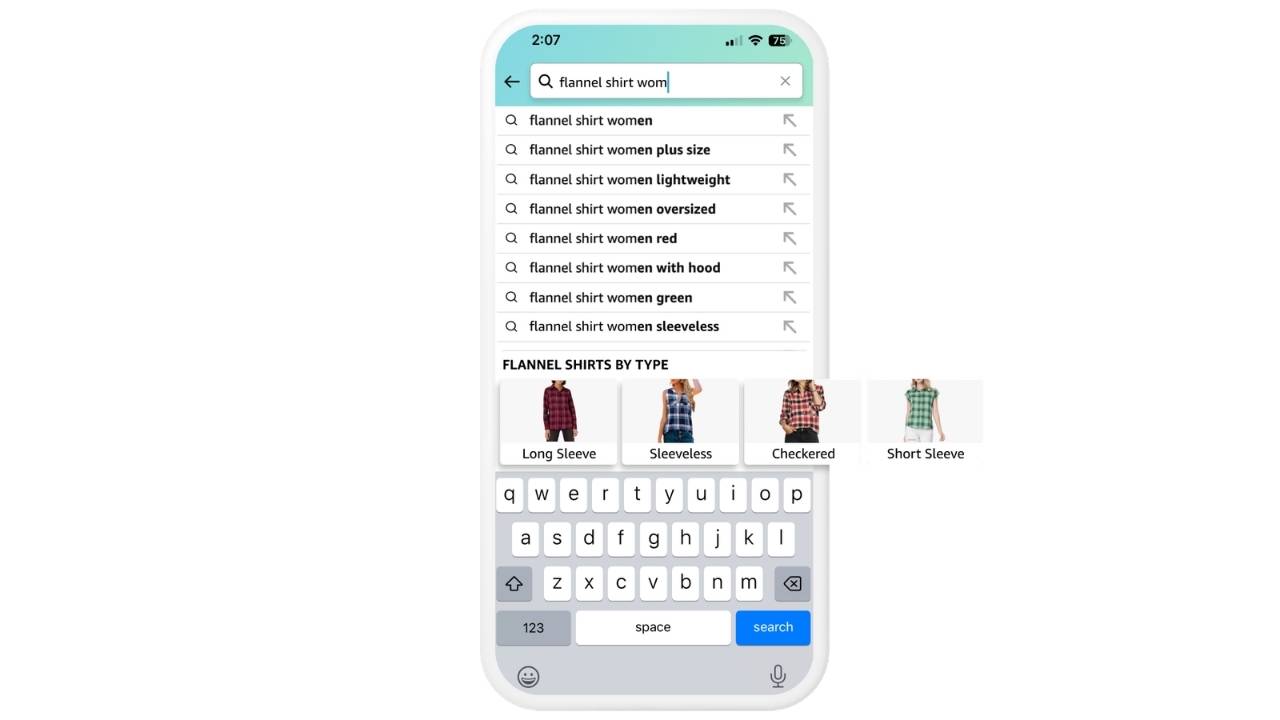
Amazon says the new feature appears in the search suggestions area of its Shopping app for U.S. customers. It is rolling out on iOS and Android, starting with apparel and home, where looks carry a lot of weight. Amazon says more categories will be added over time.
That makes sense. Visual details can make or break a purchase. A “blue chair” may give you thousands of results. A “blue velvet accent chair with gold legs” gets closer. Add “curved back” or “tufted seat,” and the AI image can shift as your description gets sharper.
Instead of forcing you to know the right design term, Amazon lets you describe the look. Then the app turns that description into a visual cue.
How the new Amazon AI search works
You start by typing into the Amazon search bar the way you normally would. However, this time, Amazon wants you to use more descriptive language.
For example, you might type: “green dress with puff sleeves” or “wood coffee table with rounded edges.”
As you add details, AI-generated images appear below the search bar. Those images update as you refine your wording. When one looks close to what you imagined, you can tap it and shop for products with a similar look.
That last part is important because the AI image itself may not represent a real product listing. It works more like a visual guide. Amazon uses it to understand the style you want, then matches that idea to items in its store.

Credit: Amazon
Here’s how to try Amazon’s AI image search
- Open the Amazon Shopping app on your iPhone or Android phone.
- Tap the search bar.
- Type a visual description of what you want. Include details like color, material, shape, pattern or size.
- Watch the AI-generated images appear in the suggestions area below the search bar.
- Keep adding details until one image looks close to what you had in mind.
- Tap the image to see visually similar products you can shop.
- From there, Amazon uses that visual cue to show products that look similar to your description.
How this could help you shop
The best use case here involves those hard-to-describe purchases. Furniture, clothing, accessories and decor often depend on texture, shape, pattern and color.
Search has always handled exact terms pretty well. Type a brand name or model number, and you usually get somewhere useful. The problem starts when you know the vibe but not the vocabulary.
Amazon’s AI search could help when you want:
- A coastal-looking couch that does not feel too beachy
- Dining chairs with a curved back
- A black dress with sheer sleeves
- Lighting with a woven shade
- Vintage-style rugs that do not look too formal
That could save time, especially for those of you who browse with a mental image instead of a shopping list.
The catch with AI-generated shopping images
There is just one big caution here: AI can create something that looks perfect but may not exist. That could lead to disappointment if the generated image looks better than the real products Amazon surfaces afterward. Shoppers may tap an image expecting an exact match and end up with close-enough results.
So treat the AI image as a sketch, not a product promise. Before you buy, check the actual listing photos, dimensions, materials, reviews and return policy. That extra minute can save you from ordering a “close match” that misses the detail you cared about most.
Amazon is expanding visual search in other ways, too
The new real-time AI image search fits into a larger push by Amazon to make shopping more visual. Amazon Lens already lets you point your phone camera at an item and search for similar products. Lens Live takes that further by scanning items in real time and showing matching products in a swipeable carousel.
You can also add text to an image search. So, if you upload a photo of a beige sofa, you can add a note like “in white” or “smaller size” to narrow the results.
Amazon also offers a “More like this” option on product images. That can help when you like one product’s look but want a different sleeve, length, color or style.
For iPhone users, Amazon Lens can also launch from the lock screen through a widget. That means you can spot something in the real world and search for it faster.
Shop by style adds outfit inspiration
Amazon is also using AI-generated style images in apparel search results. When you search for clothing, you may see “Shop by style” collages tied to looks such as “Urban luxe” or “Soft elegance.”
Tap a collage, and Amazon takes you to a page with shoppable items, similar products and style options you can browse. That makes the experience feel closer to a digital stylist than a basic product search.
It could help those of you who want outfit ideas rather than a single item. However, the same caution applies. Use the AI styling as inspiration, then judge the actual products on their own.

Credit: Amazon
What this means to you
Amazon wants to make search feel less like typing keywords and more like describing a picture. That could make it easier to find products when you lack the exact name for a style, material or shape. It may also make browsing feel more personal and less frustrating.
Still, AI shopping tools can nudge you toward impulse buys. A polished image may make a product idea feel more appealing before you compare prices or check quality. So use the feature as a starting point, not the final word.
The smartest approach is simple: describe what you want, use the AI image to narrow your search and then slow down before checkout. Look at the real listing, read recent reviews and confirm the details that matter to you.
Related Links:
- How to get a cheap Amazon Prime membership
- Amazon Health AI brings a doctor to your pocket
- Amazon recall text scam warning
Kurt’s key takeaways
Amazon’s new AI search could make online shopping feel more natural for those of you who think visually. Instead of guessing the right product term, you can type what you imagine and let the app build a picture from your words. That could be genuinely useful for home decor and fashion, where small details often decide whether something feels right. At the same time, shoppers should remember that AI images can create expectations that real products may not match. So yes, Amazon’s search bar may soon feel more creative. The bigger question is whether that creativity helps you buy smarter or simply makes you want more.
Would you trust an AI-generated shopping image to guide your next purchase, or would it make you more skeptical before clicking buy? Let us know in the comments below.
FOR MORE OF MY TECH TIPS & SECURITY ALERTS, SUBSCRIBE TO MY FREE CYBERGUY REPORT NEWSLETTER HERE
Copyright 2026 CyberGuy.com. All rights reserved. CyberGuy.com articles and content may contain affiliate links that earn a commission when purchases are made.