Have you ever signed up for a free trial of an app or service on your Android device, only to forget about it and end up paying for a subscription you don’t use? You’re not alone.
In fact, many people fall into this trap and end up wasting money on things they don’t need or want. Fortunately, don’t worry. There is a simple way to check and cancel your subscriptions on Android. Simply follow these easy steps.
On the other hand, for those of you who have an iPhone and want to check and cancel your subscriptions, click here.
First: Go to the Google Play Store
Settings may vary depending on your Android phone’s manufacturer
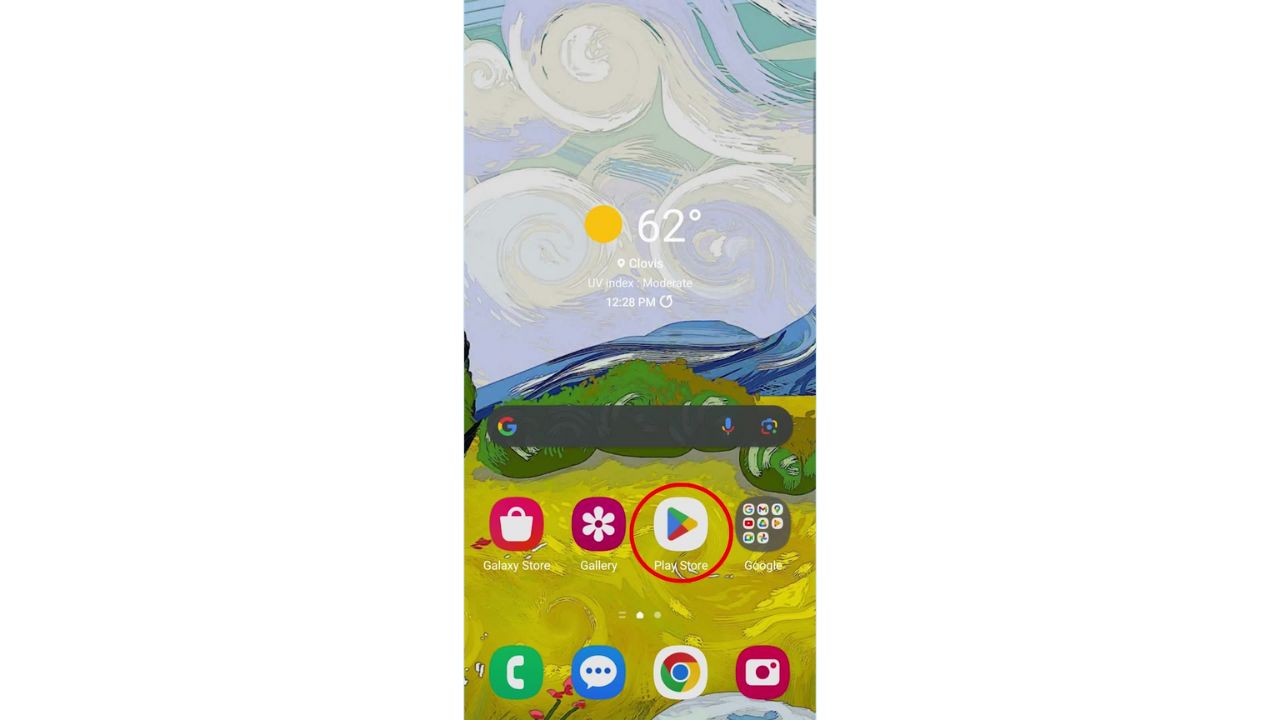
- Open the Google Play Store app on your Android and tap it. You can find it on your home screen or in your app drawer.
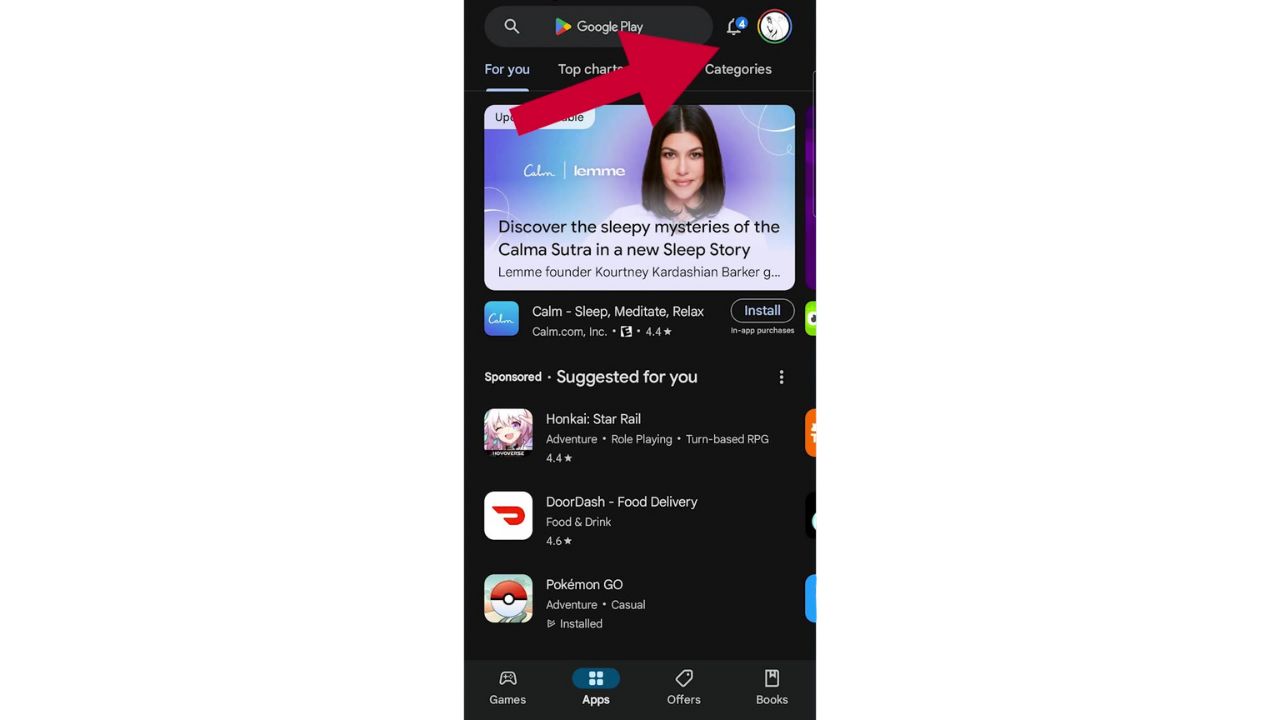
Next: Tap on your account profile picture
- First, look at the top right corner of the screen, and you will see your account profile picture. Tap on it to bring up your account options and info.
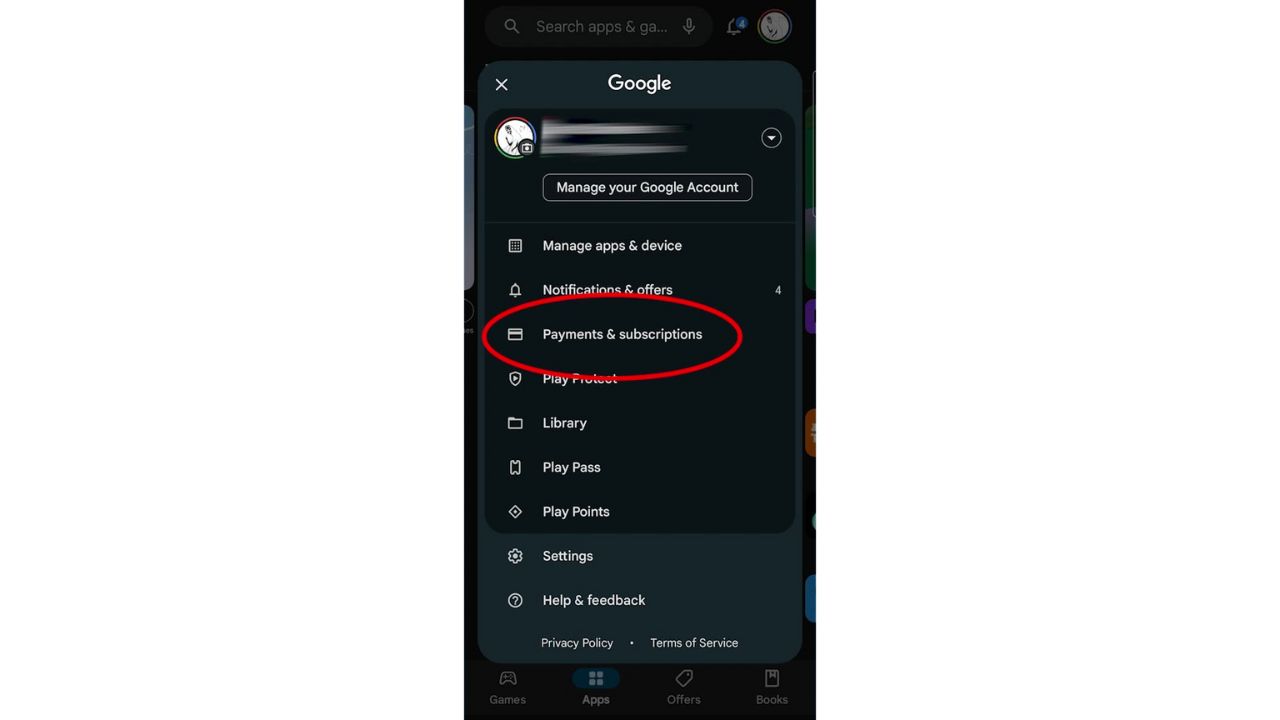
Then: See your “Payments and subscriptions”
- Now, on the menu that appears, you will see Payments and subscriptions. Tap on it.
- Next, tap on subscriptions
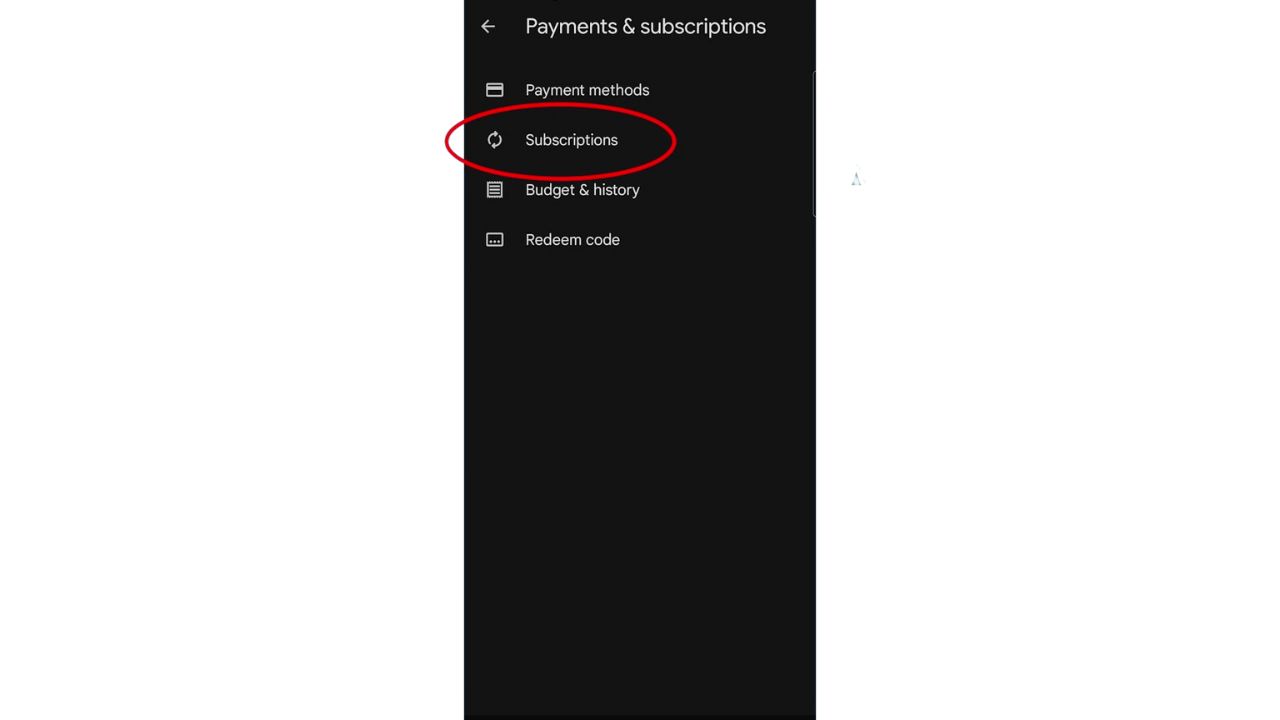
Finally: View and cancel your subscriptions
- Here you can view all your currently active and lapsed subscriptions. You can see the name of the app or service, the price, the billing cycle, and the next payment date.

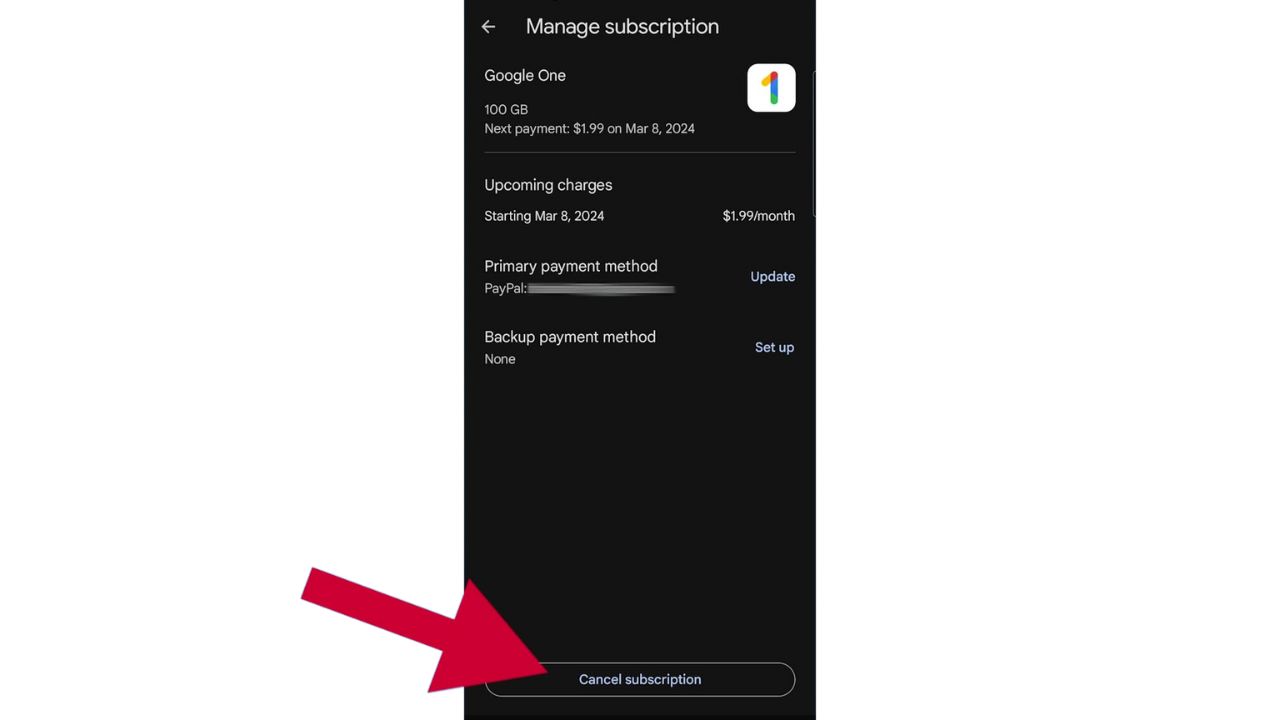
- If you want to cancel a subscription, just tap on whichever one you wish to cancel. Now, you will see more details about the subscription, such as the benefits, the cancellation policy, and the support contact.
- To cancel the subscription, tap on Cancel subscription at the bottom of the screen.
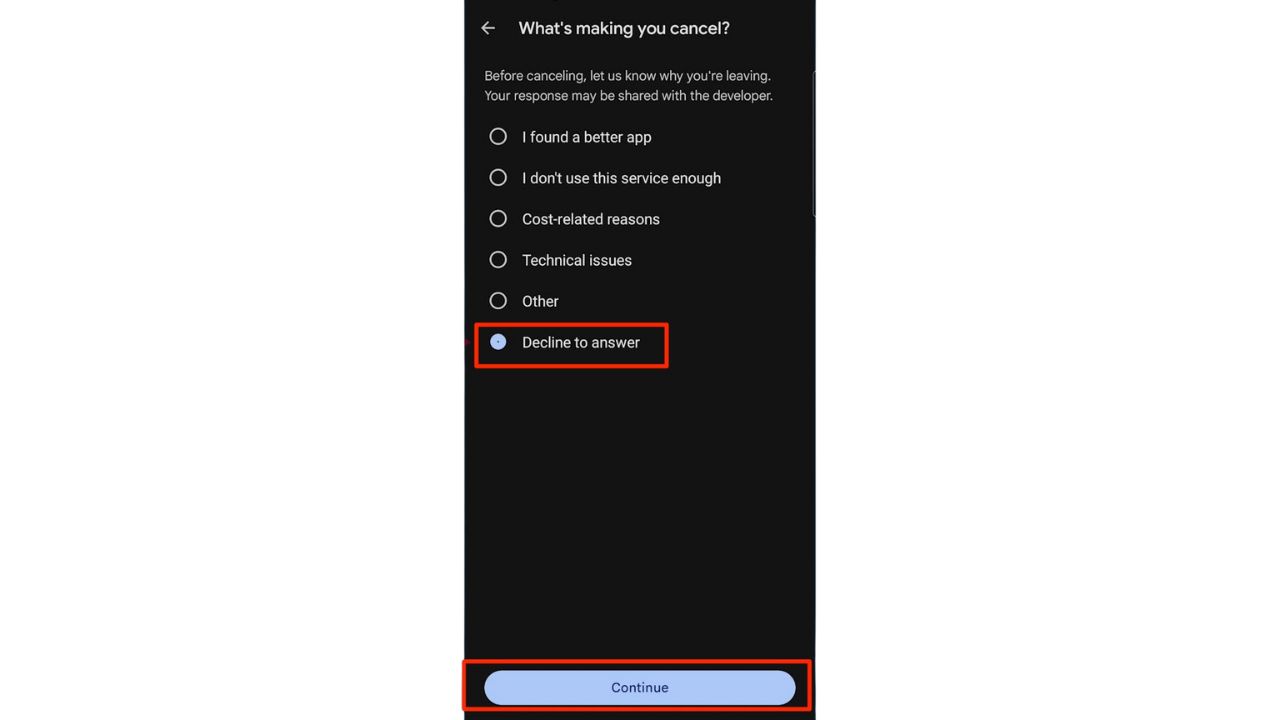
- Next, you will be asked to confirm your decision and provide a reason for canceling. Now, you don’t have to answer the question, just tap on Decline to answer and then tap on Continue
- Finally, tap on Cancel subscription again to complete the process

Now, you will no longer be charged for that particular subscription, but you can still use it until the end of the current billing cycle. After that, the service will stop working, and you will lose access to any features or content that were included in the subscription.
A Texas mom says she spent the night in jail after speaking up online about dirty water in her town. The case was later dropped, but her story raises a troubling question: could something you post online ever put you at risk?

Missed this event? Sign up via the registration form and see our live recording.
See Kurt’s 2026 picks for practical tech and everyday upgrades.
Related Links:
- How to change your privacy settings on Android
- How to easily record phone calls on your Android
- Android security upgrades outsmart scams and protect your privacy
Kurt’s key takeaways
Now you know how to check and cancel your subscriptions on Android. You can save money and avoid paying for things you don’t use or want. In addition, you can manage your subscriptions anytime by following the same steps. Just remember to review your subscriptions regularly and cancel the ones you don’t need.
Do you think app stores have a responsibility to make canceling subscriptions easier for users? Why or why not? Let us know in the comments below.
FOR MORE OF MY TIPS, SUBSCRIBE TO MY FREE CYBERGUY REPORT NEWSLETTER HERE
Copyright 2026 CyberGuy.com. All rights reserved. CyberGuy.com articles and content may contain affiliate links that earn a commission when purchases are made.
🎙 Now Streaming: My New Podcast: The CyberGuy Report
Kurt’s Top Deals
Deals move fast and inventory can be limited, so don’t wait too long.
| 🔥 Editor’s pick  Summer entertaining Ninja SLUSHi Machine (26% off) Frozen drinks and slushies at home in minutes. | |
| 💰 Top deal  Outdoor essential TYPEC Solar Bug Zapper (36% off) Solar-powered bug zappers for patios and camping. |