



At a glance
- Facebook’s new Meta AI feature turns photos in your camera roll into ready-to-share collages and edits.
- You must opt in by allowing camera roll cloud processing in the Facebook app settings.
- All suggestions stay private until you choose to save or post them.
- You can turn the feature off anytime and remove Facebook’s access to your photos for added privacy.
Your phone is full of photos you’ve never posted, moments you meant to share but never got around to. That’s exactly what Facebook wants to change. It now uses Meta AI to spot hidden gems in your camera roll, polish them, and create simple collages you can share. You take the pictures, and Facebook helps turn them into easy, ready-to-share memories. No design skills required.

Why Meta created this AI photo feature
Many people take photos but then don’t share them because they feel the image isn’t “post-worthy,” or they simply don’t have time to make it look good. Meta’s logic: if those moments are sitting unseen in your phone, screenshots, receipts, random snaps, they might still matter to you. So the tool helps you rediscover and share them. From Meta’s perspective, this also fits its bigger push into AI-driven features across its apps.
Behind the scenes, Meta AI analyzes photo details, like lighting, people, and events, to group similar moments and create polished collage layouts automatically. It can suggest captions or filters, but users can edit or reject any suggestion before posting.
How to enable the Facebook AI feature
Here’s how to turn this feature on in Facebook (and how to disable it if you prefer).
- Open the Facebook app on your phone (iOS or Android).
- Tap your profile picture or the menu icon.
- Go to Settings & Privacy.
- Click Settings.
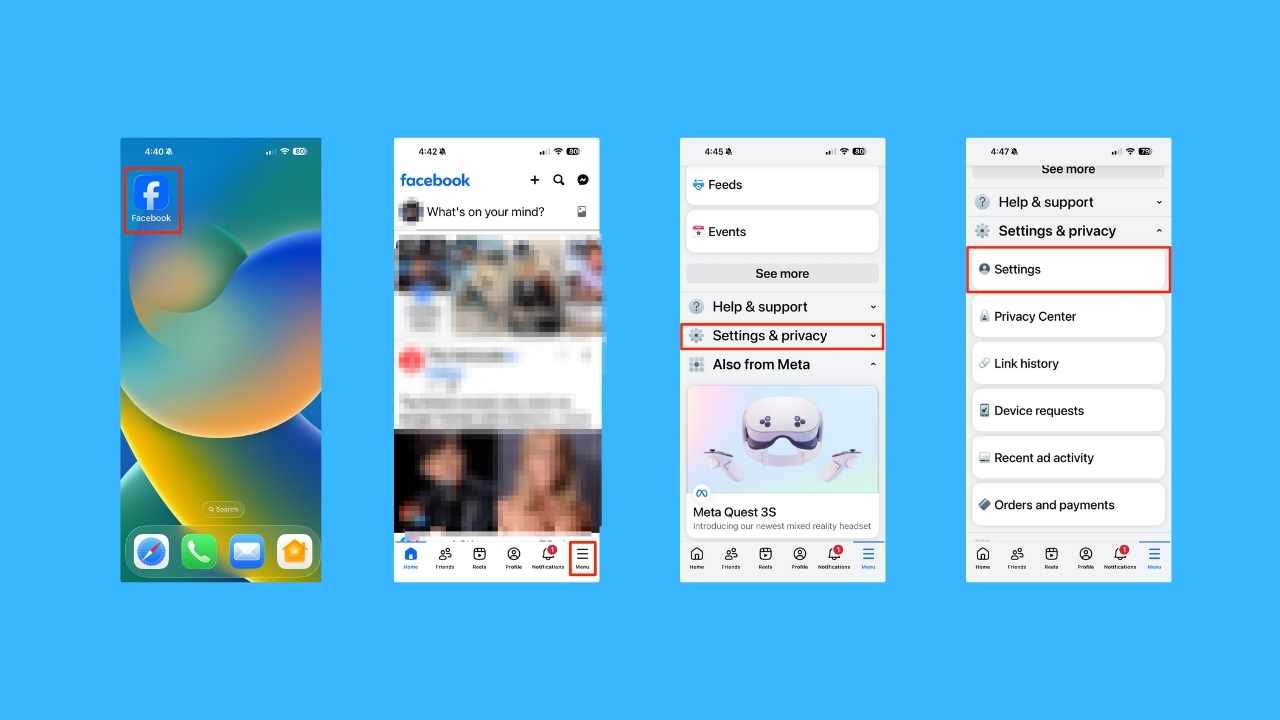
- Scroll to Preferences (or something similar) and find Camera Roll Sharing Suggestions and tap on it.
- Toggle on ‘Get creative ideas made for you by allowing camera roll cloud processing’ (or similar wording). You may be prompted to allow “cloud processing,” whereby Facebook uploads photos from your device to its servers so Meta AI can analyze them.

- Confirm the opt-in and accept any permission prompts. Once enabled, Meta claims that only you see suggestions, and you decide if you save or share them.

You’ll also receive optional notifications when new collage suggestions are ready, giving you the chance to preview and edit them before sharing.
Steps to disable or opt out
- Follow the same path: Facebook app → Settings & Privacy → Settings → Preferences → Camera Roll Sharing Suggestions.
- Toggle the feature off or disable “cloud processing”.
- For extra privacy, you can also revoke Facebook’s access to your camera roll in your phone’s OS settings.
If you’ve already uploaded photos for analysis, Meta says you can delete that data by turning off the feature and clearing saved files under “Your Facebook Information” in Settings.
What this means for you
Here’s how Facebook’s new AI photo feature could change the way you share, save, and see your favorite moments online.
- More sharing without the effort. You capture the moment, Facebook helps polish it. The barrier of “this photo isn’t good enough” gets lowered.
- Greater visibility for memories. That vacation scrapbook photo or family snap buried in your camera roll might now get a second life.
- Full control remains. You decide whether to share the suggested edit or keep it private. Meta emphasizes that the suggestions are shown only to you unless you choose to share.
- Privacy considerations. Even though Meta says your photos won’t be used to train AI unless you edit or share them, they do get uploaded to Meta’s cloud when you opt in and may be stored for some time. Meta confirms that the uploaded photos aren’t used for ad targeting or facial recognition, but they may be stored temporarily for processing before being deleted.
- Limited rollout. At present U.S. and Canada only; international users may need to wait.
Watch the latest episode of The CyberGuy Report.

Missed this event? Sign up via the registration form and see our live recording.
See Kurt’s latest Amazon picks for useful gadgets, smart home upgrades and everyday tech worth grabbing while the deals last.
Related Links:
- Meta strengthens teen safety with expanded accounts
- Meta’s AI chatbot rules revealed
- Meta account suspension scam hides FileFix malware
- How to recover a hacked Facebook account
Kurt’s key takeaways
This move by Facebook addresses a common pain point (photos that don’t get shared) and leverages AI to make sharing more effortless. If you’re an active Facebook user who takes many photos and wants to share more of them, this feature could be a welcome boost. But if you’re cautious about how your private media may be handled, the opt-out path is important and worth using. Either way, it reflects how AI is quietly reshaping everyday apps.
Will you turn on Facebook’s AI-powered photo suggestion feature or keep your camera roll private just the way it is? Let us know your thoughts in the comments below.
FOR MORE OF MY TECH TIPS & SECURITY ALERTS, SUBSCRIBE TO MY FREE CYBERGUY REPORT NEWSLETTER HERE
Copyright 2026 CyberGuy.com. All rights reserved. CyberGuy.com articles and content may contain affiliate links that earn a commission when purchases are made.
🎙 Now Streaming: My New Podcast: The CyberGuy Report
Kurt’s Top Deals
Deals move fast and inventory can be limited, so don’t wait too long.
| 🔥 Editor’s pick  Summer entertaining Ninja SLUSHi Machine (26% off) Frozen drinks and slushies at home in minutes. | |
| 💰 Top deal  Outdoor essential TYPEC Solar Bug Zapper (36% off) Solar-powered bug zappers for patios and camping. |


