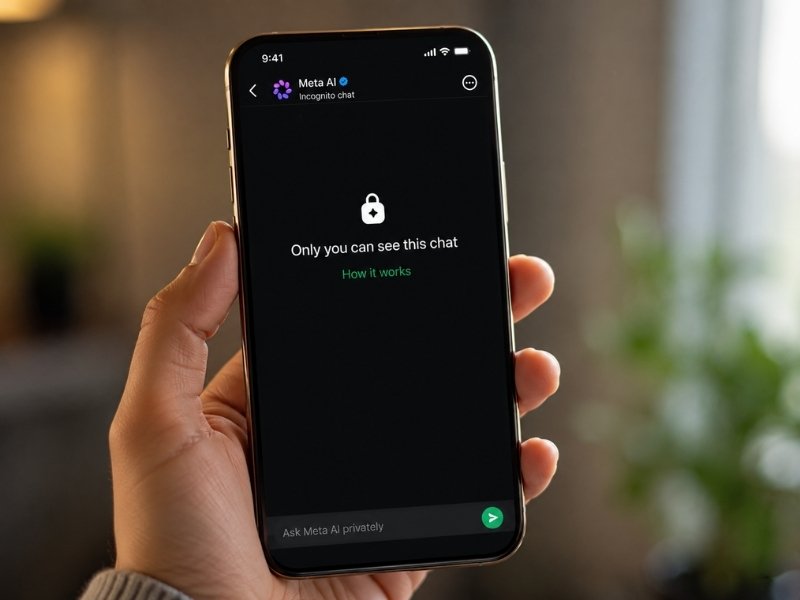
- Meta AI is rolling out Incognito Chat for WhatsApp and the Meta AI app.
- Meta says private AI chats are temporary and disappear by default.
- The company says even Meta cannot read conversations in Incognito Chat.
- A coming Sidechat feature will let Meta AI help inside WhatsApp conversations.
Chatting with AI can feel casual until the question gets personal. Maybe you want to ask about a health concern. Maybe you need help understanding a loan. Or maybe you want career advice without feeling like your question is sitting in a data file somewhere.
That is the idea behind Incognito Chat with Meta AI, a new private chat mode Meta says is coming to WhatsApp and the Meta AI app.
According to Meta, the feature creates a temporary AI conversation that is processed in a secure environment and not saved by default. Meta also says no one, including Meta, can read those conversations.

Credit: Meta
How Meta AI Incognito Chat works
Meta says Incognito Chat gives you a private space to talk with Meta AI. When you start one, the conversation becomes temporary. Your messages disappear by default, and Meta says the chat is processed in a way that keeps it invisible to anyone else. The big promise is simple: you can ask sensitive questions without leaving behind a saved AI chat history. Meta says the feature uses Private Processing, a system built on WhatsApp’s privacy technology. In plain terms, Meta says your request goes into a protected server environment where the AI can respond without exposing your messages to Meta, WhatsApp or outside parties.
Why this matters for personal AI questions
People already ask AI tools things they may never type into a public search bar. That could include a medical symptom, a financial worry, a relationship issue or a job decision. Those are exactly the kinds of questions where privacy matters most. Incognito Chat is Meta’s answer to a growing concern: AI can be useful, but people may hesitate when the topic feels too sensitive. If Meta’s system works as described, it could make AI feel less risky for those who want help but do not want a permanent record attached to every question.

Credit: Meta
What makes this different from other incognito modes
Meta is drawing a clear line between its new feature and other “incognito-style” AI modes. The company says some private modes may avoid saving a chat, while the service can still see the question and answer as they move through the system. Meta says Incognito Chat is built differently because conversations are processed in a secure environment that even Meta cannot access. That is a strong claim. It also means users should watch how clearly Meta explains the feature inside WhatsApp and the Meta AI app once it appears. Privacy promises only help when people understand what is happening before they type.
Sidechat with Meta AI is also coming
Meta also says another WhatsApp feature called Sidechat is planned for the coming months. Sidechat will let Meta AI help inside a WhatsApp chat while using the context of that conversation. Meta says it will be protected by Private Processing and will avoid disrupting the main chat. That could be useful if you want help writing a reply, summarizing a conversation or understanding what people are discussing. However, it also raises a practical question users will want answered clearly: when is AI looking at chat context, and how obvious will that be?
What this means to you
If you use WhatsApp and already ask AI for help, this could make those conversations feel more comfortable. The feature may be especially useful for sensitive questions you do not want stored in a normal AI chat history. It could also help people who avoid AI because they worry their questions are too personal. However, the feature is still rolling out over the coming months. So you may not see it right away. Also, you should wait to see exactly how Meta labels the feature inside the app and what controls users get at launch.

Watch the latest episode of The CyberGuy Report.

Missed this event? Sign up via the registration form and see our live recording.
See Kurt’s latest Amazon picks for useful gadgets, smart home upgrades and everyday tech worth grabbing while the deals last.
How to use Meta AI Incognito Chat safely
Once Incognito Chat becomes available, treat it as a privacy upgrade, not a magic shield.
1) Check that you are actually in Incognito Chat
Do not assume every Meta AI conversation is private. Look for the Incognito Chat label before asking anything sensitive.
2) Read the “How it works” screen
Meta says Incognito Chat will explain what happens to your messages. Take a moment to read that screen so you know what is private, what disappears and what is not saved.
3) Avoid sharing unnecessary personal details
Even in a private mode, you can often ask a useful question without giving your full name, address, account number or other identifying details.
4) Be careful with medical and financial advice
AI can explain options, but it should not replace a doctor, lawyer or financial professional when the stakes are high.
5) Review disappearing message behavior
Meta says messages are not stored or saved in chat history. Still, check how the feature explains disappearing messages once it appears on your device.
6) Keep WhatsApp updated
New privacy features often depend on the latest app version.
On iPhone: App Store > tap your profile picture > App Updates > look for WhatsApp. If it appears, tap Update. If it does not appear, no WhatsApp update is currently available.
On Android, go to Google Play Store > profile picture > Manage apps & device > Updates available > Update next to WhatsApp. Settings may vary depending on your Android phone’s manufacturer.
Related Links:
- AI chatbots refilling psych meds sparks debate
- Millions of AI chat messages exposed in app data leak
- Can AI chatbots trigger psychosis in vulnerable people?
Kurt’s key takeaways
AI is becoming the place people go for answers they once saved for a close friend, a search box or a late-night spiral through online forums. That makes privacy a big deal. Meta’s Incognito Chat could be a meaningful step if it gives you a clear, temporary and truly private way to ask sensitive questions. The real test will be how easy it is to find, understand and use.
Would you ask an AI a deeply personal question if the app promised that even the company behind it could not read it? Let us know in the comments below.
FOR MORE OF MY TECH TIPS & SECURITY ALERTS, SUBSCRIBE TO MY FREE CYBERGUY REPORT NEWSLETTER HERE
Copyright 2026 CyberGuy.com. All rights reserved. CyberGuy.com articles and content may contain affiliate links that earn a commission when purchases are made.
🎙 Now Streaming: My New Podcast: The CyberGuy Report
Kurt’s Top Deals
Deals move fast and inventory can be limited, so don’t wait too long.
| 🔥 Editor’s pick  Summer entertaining Ninja SLUSHi Machine (26% off) Frozen drinks and slushies at home in minutes. | |
| 💰 Top deal  Outdoor essential TYPEC Solar Bug Zapper (36% off) Solar-powered bug zappers for patios and camping. |