



- Scammers are sending fake YouTube TV billing failure emails to trigger panic and fast clicks.
- The emails look official but come from domains that have no connection to Google or YouTube.
- Urgent language like “billing failed” and “fix now” is used to push action without verification.
- Real billing issues always appear inside your account, not through email payment links.
An email arrived that looked like a routine billing alert for YouTube TV Premium. Near the top, it displayed BILLING FAILED in capital letters. Below that, the message claimed the payment was declined and urged immediate action to keep streaming. This email was sent to us by Jackie from New York, NY, who immediately knew something was wrong.
“I’m not a YouTube TV Premium subscriber so I knew right away this was a scam. So why am I receiving these emails?”
That question matters. If a billing alert references a service you do not use, it is almost always a scam. The email still appeared legitimate. Billing notices like this are common, and scammers rely on that familiarity to slip past quick checks.
Another warning sign appeared in the sender’s details. The message was routed through a domain with no connection to Google or YouTube. That mismatch confirmed what Jackie already suspected.
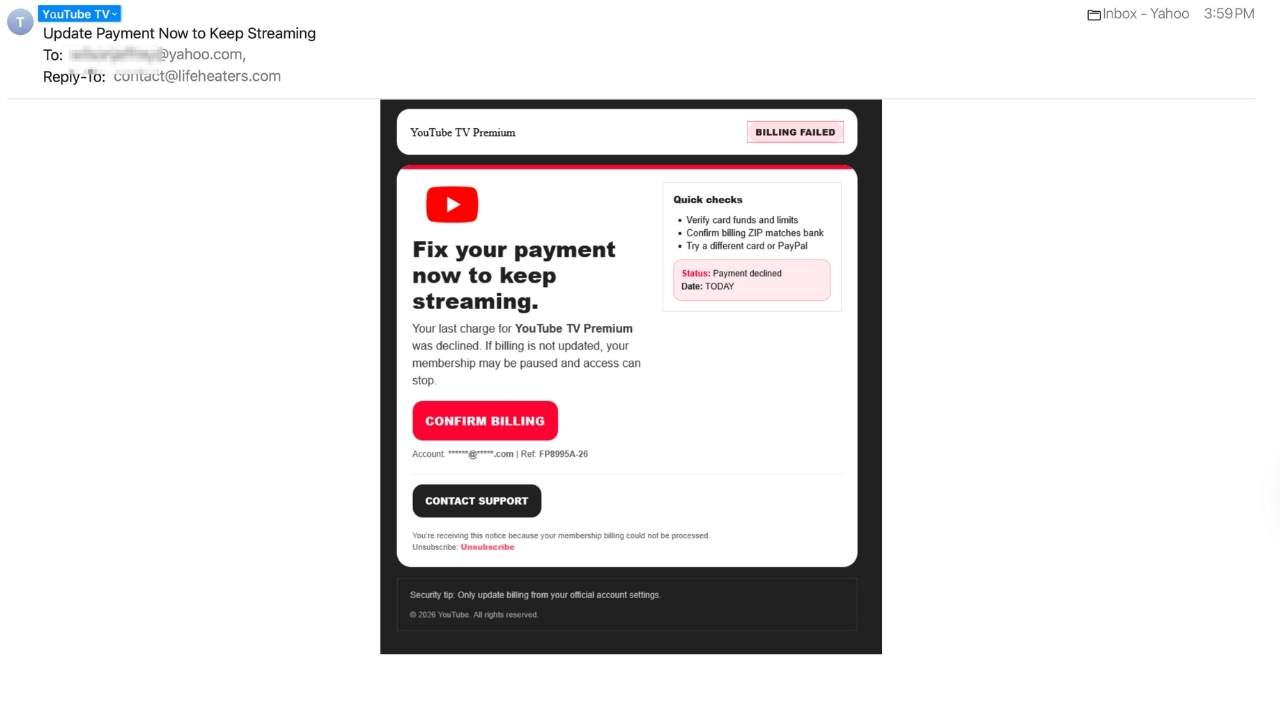
Why this scam feels so convincing
Scammers understand behavior. People skim emails. They react quickly when access to familiar services feels threatened. This message uses recognizable branding, clean formatting and simple language. It also assumes the recipient already subscribes. That assumption is intentional. These emails go out in bulk, knowing some recipients really do have YouTube TV and may act before verifying.
Urgency language is meant to push for quick action
Scam emails rely on pressure. This one uses several subtle cues.
“BILLING FAILED” draws immediate focus
Capital letters pull attention to the problem first. It feels like a system notice, even though no real account check took place.
“Fix your payment now to keep streaming” creates momentum
That line suggests access could stop at any moment. Scammers know interruptions feel urgent, so they push fast decisions.
“Status: Payment declined” sounds technical
The word status makes the message feel automated and official. In reality, scammers use vague labels because they cannot see real billing data.
“Date: Today” adds time pressure
Including today makes the issue feel current and unresolved. Legitimate companies rarely demand same-day action through email links alone.
When urgency replaces clarity, that pressure itself becomes the warning sign.

Red flags hiding in plain sight
The layout of the email matters as much as the wording.
“Confirm billing” buttons are designed to prompt clicks
The red CONFIRM BILLING button encourages action before verification. Real companies usually direct users to sign in normally, not through a single email button.
“Contact support” links can be misleading
The black CONTACT SUPPORT button looks official and helpful. In scam emails, these links often lead to fake support pages or phishing forms.
Color and design influence behavior
Red suggests urgency. Dark colors suggest authority. Familiar branding builds comfort. Together, they encourage quick action.
Watch the latest episode of The CyberGuy Report.

Missed this event? Sign up via the registration form and see our live recording.
See Kurt’s latest Amazon picks for useful gadgets, smart home upgrades and everyday tech worth grabbing while the deals last.
If an email pushes any button to fix a problem, pause and verify first.
The biggest red flag most people miss
The message claims to be about YouTube TV. The sending infrastructure points somewhere else. Lifeheaters.com has no legitimate relationship with Google or YouTube. Billing emails should always come from official domains tied directly to the company.
We reached out to Google, YouTube’s parent company, and a spokesperson told us, “We can confirm that this is a phishing scam and not an official communication from YouTube.”

How to protect yourself from YouTube TV billing email scams
If you receive a billing alert like this, pause before acting. Scammers rely on speed and stress. These steps help you stay in control.
1) Go straight to the official website or app
Instead of clicking links in the email, open a new browser tab. Then go directly to the official YouTube TV website or app. Real billing issues always appear inside your account dashboard.
2) Check billing inside your account settings
Once you are logged in, review your payment status. If there is a real problem, you will see it there. If everything looks normal, the email is fake.
3) Inspect links before you click
Hover your cursor over any link in the email. Look closely at the destination. If the domain does not clearly match Google or YouTube, do not click it. That mismatch is a major warning sign. Also, installing strong antivirus software adds a critical layer of protection. It can block malicious links, flag phishing pages and stop malware before it installs. That matters if you accidentally click the wrong thing. The best way to protect yourself from malicious links that install malware and potentially access your private information is to have strong antivirus software installed on all your devices. This protection can also alert you to phishing emails and ransomware scams, keeping your personal information and digital assets safe.
- Strong real-time protection against viruses, malware, ransomware and hacking attempts
- AI-powered scam protection to help identify suspicious emails, texts and websites
- Built-in password manager to securely store and manage logins
- 2 GB PC cloud backup to help protect important files from ransomware or hardware failure
- Smart firewall and phishing protection
- Protects 1, 3 or 5 devices
- Available for Windows, macOS, Android and iOS
- Includes real-time threat protection, smart firewall and phishing protection to guard against online attacks
4) Act fast if you already clicked
If you clicked the link or entered information, respond quickly. Change your Google password right away. Consider using a password manager to securely store and generate complex passwords, reducing the risk of password reuse. Then review recent account activity and payment methods for any suspicious activity.
Next, see if your email has been exposed in past breaches. Our #1 pick, NordPass, includes a built-in breach scanner that checks whether your email address or passwords have appeared in known leaks. If you discover a match, immediately change any reused passwords and secure those accounts with new, unique credentials.
- Unlimited password storage
- Secure sharing
- Password health reports
- Auto-fill and emergency access
- Data breach monitoring to alert you if your credentials have been exposed
- A Security Dashboard with tools like the Data Breach Scanner and Password Health Checker to identify weak, reused, or compromised passwords
CyberGuy Exclusive Deal: Save 52% now with CyberGuy’s exclusive NordPass offer – Get 1 extra month FREE with a 2-year plan. Try 30 days risk-free for only $1.43 per month!
5) Remove your data from data broker sites
Scammers often target people using leaked personal data. A data removal service helps reduce how much of your information is floating around online. Less exposed data means fewer targeted scam attempts.
While no service can guarantee the complete removal of your data from the internet, a data removal service is really a smart choice. They aren’t cheap, and neither is your privacy. These services do all the work for you by actively monitoring and systematically erasing your personal information from hundreds of websites. It’s what gives me peace of mind and has proven to be the most effective way to erase your personal data from the internet. By limiting the information available, you reduce the risk of scammers cross-referencing data from breaches with information they might find on the dark web, making it harder for them to target you.
Exclusive Deal for CyberGuy Readers (60% off): Incogni offers a 30-day, money-back guarantee and applies a special CyberGuy discount to all annual plans, for as low as $6.39/month for one person (billed annually) or $13.19/month for your family (up to 5 people) on their annual plan.
I strongly recommend the family plan. Here's why: the scam that starts with a Google search of your name almost always ends with a call to you, your elderly parent or a text to your adult child. Protecting yourself without protecting the people around you is half a solution. At $2.64 per person per month, the family plan covers up to five people, and the people most likely to be the final target are often the ones who'd never think to protect themselves.
Get Incogni and remove your info
6) Watch for sender domains that do not match
Legitimate companies send billing emails from their own domains. A message about YouTube TV should never route through an unrelated site like lifeheaters.com. That disconnect alone is enough to walk away.
7) Never update payment info through email links
Scammers want your login details or credit card number. Avoid giving them either. Always update billing information directly inside your account, not through an email prompt.
Related Links:
- Why January is the best time to remove personal data online
- Make 2026 your most private year yet by removing broker data
- Surprising places your personal data is exposed and how to remove it
Kurt’s key takeaways
This email looked polished. The message felt urgent. The branding felt familiar. Yet one small detail gave it away. Billing emails should always come from official domains and verified accounts. When they do not, trust your instincts and verify independently. Pausing for ten seconds can save you weeks of cleanup.
Have you received a billing or subscription email that looked real but turned out to be fake? What tipped you off? Let us know in the comments below.
FOR MORE OF MY TECH TIPS & SECURITY ALERTS, SUBSCRIBE TO MY FREE CYBERGUY REPORT NEWSLETTER HERE
Copyright 2026 CyberGuy.com. All rights reserved. CyberGuy.com articles and content may contain affiliate links that earn a commission when purchases are made.
🎙 Now Streaming: My New Podcast: The CyberGuy Report
Kurt’s Top Deals
Deals move fast and inventory can be limited, so don’t wait too long.
| 🔥 Editor’s pick  Summer entertaining Ninja SLUSHi Machine (26% off) Frozen drinks and slushies at home in minutes. | |
| 💰 Top deal  Outdoor essential TYPEC Solar Bug Zapper (36% off) Solar-powered bug zappers for patios and camping. |


