



ClickFix is a social engineering trick that hackers have been using more and more since early 2024 to spread malware. It fools you into running malicious commands on your own computer, and the attack is now more common than ever. Hackers are getting people to install password-stealing malware by making them press a series of keyboard shortcuts, all under the pretense of proving they’re not bots. Bots are automated computer programs that perform repetitive tasks online, often mimicking human behavior. By tricking you into proving they’re not bots, hackers exploit your lack of understanding about these automated systems to make you unwittingly install malware.

What you need to know
As reported by KrebsOnSecurity, the latest ClickFix campaign tricks you into installing password-stealing malware under the guise of a routine “Verify You Are a Human” test. Initially seen in targeted attacks, it has now gone mainstream, affecting industries like hospitality and healthcare.
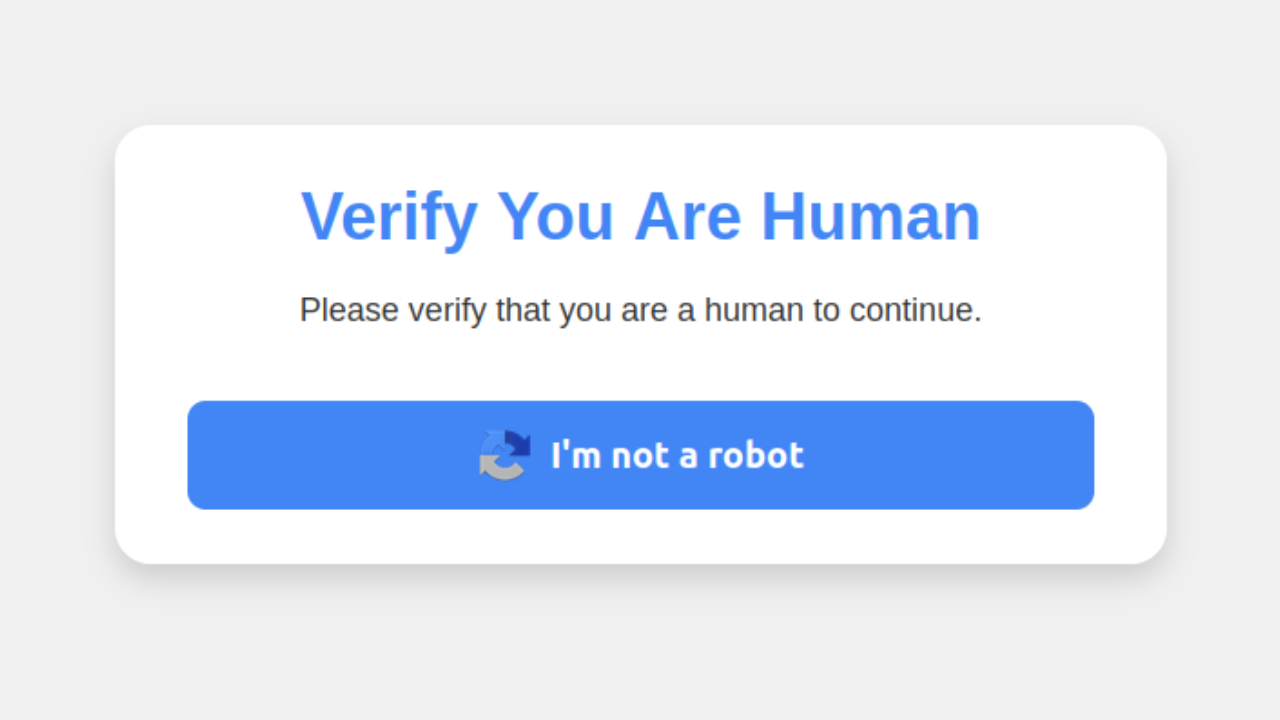
The scam begins when you visit a hacked or malicious website and see a fake CAPTCHA-style prompt. Clicking the “I’m not a robot” button triggers a set of instructions asking you to press specific keyboard shortcuts. First, you are told to press Windows + R, which opens the Windows Run dialog. Then, you are instructed to press CTRL + V, which pastes a malicious script copied from the website’s virtual clipboard. If you press enter, a script is executed, which downloads and runs malware.
Cybercriminals are using phishing emails and malicious websites to spread ClickFix. The hospitality industry has been heavily targeted, with attackers impersonating Booking.com and sending fake emails referencing guest reviews or promotions. Clicking on links in these emails directs you to a ClickFix trap. Healthcare workers have also been targeted, with malicious code embedded into the widely used physical therapy site HEP2go.
Once ClickFix is on your PC, it installs various types of malware, including password stealers like XWorm, Lumma Stealer, and Danabot, which extract your login credentials and financial information. Some versions deliver remote access trojans like VenomRAT and AsyncRAT, giving attackers full control over your system. Others deploy NetSupport RAT, a remote access tool commonly misused for cyber espionage.

KrebsOnSecurity
THE HIDDEN COSTS OF FREE APPS: YOUR PERSONAL INFORMATION
Previous ClickFix attacks
Security researchers believe ClickFix has been targeting people since March 2024. I reported on the malware back in June 2024 when it posed as fake Google Chrome, Word, and OneDrive errors to trick users into downloading harmful code. Just like in the current campaign, attackers prompted victims to click a button that copied a PowerShell “fix” to the clipboard, then paste and run it in a Run dialog or PowerShell prompt.
By November 2024, attackers had expanded their targets to Google Meet users. The scam started with an email containing a link to a Google Meet session, often disguised to appear as if it were from the victim’s organization. This link leads to an invite for a meeting, webinar, or online collaboration. Clicking the link directed the victim to a fake Google Meet page, which displayed a warning claiming there was an issue with their PC, such as problems with their microphone, camera, or headset.
The attack was also seen in fake Chrome error pages and Facebook login prompts, further spreading the malware across different platforms and increasing its reach.
KrebsOnSecurity
OUTSMART HACKERS WHO ARE OUT TO STEAL YOUR IDENTITY
6 ways you can stay safe from ClickFix malware
To protect yourself from the evolving threat of ClickFix malware, which continues to target users through sophisticated social engineering tactics, consider implementing these six essential security measures:
A Texas mom says she spent the night in jail after speaking up online about dirty water in her town. The case was later dropped, but her story raises a troubling question: could something you post online ever put you at risk?

Missed this event? Sign up via the registration form and see our live recording.
See Kurt’s 2026 picks for practical tech and everyday upgrades.
1) Be skeptical of CAPTCHA prompts: Legitimate CAPTCHA tests never require you to press Windows + R, copy commands, or paste anything into PowerShell. If a website instructs you to do this, it’s likely a scam. Close the page immediately and avoid interacting with it.
2) Don’t click links from unverified emails and use strong antivirus software: Many ClickFix attacks start with phishing emails that impersonate trusted services like Booking.com or Google Meet. Always verify the sender before clicking on links. If an email seems urgent or unexpected, go directly to the company’s official website instead of clicking any links inside the email.
The best way to safeguard yourself from malicious links that install malware, potentially accessing your private information, is to have strong antivirus software installed on all your devices. This protection can also alert you to phishing emails and ransomware scams, keeping your personal information and digital assets safe.
My top pick is TotalAV, and you can get a limited-time deal for CyberGuy readers: $19 your first year (80% off) for the TotalAV Antivirus Pro package.
3) Enable two-factor authentication: Enable two-factor authentication whenever possible. This adds an extra layer of security by requiring a second form of verification, such as a code sent to your phone, in addition to your password.
4) Keep devices updated: Regularly updating your operating system, browser, and security software ensures you have the latest patches against known vulnerabilities. Cybercriminals exploit outdated systems, so enabling automatic updates is a simple but effective way to stay protected.
5) Monitor your accounts for suspicious activity and change your passwords: If you’ve interacted with a suspicious website, phishing email, or fake login page, check your online accounts for any unusual activity. Look for unexpected login attempts, unauthorized password resets, or financial transactions that you don’t recognize. If anything seems off, change your passwords immediately and report the activity to the relevant service provider. Also, consider using a password manager to generate and store complex passwords.
One of the best password managers out there is NordPass. It is secure, user-friendly and uses zero-knowledge and military-grade XChaCha20 encryption to protect your data. It supports Windows, macOS, Linux, Android, iOS, and major browsers while offering unlimited password storage, secure sharing, password health reports, data breach monitoring, auto-fill, and emergency access.
Get more details about my best expert-reviewed Password Managers of 2025 here.
6) Invest in personal data removal service: Consider using a service that monitors your personal information and alerts you to potential breaches or unauthorized use of your data. These services can provide early warning signs of identity theft or other malicious activities resulting from ClickFix or similar attacks. While no service promises to remove all your data from the internet, having a removal service is great if you want to constantly monitor and automate the process of removing your information from hundreds of sites continuously over a longer period of time.
A service like Incogni can help you remove all this personal information from the internet. It has a very clean interface and will scan 195 websites for your information and remove it and keep it removed.
Special for CyberGuy Readers (60% off): Incogni offers A 30-day money-back guarantee and then charges a special CyberGuy discount only through the links in this article of $5.99/month for one person (billed annually) or $13.19/month for your family (up to 4 people) on their annual plan and get a fully automated data removal service, including recurring removal from 200+ data brokers. You can add up to 3 emails, 3 home addresses and 3 phone numbers (U.S. citizens only) and have them removed from data-broker databases. I recommend the family plan because it works out to only $4.12 per person per month for year-round coverage. It’s an excellent service, and I highly recommend at least trying it out to see what it’s all about.
Get Incogni for your family (up to 4 people) here
MASSIVE SECURITY FLAW PUTS MOST POPULAR BROWSERS AT RISK ON MAC
Kurt’s key takeaway
ClickFix is a reminder that malware doesn’t always rely on complex exploits—it often just needs you to follow the wrong instructions. Attackers are refining their methods, making scams like fake CAPTCHAs, phishing emails, and deceptive pop-ups more convincing than ever. The best way to stay ahead is to question anything that seems even slightly off. If a website asks you to run commands or paste something into PowerShell, it’s a red flag. If an email pressures you into clicking a link, verify it first.
Do you think tech companies are doing enough to stop malware like ClickFix? Let us know in the comments below.
FOR MORE OF MY SECURITY ALERTS, SUBSCRIBE TO MY FREE CYBERGUY REPORT NEWSLETTER HERE
Copyright 2025 CyberGuy.com. All rights reserved. CyberGuy.com articles and content may contain affiliate links that earn a commission when purchases are made.
🎙 Now Streaming: My New Podcast: The CyberGuy Report
Kurt’s Top Deals
Deals move fast and inventory can be limited, so don’t wait too long.
| 🔥 Editor’s pick  Summer entertaining Ninja SLUSHi Machine (26% off) Frozen drinks and slushies at home in minutes. | |
| 💰 Top deal  Outdoor essential TYPEC Solar Bug Zapper (36% off) Solar-powered bug zappers for patios and camping. |


1 comment
No, I think the Government should take a more aggressive roll in capturing and punishing these scammers. They are just another form of terrorist and should get the worst punishment. No mercy.