How would you feel if you clicked on a link that looked like the official Amazon website, only to eventually find out that you ended up on a page that tried to scam you?
This is what happened to some unsuspecting individuals who searched for Amazon on Google and clicked on an ad that appeared to be from the online retailer. The ad was instead a fake that used a clever trick to disguise its malicious intent. It exploited a flaw in the way Google displays URLs in its ads, making them look identical to the real ones.
Once the person clicks on the ad, they are redirected to a tech support scam claiming their computer is infected, asking them to call a fake number.
How to spot and avoid the Defender scam
If you click on the link, you’ll see a fake “alert” appearing to be from Microsoft’s Windows Defender. It’s not the real antivirus software, although it looks pretty convincing. It’ll say that your device has malware, lock your browser, and take over your whole screen. Then it’ll show you a phone number to call, saying it’s “Microsoft Windows Support.”
Don’t call the phone number or follow any instructions on the screen. It’s a scam. It’s just a way to try to trick you into paying for fake services or giving away your personal information.
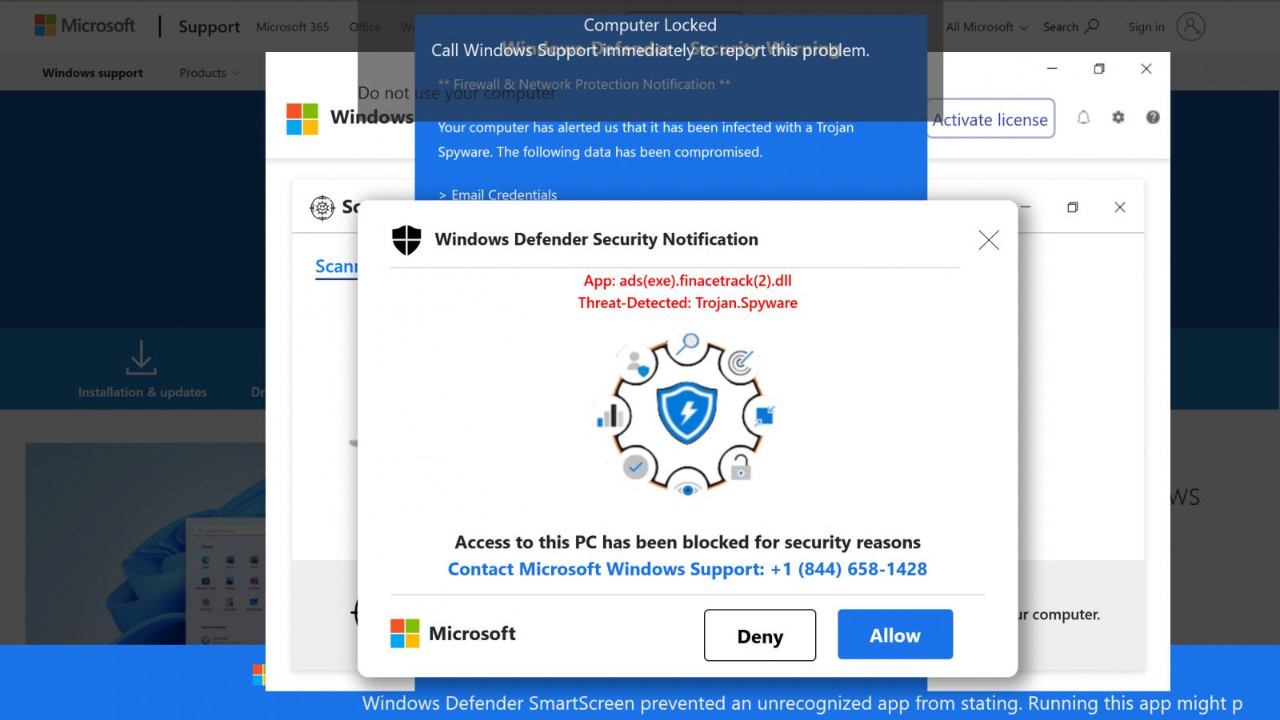
Credit: BleepingComputer
MORE: DON’T FALL FOR THIS LATEST ANTIVIRUS PROTECTION SCAM
How does this happen?
Scammers have exploited Google’s ad creation system to copy official links of reputable companies and redirect them to phishing or fraudulent web pages. This way, they can trick you into giving away your personal or financial info or installing malware on your device.

How to react and report the fake Defender support scam
If you find yourself confronted by the Defender support scam, you should close your browser window immediately. Scan your device with antivirus software for any malware that might have caused the redirection.
Finally, be sure to report the fake Google ad to Google and the legitimate website that it copied, in this case, Amazon. This way, you can protect yourself and others from this scam.
How do I avoid the fake Defender support scam?
Enabling antivirus software on all your devices is the best way to protect yourself from these potential scams. Having good antivirus protection actively running on your devices will alert you of any malware in your system, warn you against clicking on any malicious links in phishing emails, and ultimately protect you from being hacked. See my expert review of the best antivirus protection for your Windows, Mac, Android & iOS devices.
Never call the phone number that appears in a pop-up window or an error message claiming to be from Microsoft. Real Microsoft error messages never include a phone number.
Do not give remote access to your computer to anyone who contacts you unsolicited. Scammers can use remote access to install malware, ransomware, or other unwanted programs on your device.

Watch the latest episode of The CyberGuy Report.

Missed this event? Sign up via the registration form and see our live recording.
See Kurt’s latest Amazon picks for useful gadgets, smart home upgrades and everyday tech worth grabbing while the deals last.
MORE: DON’T FALL FOR THAT DECEPTIVE EMAIL ASKING FOR HELP
Kurt’s Key Takeaways
It continues to become harder to trust anything you see on the internet. Even when all the signs point to something being safe, there is still the possibility that it is a scam or attack.
This is why having antivirus protection is so important, along with the vast array of other tips and tactics I recommend to stay safe.
Are you tired of having to constantly stay on the lookout for threats? Let us know by commenting below.
FOR MORE OF MY TECH TIPS & SECURITY ALERTS, SUBSCRIBE TO MY FREE CYBERGUY REPORT NEWSLETTER HERE
🎙 Now Streaming: My New Podcast: The CyberGuy Report
Kurt’s Top Deals
Deals move fast and inventory can be limited, so don’t wait too long.
| 🔥 Editor’s pick  Summer entertaining Ninja SLUSHi Machine (26% off) Frozen drinks and slushies at home in minutes. | |
| 💰 Top deal  Outdoor essential TYPEC Solar Bug Zapper (36% off) Solar-powered bug zappers for patios and camping. |