



These days, our phones are constantly buzzing with notifications, and it’s becoming increasingly difficult to distinguish between legitimate messages and potential scams. Bill from Mesa, Arizona, recently shared an experience that highlights this growing concern:
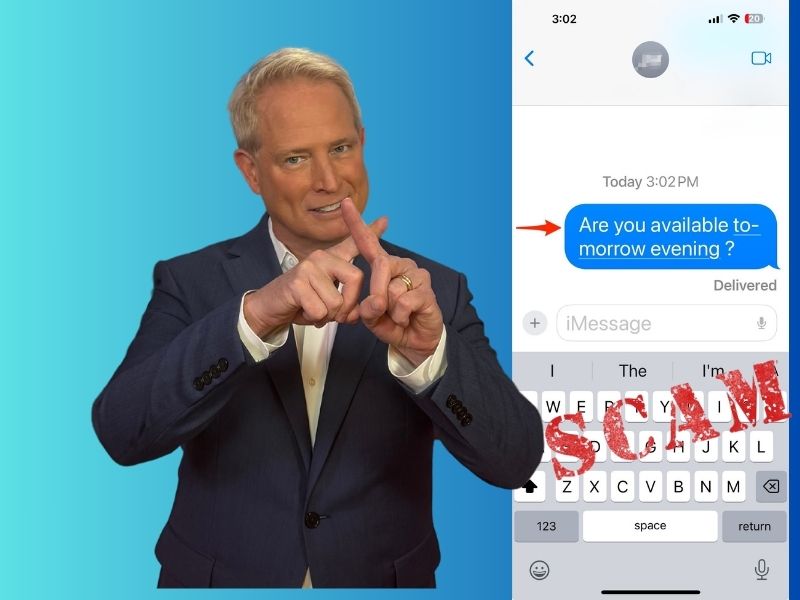
Twice in the last week I’ve received texts supposedly sent elsewhere. The last one asked if I was ‘available tomorrow evening.’ I did not recognize the number but am active in an old people park so receive many calls and texts from unfamiliar numbers. I texted back that my wife thought we were available. A few minutes later a text came asking if I was Mrs. Amy. I texted that I wasn’t Mrs. Amy and had never been but it was a problem. A return text came thanking me for being so polite and the texter’s appreciation for polite people and if I were ever in LA I would be welcome to a back yard BBQ. Looking back there were a couple more texts ending with ‘I like to make friends with polite people’. The first text which I deleted was in a very similar vein and format. Is this a scam and why, for what?
Bill’s experience is not unique. Many people receive similar messages that seem harmless at first glance but could potentially be part of a more sinister scheme. Let’s dive into the world of text message scams and learn how to protect ourselves.

The anatomy of a text message scam
Text message scams, also known as “smishing” (a combination of SMS and phishing), have become increasingly sophisticated. Scammers use various tactics to engage potential victims and gain their trust. Here are some common elements:
Unfamiliar numbers: The message comes from a number you don’t recognize. For instance: You receive a text from +1 (555) 123-4567, a number not in your contacts.
Unsolicited contact: The text arrives unexpectedly, often with a friendly or urgent tone. Example: “Hey! Long time no see. How have you been?”
Personal touch: The scammer might use your name or reference a common activity to seem legitimate. Example: “Hi Sarah, it’s Mike from the book club. Are you coming to the meeting next week?”
Too good to be true: Offers of prizes, invitations, or other enticing propositions are common. Example: “Congratulations! You’ve won a $500 gift card. Click here to claim your prize!”
Requests for information: The scammer may ask for personal details, either directly or indirectly. Example: “This is your bank. We need to verify your account. Please reply with your account number and PIN.”
Remember, these are all examples of potential scams. Always be cautious when receiving unexpected messages, especially those asking for personal information or containing suspicious links.
Understanding the scammer’s strategy
In Bill’s case, the scammer employed a “long-play” strategy. By engaging in friendly conversation and offering invitations, they aim to build trust over time. The end goal could be:
Phishing for information: Gradually collecting personal details that can be used for identity theft.
Malware distribution: Eventually sending a link that, when clicked, installs malicious software on your device.
A Texas mom says she spent the night in jail after speaking up online about dirty water in her town. The case was later dropped, but her story raises a troubling question: could something you post online ever put you at risk?

Missed this event? Sign up via the registration form and see our live recording.
See Kurt’s 2026 picks for practical tech and everyday upgrades.
Financial scams: Building trust to eventually request money or financial information.

HOW TO EASILY ACTIVATE AUTO-REPLY FOR TEXT MESSAGES ON IPHONE AND ANDROID
How to identify suspicious texts
To protect yourself from text message scams, follow these steps:
- Check the sender: Look at the full email address or phone number, not just the display name.
- Analyze the content: Be wary of messages with urgent subjects, grammatical errors, or strange URLs.
- Verify independently: If the message claims to be from a known entity, contact them through official channels to confirm.
- Trust your instincts: If something feels off, it probably is. Don’t let politeness override your judgment.
What to do if you suspect a scam
If you believe you’ve received a scam text, here are 6 steps to follow:
1) Don’t respond: Avoid engaging with the scammer to prevent further attempts.
2) Block the number: Use your phone’s built-in blocking features to prevent further contact.
- For iPhone: Open the message, tap the sender’s name or number, select “Info,” then “Block Caller.”
- For Android: Open the message, long-press the conversation, tap the three-dot menu, and select “Block” or “Block & Report Spam.” You may be asked to confirm your decision by clicking Yes. Settings may vary depending on your Android phone’s manufacturer.
3) Report the message: Forward the suspicious text to 7726 (SPAM). Also, report it directly to the FTC at ReportFraud.ftc.gov.
4) Keep your information safe: Never click on links or provide personal information in response to unsolicited texts.
5) Have strong antivirus software: Install and run strong antivirus apps on your phone to scan for malware and ensure your device is secure. The best way to safeguard yourself from malicious links that install malware, potentially accessing your private information, is to have antivirus software installed on all your devices. This protection can also alert you to phishing emails and ransomware scams, keeping your personal information and digital assets safe.
- Strong real-time protection against viruses, malware, ransomware and hacking attempts
- AI-powered scam protection to help identify suspicious emails, texts and websites
- Built-in password manager to securely store and manage logins
- 2 GB PC cloud backup to help protect important files from ransomware or hardware failure
- Smart firewall and phishing protection
- Protects 1, 3 or 5 devices
- Available for Windows, macOS, Android and iOS
- Includes real-time threat protection, smart firewall and phishing protection to guard against online attacks
6) Invest in personal data removal services: Consider using a data removal service to eliminate your personal information from data broker sites. These services can help reduce spam, decrease the risk of identity theft, and clean up your online presence by automating the removal of your data from hundreds of data broker sites.
While no service promises to remove all your data from the internet, having a removal service is great if you want to constantly monitor and automate the process of removing your information from hundreds of sites continuously over a longer period of time.
Incogni, a service I trust 100% and use myself, helps automate the process by submitting removal requests to hundreds of data brokers and people-search sites on your behalf.
Incogni automatically contacts data brokers on your behalf and requests the removal of your personal information. It also continues monitoring those sites and submits new removal requests if your data reappears.
- Incogni currently removes personal data from 420+ data broker and people-search websites, and its Unlimited plan allows you to request removals from as many additional sites as you need.
- Incogni has also received third-party assurance from Deloitte, validating its marketing claims.
- The goal is simple: make it much harder for strangers, scammers, and cybercriminals to find your personal information online.
CyberGuy readers get 60% off Incogni’s annual plans using the links in this article.
The service also includes a 30-day money-back guarantee, so you can try it risk-free and see how much of your information is exposed online.
Related Articles:
- Best services for removing your personal information from the Internet 2026
- Hackers abuse Google Cloud to send trusted phishing emails
- Why you’re getting strange texts from unknown numbers
Kurt’s key takeaways
While it’s natural to want to be polite, as Bill was, remember that your safety and personal information are paramount. Trust your instincts, verify unfamiliar contacts, and never hesitate to ignore or block suspicious messages. Remember, a true friend won’t mind if you take extra steps to verify their identity, and a legitimate organization will have official channels for communication.
How have you or someone you know been affected by text message scams, and what steps did you take to protect yourself? Let us know in the comments below.
Copyright 2026 CyberGuy.com. All rights reserved. CyberGuy.com articles and content may contain affiliate links that earn a commission when purchases are made.
🎙 Now Streaming: My New Podcast: The CyberGuy Report
Kurt’s Top Deals
Deals move fast and inventory can be limited, so don’t wait too long.
| 🔥 Editor’s pick  Summer entertaining Ninja SLUSHi Machine (26% off) Frozen drinks and slushies at home in minutes. | |
| 💰 Top deal  Outdoor essential TYPEC Solar Bug Zapper (36% off) Solar-powered bug zappers for patios and camping. |


3 comments
My husband and I have been getting (several times a week) a group text message that states we are being removed from the text group. Neither of us belong to any text groups. We always block these text messages. The texts seem to be coming from Missouri and also California.
I get calls from 888 numbers. I hit go to voicemail. The message is always “If this is not you press 1”
Any idea who this is. It is always 888 but the rest of the number changes. Anyone else getting these?
I was scammed by what is called “Pig Butching,” (more about this here) which began with a wrong number, which I thought was a friend’s. The person on the phone was friendly and apologized for calling me by mistake. I should have blocked the number, but I thought it was an innocent mistake. It wasn’t.
I fell for the friendly keeping-in-touch chit-chat. Nothing alerted me to what was to come. My trust was built over weeks of friendly chit-chat. Long story short, I was conned into trading on a legitimate platform; it was very sophisticated and took months. It wasn’t until I tried to withdraw my funds that I was informed I couldn’t unless I paid a verification wallet fee. The “wallet” generated an address I thought was mine only, but a backdoor operator routed my funds to this bogus wallet address. I did not pay the verification fee, knowing it was illegal.