



When you visit a webpage, you might see a captcha to make sure you’re a real person and not a bot. These usually involve jumbled words, some recognizable images, or just a box that says, “I am not a robot.” Captchas are harmless, but hackers are now using them to infect your PC with malware.
Security researchers have found a huge fake captcha campaign spreading the dangerous Lumma info-stealer malware, which can bypass security measures like Safe Browsing. This campaign shows how malvertising works, with over a million ad impressions every day and thousands of victims losing their accounts and money through a network of more than 3,000 sites. I’ll break down how this scam works, who’s responsible, and how you can protect yourself.
How does the scam work?
As reported by Guardio, the fake captcha scam is a sophisticated malvertising campaign that lures you into unknowingly installing malware under the guise of routine captcha verification. The cyberattack starts when you’re browsing websites—often those offering free streaming, downloads, or pirated content. These sites are used by hackers to present you with what appears to be a legitimate captcha verification page.
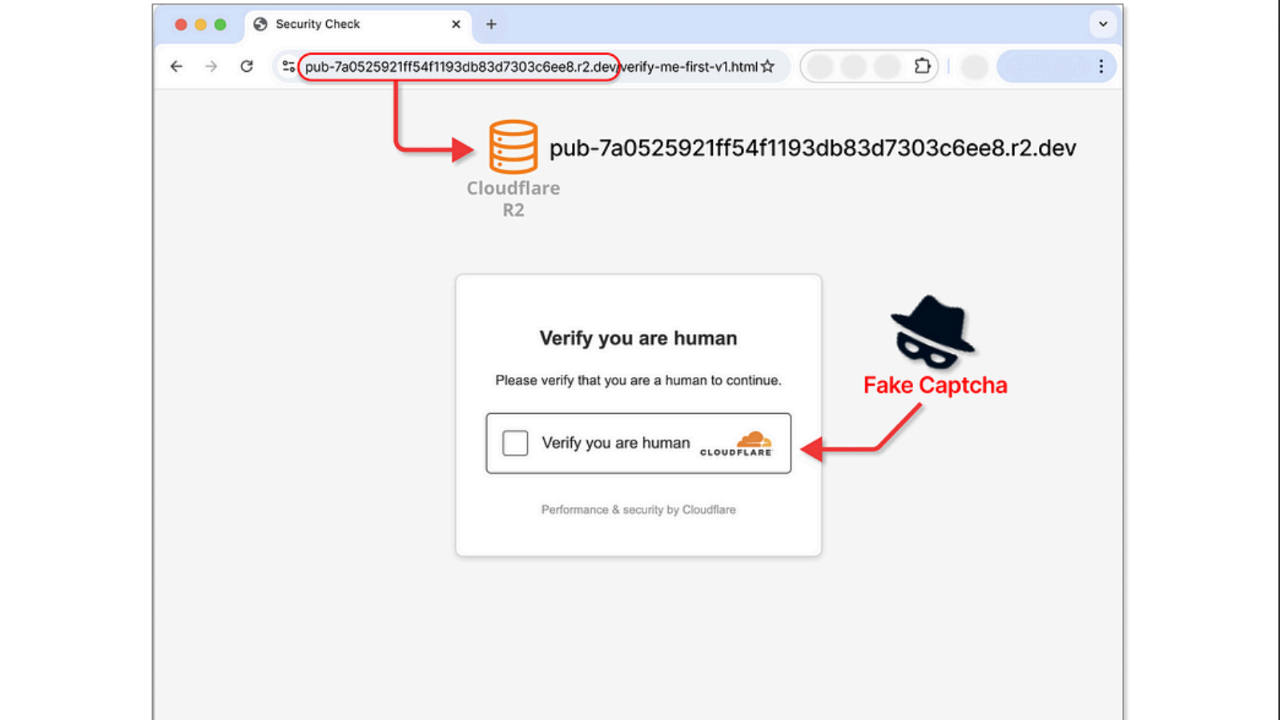
The page mimics a real captcha, asking you to confirm you are human. However, the instructions are designed to trick you into initiating harmful actions, like triggering the Windows “Run” dialog. Users unknowingly paste and execute a crafted PowerShell command, which silently installs the Lumma info-stealer malware onto their system.
The malware targets sensitive data, including social media accounts, banking credentials, saved passwords, and personal files, potentially leading to financial and identity theft.
Guard.io
How can you tell if a captcha is fake?
Spotting a fake captcha can be tough since hackers go out of their way to mimic the real thing. Here are some key signs to look for:
- Check the URL: Real captchas come from trusted domains, like Google’s reCAPTCHA (google.com/recaptcha). If you see a captcha on a strange or unrelated domain, that’s a warning sign.
- Watch the instructions: Legit captchas ask you to click boxes, solve image puzzles, or type in distorted words. They never tell you to press keyboard shortcuts, open the Windows “Run” dialog, or paste in text. If you see instructions like that, it’s fake.
- Think about where it appears: Fake captchas often pop up on shady sites offering pirated movies, free downloads, or suspicious streaming. You’re much less likely to see one on well-established, reputable websites.
- Look closely at the design: Real captchas are simple and consistent. A fake may look a little off—odd fonts, blurry logos, or instructions that don’t quite fit.
If you’re ever unsure, the safest move is to close the page instead of interacting with it.
Who’s to blame for this?
The fake captcha scam shows how messy the internet’s ad system has become, with everyone involved passing the buck. Guardio Labs points to ad networks like Monetag as a big part of the problem. They distribute malicious ads that are disguised during moderation using tricks like cloaking. Publishers, especially those offering free or pirated content, add to the issue by running these shady ads on their sites, often without checking what they’re actually showing users.
Then there are services like BeMob, which lets scammers hide their bad links behind harmless-looking URLs. These companies call themselves analytics tools, but they’re helping the scams stay hidden. Hosting providers don’t escape blame either. They’re where these fake captcha pages live, and they often don’t bother to check what’s being hosted.
Of course, the scammers themselves are the ones pulling the strings. But because they spread their operations across so many platforms, they’re almost impossible to track down. Guardio’s research shows how all these moving parts work together, creating a system where no one takes responsibility, and the scams keep running.
Watch the latest episode of The CyberGuy Report.

Missed this event? Sign up via the registration form and see our live recording.
See Kurt’s latest Amazon picks for useful gadgets, smart home upgrades and everyday tech worth grabbing while the deals last.
5 ways to stay safe from fake captchas
1) Use reliable security software: Keeping your antivirus and anti-malware software up to date is one of the most effective ways to protect yourself from fake captcha scams. A strong antivirus software will detect and block malware like the Lumma info-stealer before it can infect your device.
- Strong real-time protection against viruses, malware, ransomware and hacking attempts
- AI-powered scam protection to help identify suspicious emails, texts and websites
- Built-in password manager to securely store and manage logins
- 2 GB PC cloud backup to help protect important files from ransomware or hardware failure
- Smart firewall and phishing protection
- Protects 1, 3 or 5 devices
- Available for Windows, macOS, Android and iOS
- Includes real-time threat protection, smart firewall and phishing protection to guard against online attacks
2) Enable browser protection features: Modern browsers offer built-in security features, such as Safe Browsing and phishing protection, which warn you about potentially dangerous sites. Make sure these features are enabled in your browser settings. These tools can alert you to malicious links or fake captchas trying to trick you into downloading malware.
3) Be cautious with “free” content: There’s a saying that goes, “If something is free, you’re what they are selling.” Websites that offer free downloads, streaming services, or pirated content are often associated with malvertising campaigns. Fake captcha scams are commonly spread through these types of sites, where users are tricked into clicking on malicious ads or links. Even if a site seems tempting, it’s important to be cautious. Avoid clicking on suspicious links or using “free” services, as they could be traps designed to infect your device with malware.
4) Avoid clicking on suspicious ads: Always be wary of ads that appear out of nowhere or seem too good to be true. Fake captcha scams often disguise themselves as legitimate ads, asking you to click to verify you’re human. Never interact with pop-up ads or unfamiliar banners, especially those that claim to give you something for free, as they may lead to malicious pages or trigger malware downloads. Get my picks for the best 2026 antivirus protection winners for your Windows, Mac, Android & iOS devices.
5) Check for HTTPS and look for signs of a legitimate site: Before entering any personal information or interacting with a captcha, ensure that the website is secure. Look for “https://” in the website’s URL, which indicates the connection is encrypted. Legitimate websites also tend to have a professional appearance, so if something feels off or the design looks poor, trust your instincts and leave the site.
6) Enable two-factor authentication (2FA): Two-factor authentication adds an extra layer of security, making it harder for attackers to access your accounts.
Related Links:
- What to do if your bank account is hacked
- Beware of encrypted pdfs as the latest trick to deliver malware to you
- Here’s what ruthless hackers stole from 110 million at&t customers
Kurt’s key takeaway
There’s no question that fake captcha scams are a growing threat, putting millions of us at risk of malware infections and financial loss. What’s even more concerning is that ad networks, publishers, and hosting services continue to allow malicious campaigns to spread through their platforms despite the widespread awareness of the problem. The companies involved must take immediate action to improve content moderation, tighten security measures, and prevent these scams from thriving. We are seeing a dangerous loophole in the digital advertising ecosystem that could have serious consequences for internet users.
Do you think ad networks and publishers should be held accountable for the spread of malware through their platforms? Let us know in the comments below.
FOR MORE OF MY TECH TIPS & SECURITY ALERTS, SUBSCRIBE TO MY FREE CYBERGUY REPORT NEWSLETTER HERE
Copyright 2026 CyberGuy.com. All rights reserved. CyberGuy.com articles and content may contain affiliate links that earn a commission when purchases are made.
🎙 Now Streaming: My New Podcast: The CyberGuy Report
Kurt’s Top Deals
Deals move fast and inventory can be limited, so don’t wait too long.
| 🔥 Editor’s pick  Summer entertaining Ninja SLUSHi Machine (26% off) Frozen drinks and slushies at home in minutes. | |
| 💰 Top deal  Outdoor essential TYPEC Solar Bug Zapper (36% off) Solar-powered bug zappers for patios and camping. |


2 comments
Yes. This is out of control
ive been hacked on every device I get its like my name Has been hacked