



What looks like a simple “Are you human?” check is now one of the most dangerous tricks on the internet. Fake captchas have evolved into full-blown malware launchpads, thanks to a sneaky new method called ClickFix. It copies commands to your clipboard and tricks you into running them, without ever downloading a file.
This shift in attack tactics is so big that researchers are calling it “CAPTCHAgeddon.” It’s not just a new scam. It’s a viral malware delivery system that’s more convincing, stealthy, and widespread than anything before it. Let’s break down how this new wave of attacks works and what makes it so hard to stop.

Credit: Guardio
How fake CAPTCHAS took over
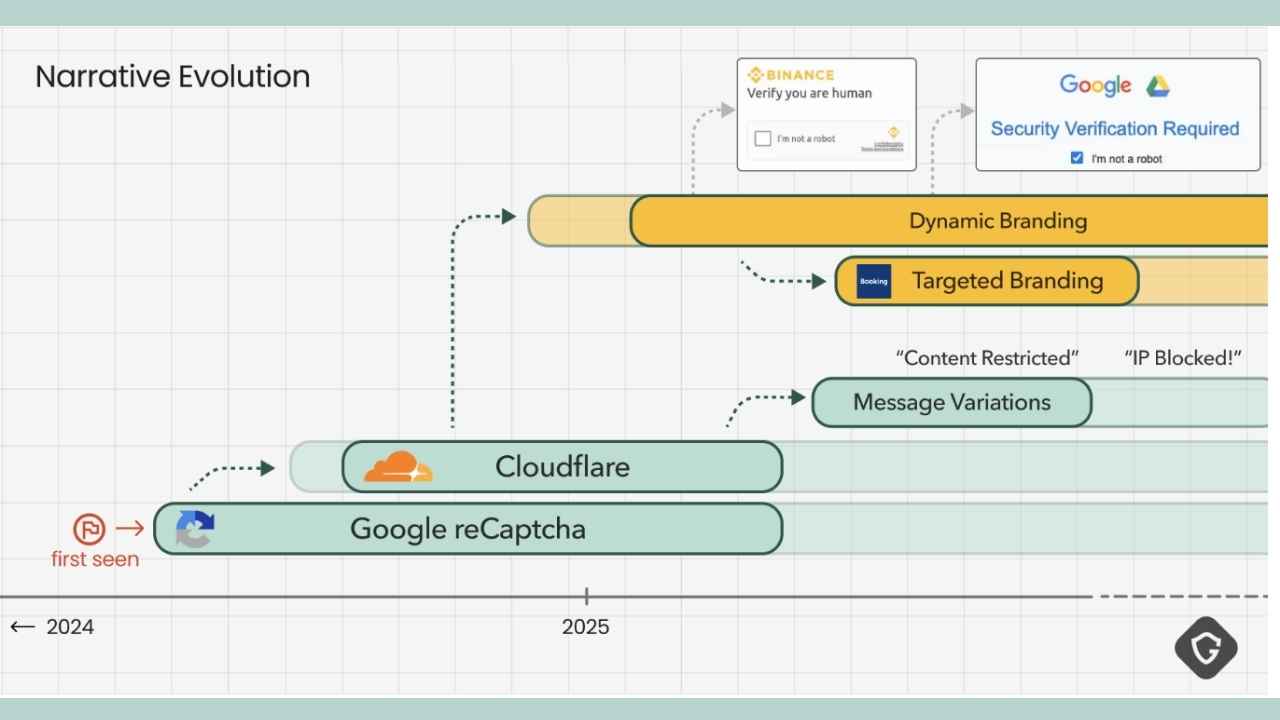
Back in 2024, security experts warned about fake browser update pop-ups. Victims were told to download files that turned out to be malware. But those tricks are now outdated. Enter ClickFix.
Instead of asking users to install something, ClickFix loads a fake CAPTCHA screen. It looks legit, just like Google reCAPTCHA or Cloudflare’s bot checks. But when you click “verify,” it secretly copies a malicious PowerShell or shell script to your clipboard.
From there, you’re just one paste away from installing malware that steals your accounts, passwords, and files. This new trick is more convincing than any old download prompt. And it’s spreading like wildfire.
From pop-ups to full-scale CAPTCHA campaigns
Fake captchas didn’t stay in sketchy ad pop-ups for long. Attackers realized they could hide these tricks in places people already trust:
- Compromised WordPress blogs
- GitHub repositories
- Reddit threads
- Blurred-out news sites
- Booking.com phishing emails
Each attack blends into the site or service it mimics. Some CAPTCHAS even display site logos, making the trick look like it came from the page itself. This isn’t a spray-and-pray scheme anymore. It’s targeted social engineering wrapped in sleek design.

Credit: Guardio
The tech behind the CAPTCHA trick
These aren’t low-effort scams. Attackers constantly evolve their tactics to avoid detection. Here’s what makes this malware so stealthy:
- Clipboard hijacking: Instead of downloading a file, it pastes the attack right into your clipboard.
- Obfuscated code: PowerShell and shell scripts are hidden with misspellings, symbols, and encoding.
- Trusted hosts: Some payloads come from Google Scripts, making them look safe.
- Cross-platform reach: They target Windows, macOS, and Linux users alike.
Attackers also serve the payloads through trusted-looking domains and even legitimate-looking JavaScript libraries.
Tracking the malware’s DNA
Security researchers at Guardio didn’t just look at one attack. They analyzed thousands. By clustering command structures, domains, and payload patterns, they identified multiple threat actors using similar tactics, each with a slightly different twist. Some groups use heavily obfuscated code. Others go for speed with clean, readable scripts. But all of them rely on the same core trick: fooling you into clicking something that seems harmless.
Credit: Guardio
Here’s how you can tell if a CAPTCHA is legit versus a scam:
Signs of a Legit CAPTCHA
- Comes from a known, reputable site — You’re already on a domain you trust
- No downloads or software prompts — Real CAPTCHAs never tell you to install anything.
- No unrelated pop-ups or redirects — After solving it, you go directly to the content you wanted.
- Standard challenge style — Often “click all images with…” or “check the box to prove you’re human.”
- Served over HTTPS — You’ll see the secure lock icon in your browser bar.
Signs of a Fake CAPTCHA (Scam)
- Appears on a shady or unfamiliar site — especially ones reached from spam links or pop-ups.
- Leads to downloads — Any “CAPTCHA” that says you need to update Flash, install a security tool, or run a file is fake.
- Triggers constant redirects — You solve it but get sent to ads, surveys, or other random pages.
- Odd wording or design — Spelling errors, weird fonts, or low-quality graphics.
- Asks for personal info — A real CAPTCHA never wants your name, email, or phone number.
How to protect yourself from fake CAPTCHA attacks
These new ClickFix scams are stealthy, convincing, and hard to detect, but you can stay safe with the right habits and tools. Here’s what to do immediately:
1) Keep your browser and antivirus software updated
Always run the latest version of your browser and operating system. Updates patch security holes that attackers exploit. Also, use a strong antivirus software and keep it updated. The best way to safeguard yourself from malicious links that install malware, potentially accessing your private information, is to have strong antivirus software installed on all your devices. This protection can also alert you to phishing emails and ransomware scams, keeping your personal information and digital assets safe.
TotalAV is easy to set up and offers real-time protection for paid users, keeping your devices safe around the clock. It includes tools to block phishing scams, remove ransomware and spyware, and clean up adware and junk files. The software also features a browser manager, system tune-up tools, and protects across Windows, Mac, Android, and iOS devices.
GET MY EXCLUSIVE CYBERGUY TOTALAV DEAL:
Please note:
1) If you're having difficulty seeing either of the above deals, do this:
- If you're on a mobile device, hold down the link above, "Copy Link", and then paste it into a private or incognito browser.
- If you're on a laptop or desktop, right click the link, "Copy Link", and then paste it into a private or incognito browser.
2) During registration you may see optional upsells you can decline. Our top pick is the core antivirus product.
3) If you need help after your purchase, you can reach TotalAV directly through their official support page here.
2) Avoid copying and pasting commands from unknown sources
If a site asks you to paste a command into your terminal or browser console, stop. That’s the main delivery method for ClickFix malware. Legitimate services will never ask you to do this.
3) Check links and domains carefully
Phishing campaigns are hiding fake CAPTCHAs in legit-looking URLs on Reddit, GitHub, and even news sites. Always hover over links before clicking and double-check the domain, especially if prompted to “verify you’re human.”
4) Use a personal data removal service
These attacks often target users whose emails or personal details are already circulating online. These services can reduce your digital footprint by requesting removal from data broker sites. While no service can guarantee the complete removal of your data from the internet, a data removal service is really a smart choice. They aren’t cheap – and neither is your privacy. These services do all the work for you by actively monitoring and systematically erasing your personal information from hundreds of websites. It’s what gives me peace of mind and has proven to be the most effective way to erase your personal data from the internet. By limiting the information available, you reduce the risk of scammers cross-referencing data from breaches with information they might find on the dark web, making it harder for them to target you.
Incogni, a service I trust 100% and use myself, helps automate the process by submitting removal requests to hundreds of data brokers and people-search sites on your behalf.
Incogni automatically contacts data brokers on your behalf and requests the removal of your personal information. It also continues monitoring those sites and submits new removal requests if your data reappears.
- Incogni currently removes personal data from 420+ data broker and people-search websites, and its Unlimited plan allows you to request removals from as many additional sites as you need.
- Incogni has also received third-party assurance from Deloitte, validating its marketing claims.
- The goal is simple: make it much harder for strangers, scammers, and cybercriminals to find your personal information online.
CyberGuy readers get 60% off Incogni’s annual plans using the links in this article.
The service also includes a 30-day money-back guarantee, so you can try it risk-free and see how much of your information is exposed online.
Is your personal information exposed online?
| 🎙 Now Streaming [Ep. 34] Is that Social Security email in your inbox real? How one convincing SSA scam nearly tricked a reader, and the five red flags to check before you click |

| 📱 Lock down your phone in 30 minutes: Join Kurt “CyberGuy” Knutsson for a free live class on Saturday, June 13 at 10 AM ET and learn simple, real-time steps to protect your personal data and stay safer from scams. Register free: CyberGuyLive.com |
Run a free scan to see if your personal info is compromised. Results arrive by email in about an hour.
5) Use a browser with built-in phishing protection
Modern browsers like Brave, Chrome, Firefox, Safari, and Opera offer real-time protection that blocks malicious websites, including fake CAPTCHA pages. Microsoft Edge also includes strong phishing defenses through its SmartScreen filter. Make sure features like Enhanced Safe Browsing or SmartScreen are turned on. These tools detect threats before you click, giving you a critical layer of defense.
6) Use a password manager with phishing detection
Password managers like NordPass don’t just store your logins; they help protect you from phishing. If the URL on a login page doesn’t match the exact one saved in your vault, NordPass won’t autofill your credentials. That’s a sign the site might be fake. Pay attention when autofill fails; it could save you from a scam.
- Unlimited password storage
- Secure sharing
- Password health reports
- Auto-fill and emergency access
- Data breach monitoring to alert you if your credentials have been exposed
- A Security Dashboard with tools like the Data Breach Scanner and Password Health Checker to identify weak, reused, or compromised passwords
CyberGuy Exclusive Deal: Save 52% now with CyberGuy’s exclusive NordPass offer – Get 1 extra month FREE with a 2-year plan. Try 30 days risk-free for only $1.43 per month!
7) Report fake CAPTCHA sites
If you land on a shady CAPTCHA page, don’t just close the tab; report it. Most browsers have a “Report a security issue” option, or you can use Google Safe Browsing (safebrowsing.google.com). Flagging malicious pages helps stop the scam from spreading and protects others from falling victim to the same trap.
8) Warn your friends and family about CAPTCHA scams
Most people don’t know about these clipboard-based attacks. Share this article and talk about it. Raising awareness can stop the scam from spreading.
Related Links:
- Malware targets Mac users with fake CAPTCHA and AMOS Stealer
- From CAPTCHA to catastrophe: How fake verification pages are spreading malware
- Don’t fall for this bank phishing scam trick
Kurt’s key takeaways
CAPTCHAgeddon marks a turning point. Malware isn’t just hiding in shady downloads anymore. It’s hiding in plain sight, on familiar websites, in trusted apps, and inside the buttons you click every day. This trend replaces the fake browser update scam entirely. It’s smarter, faster, and harder to detect. And unless we understand how it spreads, it will only grow. Security now means thinking twice about the everyday. Even a CAPTCHA.
Have you ever encountered a suspicious CAPTCHA or a strange prompt online? What tipped you off, or did you almost fall for it? Let us know in the comments below.
FOR MORE OF MY TECH TIPS & SECURITY ALERTS, SUBSCRIBE TO MY FREE CYBERGUY REPORT NEWSLETTER HERE
Copyright 2025 CyberGuy.com. All rights reserved. CyberGuy.com articles and content may contain affiliate links that earn a commission when purchases are made.
🎙 Now Streaming: My New Podcast: The CyberGuy Report
Kurt’s Top Deals
Deals move fast and inventory can be limited, so don’t wait too long.
| 🔥 Editor’s pick  Summer entertaining Ninja SLUSHi Machine (26% off) Frozen drinks and slushies at home in minutes. | |
| 💰 Top deal  Outdoor essential TYPEC Solar Bug Zapper (36% off) Solar-powered bug zappers for patios and camping. |


