



- Ultra-cheap online deals can be a warning sign, especially when big-ticket items cost just a few dollars.
- The Cyrus shopping site could not be verified through basic web and BBB searches.
- Before buying from an unknown store, check reviews, contact details, prices and payment options.
- If you have already paid a suspicious seller, contact your payment provider and report the scam quickly.
A deal that looks unbelievable can be hard to ignore, especially when it appears to offer big-ticket electronics for almost nothing. But when a website promises laptops, TVs or other expensive items for just a few dollars, that bargain can quickly turn into a costly lesson.
We recently received this email from Almyra S. Here’s what she’s asking:
“Do you know if Cyrus online shopping is real? Or is it a fake… the things they have are super cheap. Like I mean, a laptop for $9.99, a TV , same price for a small one. I have to tell you, I bought several things from them over a month ago. Was supposed to get them a long time ago. Haven’t tried contacting their customer service yet to find out what’s going on.” – Almyra S.
It’s always smart to be cautious when shopping online, especially when a deal looks way too good to be true. I tried finding a website by the name Cyrus that sold electronics like TVs and laptops, as Almyra mentioned. However, after doing a Google search and checking the Better Business Bureau website, I couldn’t find it. So, unfortunately, “Cyrus online shopping” doesn’t sound as legitimate as we would want it to be.
This kind of situation happens all the time. Online shopping scams remain one of the most common scam categories reported to BBB Scam Tracker, with some BBB warnings putting them around 30% of reported scams. That’s why it’s worth taking a few minutes to vet an online store before you enter your payment information.
How to tell if an online store is real or a scam
Before you buy from an unfamiliar website, especially one offering shocking discounts, run through these steps.
1) Check the website connection, but do not rely on it alone
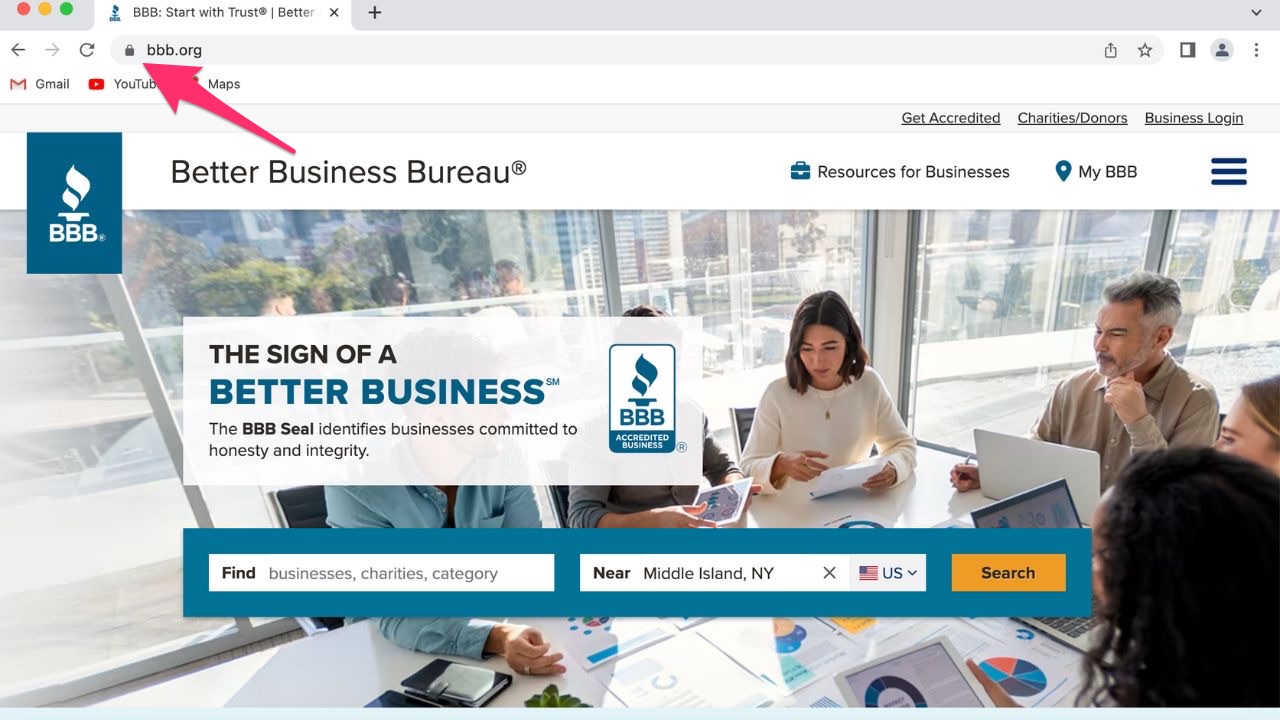
Look for signs that the site uses HTTPS, such as a browser security or settings icon near the address bar. In some browsers, you may still see a lock icon. Just remember that HTTPS only means the connection is encrypted. It does not prove the store is real, honest or safe to buy from.
Also, check the website’s URL carefully. Scam sites often use misspellings, odd domain names or web addresses that look close to a real brand but are slightly off.
2) Research the store
Do a quick online search for the store’s name and look for reviews and complaints from other customers. You should also check the Better Business Bureau website to see if the store has a rating or any complaints. If you see a lot of negative reviews and comments, don’t trust them.
3) Check the contact information
Make sure the store lists a real physical address, phone number and customer service email. Then search that address online to see whether it actually matches the business. If the address points to a random house, empty lot, unrelated business or mailbox service, that’s a red flag. Also, be careful if the site only gives you a generic contact form with no way to reach a real person.
A Texas mom says she spent the night in jail after speaking up online about dirty water in her town. The case was later dropped, but her story raises a troubling question: could something you post online ever put you at risk?

Missed this event? Sign up via the registration form and see our live recording.
See Kurt’s 2026 picks for practical tech and everyday upgrades.
4) Look for customer service
Legitimate online stores will have a customer service email or chat feature. Try contacting the store’s customer service with any questions or concerns before making a purchase. If you cannot get through or you cannot find a way to speak with a human representative rather than a bot, then you should probably move on.
5) Compare prices
If the price seems too good to be true, it probably is. Compare prices with other online stores to ensure you’re getting a fair deal. There are apps you can use for comparing prices, such as Amazon Shopping or Flipp, or you can simply do a Google Search and visit other stores’ websites.
6) Be cautious with payment
Only make payments through secure payment methods, such as credit cards or PayPal. Avoid making payments through wire transfers or prepaid cards, which can be difficult to trace and recover if there’s an issue with your purchase. You should also avoid payments from apps like Venmo or Zelle.
7) Look up the business with trusted scam tools
Websites like the Better Business Bureau are designed to help you figure out the legitimacy of a business. Use them to look up the business you’re questioning.
8) Trust your instincts
If something feels off or the deal seems impossible, pause before you pay. Scammers count on excitement, urgency and the fear of missing out. Taking one extra minute can save you a lot of money and frustration.

What to do if you have already bought from a suspicious online store
If you already placed an order and nothing arrived, act quickly.
First, contact the seller and save every message. Keep screenshots of the product listing, receipt, order confirmation, payment details and any tracking information.
Next, contact your credit card company or payment provider and ask about disputing the charge. If you paid with a debit card, call your bank right away.
You should also watch your accounts closely for unfamiliar charges. If you reused a password on that shopping site, change it immediately anywhere else you used it. A password manager such as NordPass can help you create strong, unique passwords for every account, so one scam site does not put your other logins at risk.
What other resources can I use to protect myself?
Besides the BBB, you can report online shopping scams to the FTC at ReportFraud.ftc.gov. If you believe your identity has been stolen or misused, go to IdentityTheft.gov or call 1-877-438-4338. You can also report online fraud to the FBI’s Internet Crime Complaint Center.
Use identity theft protection
If you want additional layers of protection, handholding, and recovery against identity theft, companies such as my #1 pick, Aura, can help.
Exclusive CyberGuy deal: Save up to 68% today: Get Aura’s award-winning identity theft protection and credit monitoring for as low as $9/month when billed annually.
How to check if your personal information was exposed
If you are unsure whether criminals have already exposed your personal information, take action now. Start with a free identity breach scan to see whether your data appears in known leaks. Early detection gives you more control and helps you respond before fraud spreads.
Have strong antivirus software on all your devices
The best way to protect your data from breaches is to install strong antivirus software on all your devices. This can also alert you to any phishing emails or ransomware scams.
COVERAGE
EXCLUSIVE CYBERGUY DEAL: 58% off (year 1) Please note that the above product is the core antivirus product. Norton may try to upsell additional products, but we don’t recommend them. We encourage you to decline those offers.
Related Links:
- Is that traffic ticket text a scam or real?
- Amazon recall text scam warning
- Missed voicemails with no calls? It could be a scam
Kurt’s key takeaways
Almyra’s story is a good reminder that scam stores often use prices that feel exciting in the moment. A $9.99 laptop or TV may sound like a lucky find, but deals that extreme should set off alarm bells. Before you buy from an unfamiliar site, slow down and check the basics. Search the store name, compare prices, look for real contact information and use a safer payment method. If you have already paid and the item never arrived, contact your payment provider quickly and report the scam. The biggest lesson here is simple: scammers want you to act fast. Your best defense is to pause before you pay.
Have you ever spotted an online deal so cheap it made you wonder if the whole store was fake? Let us know by writing to us in the comments below.
FOR MORE OF MY TECH TIPS & SECURITY ALERTS, SUBSCRIBE TO MY FREE CYBERGUY REPORT NEWSLETTER HERE
Copyright 2026 CyberGuy.com. All rights reserved. CyberGuy.com articles and content may contain affiliate links that earn a commission when purchases are made.
🎙 Now Streaming: My New Podcast: The CyberGuy Report
Kurt’s Top Deals
Deals move fast and inventory can be limited, so don’t wait too long.
| 🔥 Editor’s pick  Summer entertaining Ninja SLUSHi Machine (26% off) Frozen drinks and slushies at home in minutes. | |
| 💰 Top deal  Outdoor essential TYPEC Solar Bug Zapper (36% off) Solar-powered bug zappers for patios and camping. |



2 comments
Thank you for your info – I am 81 years old & you are very helpful. We still work and your info helps me keep our devices working without as much concern
I love your email. Occasionally I have an additional question which I send to your email and I ALWAYS get a prompt and courteous response. You include links to articles that are always so helpful. Thank you for sharing your knowledge.