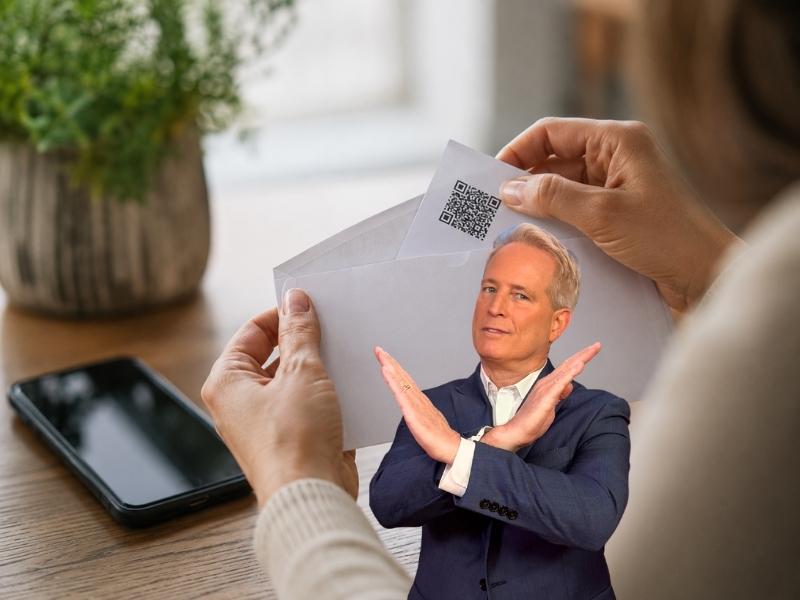
- Empty envelopes and mystery packages can be part of a brushing scam that uses your name and address.
- Scammers may use delivery records to post fake verified reviews and make junk products look trustworthy.
- A QR code inside an unexpected package can lead to phishing sites, malware or fake login pages.
- If you receive one, do not scan codes, check your accounts and report the package through official sites.
A plain white envelope shows up in your mailbox. It is addressed to you. It may even have a tracking number. The sender’s name looks unfamiliar, but the delivery seems real. Then you open it. Nothing is inside. No note. No product. No explanation.
That would make anyone curious. And that is exactly what scammers may be counting on. Investigators and consumer protection groups have warned that empty envelopes and mystery packages can be tied to a scam known as brushing. In a more dangerous version, the package may include a QR code that tries to send you to a fake website or steal your personal information.
The bigger risk is what scammers hope you do next. If they can get you to scan a QR code, click a link, call a fake number or enter personal information, that strange envelope can turn into a much bigger problem.

What is the empty envelope scam?
The empty envelope scam is often connected to brushing. That is when a third-party seller sends a cheap item, or sometimes an empty envelope, to a real person’s address to make it look like a real order was delivered.
Once the package gets marked as delivered, a shady seller may use that delivery record to post a fake “verified buyer” review on an online marketplace. Those reviews can make junk products look more popular than they really are.
Recent reports describe people receiving small white padded envelopes from unfamiliar or possibly fake sender names. Some people get them more than once. Others receive cheap trinkets, packing material or nothing at all.
That may seem like a strange nuisance. But to me, the bigger concern is this: someone may already have your name and home address.
Why scammers send empty envelopes
Scammers do not need to send you anything valuable. They only need a tracking number that shows something arrived at a real home. Here is how the scam often works:
A scammer gets your name and address from a data broker, public record, old breach or online leak. Then they create a fake order using your information. Next, they mail a cheap item or an empty envelope to your home.
After the delivery gets marked as complete, the seller can make it appear that you bought the product. A fake positive review may then appear under your name or account details. That helps bad sellers boost ratings and fool real shoppers. It also shows that your personal information may already be floating around, where scammers can grab it.
The QR code twist makes this scam more dangerous
Some mystery packages now include a QR code. The message may sound harmless. It may say something like “scan to see who sent this gift” or “scan to verify delivery.” Do not scan it.
A QR code is a hidden link. You cannot easily see where it leads before your phone reads it. Scammers know curiosity is powerful, especially when a package arrives with your name on it.
Watch the latest episode of The CyberGuy Report.

Missed this event? Sign up via the registration form and see our live recording.
See Kurt’s latest Amazon picks for useful gadgets, smart home upgrades and everyday tech worth grabbing while the deals last.
That QR code may send you to a fake website that asks for your name, phone number, address, credit card, bank login or shopping account password. It may also try to trick you into entering a one-time verification code.
That is where the real financial risk begins. If you give scammers your login details or banking information, they may be able to take over accounts, make purchases or access payment apps.
What to do if you receive an empty envelope
If an envelope or package arrives and you did not order it, do not panic. Treat it as a warning sign and take a few smart steps.
1) Do not scan any QR code
Even if the card says you need to scan it to identify the sender, skip it. Go directly to the retailer, shipper or official website yourself.
2) Do not call mystery phone numbers
Scammers may include a fake customer service number or website inside the package. If you need to contact Amazon, Walmart, eBay, USPS, UPS or FedEx, type the official website into your browser or use the company’s official app.
3) Check your shopping accounts
Log in directly to your Amazon, Walmart, eBay, TikTok Shop and other shopping accounts. Look for orders you do not recognize, strange reviews, changed addresses or unfamiliar payment methods.
4) Change important passwords
Start with your email, shopping accounts and financial accounts. Use strong, unique passwords and consider using a password manager such as NordPass to create and store them safely. Do not reuse the same password across multiple sites.
5) Turn on two-factor authentication
Two-factor authentication, also called 2FA, adds a second step to your login so a password alone is not enough. Use an authenticator app when possible. It gives you stronger protection than text messages and makes it harder for a scammer to get into your accounts.
6) Watch your bank and credit card statements
Look for small test charges, unfamiliar purchases, new subscriptions or withdrawals you did not make. Report anything suspicious to your bank right away.
7) Check your credit reports
If you think your identity may be at risk, review your credit reports. You can also consider a fraud alert or credit freeze with Equifax, Experian and TransUnion.
8) Report the package
Report suspicious packages to the U.S. Postal Inspection Service at uspis.gov/report. You can also file a scam report with the FBI’s Internet Crime Complaint Center at ic3.gov. If a retailer’s name appears on the label, report it directly through that retailer’s official site.

What if you already scanned the QR code?
Scanning a QR code does not always mean your accounts are compromised. But if you entered information, downloaded an app or typed in a verification code, act quickly.
- Close the browser window and stop using the site.
- Do not enter any more personal or financial information.
- Change the password for any account you entered and use a password manager to create and store a strong, unique replacement.
- Turn on two-factor authentication (2FA).
- Check your bank and credit card accounts for suspicious activity.
- Contact your bank if you entered payment information.
- Run a security scan on your phone or computer with a strong antivirus like Norton Antivirus Pro.
- Delete any app you installed from the QR code.
- Report the incident to the FBI’s Internet Crime Complaint Center at ic3.gov and the FTC at reportfraud.ftc.gov.
- If you entered your Social Security number, banking login or other sensitive information, consider freezing your credit.
Protect your phone from malicious links and QR codes
A good security tool can help block phishing websites, unsafe links and malicious downloads before they cause damage. We recommend Norton Antivirus Plus because it adds protection beyond basic virus scanning. It includes phishing protection, scam protection and web threat blocking for Windows, Mac, Android and iOS.
- Strong real-time protection against viruses, malware, ransomware and hacking attempts
- AI-powered scam protection to help identify suspicious emails, texts and websites
- Built-in password manager to securely store and manage logins
- 2 GB PC cloud backup to help protect important files from ransomware or hardware failure
- Smart firewall and phishing protection
- Protects 1, 3 or 5 devices
- Available for Windows, macOS, Android and iOS
- Includes real-time threat protection, smart firewall and phishing protection to guard against online attacks
Reduce the personal data scammers can use
Brushing scams often start because your name, home address, phone number or other details are already online. Data brokers collect and sell this information. Scammers can use it to make their tricks feel more believable. A data removal service can help reduce your exposure by requesting that your personal information be removed from broker sites. We recommend Incogni to help remove your personal information from data broker sites and reduce the amount of data scammers can use to target you.
Exclusive Deal for CyberGuy Readers (60% off): Incogni offers a 30-day, money-back guarantee and applies a special CyberGuy discount to all annual plans, for as low as $6.39/month for one person (billed annually) or $13.19/month for your family (up to 5 people) on their annual plan.
I strongly recommend the family plan. Here's why: the scam that starts with a Google search of your name almost always ends with a call to you, your elderly parent or a text to your adult child. Protecting yourself without protecting the people around you is half a solution. At $2.64 per person per month, the family plan covers up to five people, and the people most likely to be the final target are often the ones who'd never think to protect themselves.
Get Incogni and remove your info
Related Links:
- Stolen iPhones fuel scary passcode scam
- Text job scam cost him $10K in crypto
- Why scammers are targeting grandparents harder than ever
Kurt’s key takeaways
An empty envelope may look harmless, but it can be a sign that your personal information is already being misused. The most important move is to avoid anything inside the package that tries to pull you into another step. Do not scan QR codes from mystery packages. Do not call unknown numbers printed on cards. Do not enter personal information on a website you reached from a package you never ordered. Scammers are counting on curiosity. Slow down, go directly to official websites and secure your accounts before a strange envelope turns into a much bigger headache.
Have you received an empty envelope or mystery package you never ordered? What happened? Let us know in the comments below.
FOR MORE OF MY TECH TIPS & SECURITY ALERTS, SUBSCRIBE TO MY FREE CYBERGUY REPORT NEWSLETTER HERE
Copyright 2026 CyberGuy.com. All rights reserved. CyberGuy.com articles and content may contain affiliate links that earn a commission when purchases are made.
🎙 Now Streaming: My New Podcast: The CyberGuy Report
Kurt’s Top Deals
Deals move fast and inventory can be limited, so don’t wait too long.
| 🔥 Editor’s pick  Summer entertaining Ninja SLUSHi Machine (26% off) Frozen drinks and slushies at home in minutes. | |
| 💰 Top deal  Outdoor essential TYPEC Solar Bug Zapper (36% off) Solar-powered bug zappers for patios and camping. |