



- Scammers are using fake CAPTCHA pages to trick users into running malicious commands on their own computers.
- The attack uses simple keyboard steps that secretly install data-stealing malware without a download.
- Malware like StealC can collect passwords, browser data and other sensitive information.
- A real CAPTCHA will never ask you to use keyboard shortcuts or run commands on your device.
You’ve seen CAPTCHA checks everywhere. You click a box. You move on. No big deal. Now imagine that same box asking you to press a few keys on your keyboard. It might tell you to open a command window and paste something. It feels a little odd. Still, the page looks real.
That is exactly what scammers are counting on. A new warning from the Identity Theft Resource Center highlights a growing scam that turns a basic security check into a malware trap.

How the fake CAPTCHA scam works
This scam flips a familiar process into something dangerous. Here is what happens:
- You land on a website that looks normal
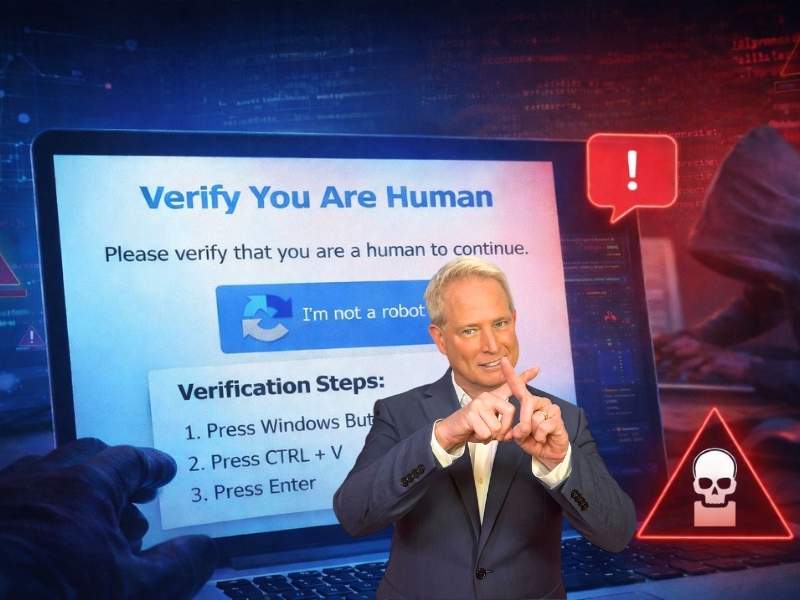
- A CAPTCHA box appears, asking you to verify that you are human
- Instead of clicking images, you get instructions
- The page tells you to press Windows + R
- Then press Ctrl + V and Press Enter
At that point, the damage is already underway. Those steps open a hidden Run window on your PC. A malicious script is already copied to your clipboard. When you paste and execute it, you install malware without realizing it. No download button. No warning screen. You did it yourself.

What gets installed on your computer
Security researchers say this scam often delivers StealC malware. This type of malware works quietly in the background. It looks for anything valuable and sends it to attackers. That can include:
- Saved passwords
- Browser login sessions
- Autofill data
- Cryptocurrency wallet details
Because it runs silently, many people have no idea anything is wrong until accounts start getting accessed.
Why is this trick so effective?
This scam works because it feels familiar. People trust CAPTCHA prompts. They see them on banking sites, shopping pages and login screens. That trust lowers your guard. It also avoids the usual red flags. There is no suspicious download. No pop-up warning. No obvious scam message. Instead, it gives you instructions. Simple steps. Follow them, and you bypass your own security.
A real CAPTCHA will never do this
This is the key takeaway. A legitimate CAPTCHA will never:
- Ask you to open a command window
- Tell you to use keyboard shortcuts like Windows + R
- Instruct you to paste or run commands
If you ever see that, close the page immediately.
What this means to you
This scam shows how fast online threats are evolving. You can do everything right. Avoid bad links. Ignore suspicious emails. Still, a single moment of trust can lead to a full compromise. That is why scams like this are so dangerous. They target behavior, not just technology.
Watch the latest episode of The CyberGuy Report.

Missed this event? Sign up via the registration form and see our live recording.
See Kurt’s latest Amazon picks for useful gadgets, smart home upgrades and everyday tech worth grabbing while the deals last.

Ways to stay safe from fake CAPTCHA scams
Start with awareness. That alone stops most attacks. Here are practical steps that make a real difference:
1) Never follow keyboard instructions from a website
If a page tells you to open Run or paste a command, leave immediately.
2) Close the page instead of interacting
Do not try to “fix” it. Do not click anything else. Just exit.
3) Use strong antivirus software
Security tools like strong antivirus software, such as Norton Antivirus Plus (CyberGuy Deal: Get 58% off here), can catch malware even if it gets installed.
4) Consider using a data removal service
Scammers often pair stolen data with information from data broker sites. A data removal service like Incogni can help reduce your exposure and limit follow-up scams.
Incogni, a service I trust 100% and use myself, helps automate the process by submitting removal requests to hundreds of data brokers and people-search sites on your behalf.
Incogni automatically contacts data brokers on your behalf and requests the removal of your personal information. It also continues monitoring those sites and submits new removal requests if your data reappears.
- Incogni currently removes personal data from 420+ data broker and people-search websites, and its Unlimited plan allows you to request removals from as many additional sites as you need.
- Incogni has also received third-party assurance from Deloitte, validating its marketing claims.
- The goal is simple: make it much harder for strangers, scammers, and cybercriminals to find your personal information online.
CyberGuy readers get 60% off Incogni’s annual plans using the links in this article.
The service also includes a 30-day money-back guarantee, so you can try it risk-free and see how much of your information is exposed online.
Is your personal information exposed online?
Run a free scan to see if your personal info is compromised. Results arrive by email in about an hour.
5) Keep your system updated
Updates patch vulnerabilities that malware often exploits.
6) Change passwords if you think you were exposed
Use a separate device to update your accounts and consider using a password manager such as Nordpass to create and store strong, unique passwords for each account.
7) Watch for unusual activity across your accounts
Look for login alerts, password reset emails or transactions you do not recognize.
What to do if you ran the fake CAPTCHA commands
Act quickly. Time matters here.
- Disconnect your computer from the internet
- Run a full antivirus scan
- Change passwords from another device
- Enable two-factor authentication (2FA) on key accounts
The sooner you respond, the better your chances of limiting damage.
Related Links:
- SSA impersonation scams are getting more personal
- The ‘Unsubscribe’ email scam is targeting Americans
- FBI warns of zoning permit scam emails
Kurt’s key takeaways
Scammers are getting smarter about how they trick people. They are not relying on obvious phishing emails anymore. They are blending into everyday online habits. That simple CAPTCHA box you have clicked hundreds of times now carries risk if it behaves differently. Trust your instincts. If something feels off, it probably is.
If a website asked you to press a few keys to prove you are human, would you hesitate or follow along without thinking? Let me know in the comments below.
FOR MORE OF MY TECH TIPS & SECURITY ALERTS, SUBSCRIBE TO MY FREE CYBERGUY REPORT NEWSLETTER HERE
Copyright 2026 CyberGuy.com. All rights reserved. CyberGuy.com articles and content may contain affiliate links that earn a commission when purchases are made.
🎙 Now Streaming: My New Podcast: The CyberGuy Report
Kurt’s Top Deals
Deals move fast and inventory can be limited, so don’t wait too long.
| 🔥 Editor’s pick  Summer entertaining Ninja SLUSHi Machine (26% off) Frozen drinks and slushies at home in minutes. | |
| 💰 Top deal  Outdoor essential TYPEC Solar Bug Zapper (36% off) Solar-powered bug zappers for patios and camping. |


1 comment
Good info – thank you!