



A new phishing scam is getting a lot of attention because it uses real Apple Support tickets to trick people into giving up their accounts. Broadcom’s Eric Moret shared how he nearly lost his entire Apple account after trusting what looked like official communication. He described the full experience in a detailed post on Medium, where he walked through the scam step by step.
This scheme stands out because the scammers relied on Apple’s own support system to make their messages look legitimate. They created an experience that felt polished and professional from the first alert to the final phone call. Here’s how the scam unfolded.

How the scam starts
Moret first received a flood of alerts. These included two-factor authentication notifications that claimed someone was trying to access his iCloud account. Within minutes, he got phone calls from calm, helpful callers who claimed to be Apple agents ready to fix the issue.
The twist is how convincing the entire setup felt. The scammers were able to exploit a flaw in Apple’s Support system that lets anyone create a genuine support ticket without verification. They opened a real Apple Support case in his name, which triggered official emails from an Apple domain. This built instant trust and lowered Moret’s guard.
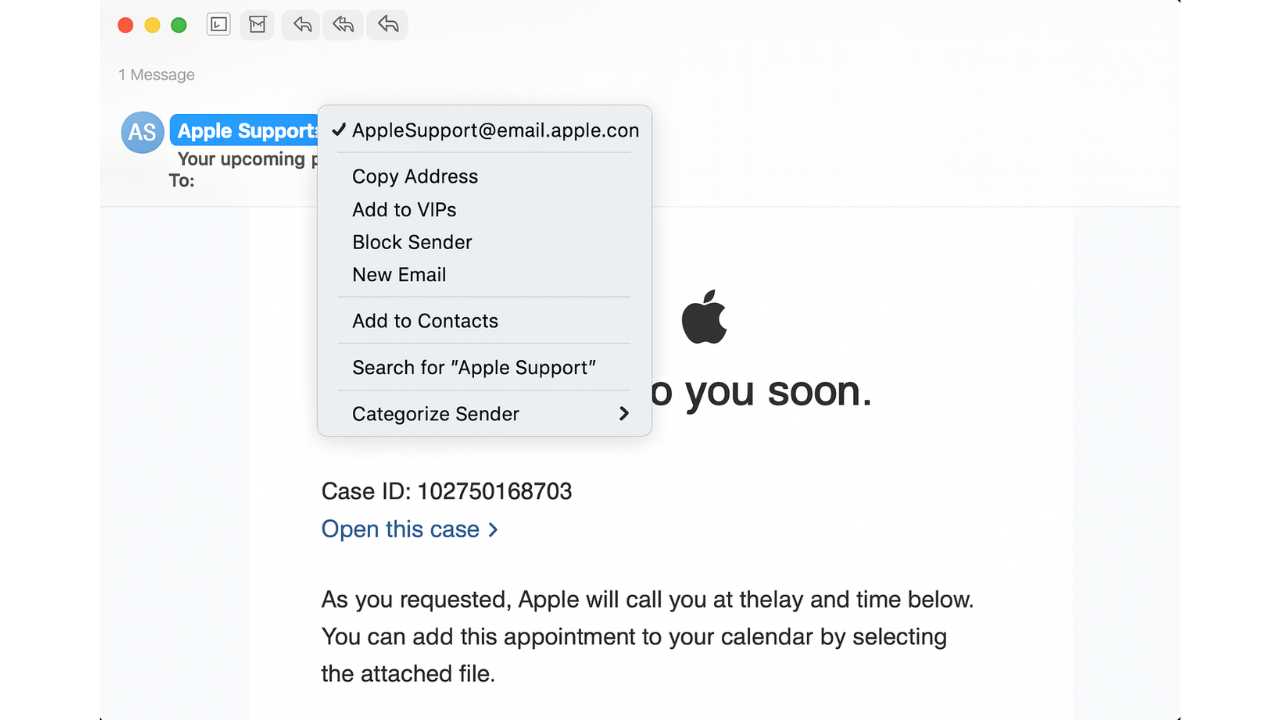
How scammers gained access to the account
During a 25-minute call, the fake agents guided Moret through what they said would secure his account. They walked him through the steps to reset his iCloud password. They also told him a link would follow so he could close the case.
That link took him to a fake site called appeal apple dot com. The page looked official and claimed his account was being secured. It then told him to enter a six-digit code sent by text to finish the process.
When Moret entered that code, the scammers got exactly what they needed to sign into his account.
He then got an alert that his Apple ID had been used to sign into a Mac mini he did not own. That confirmed the takeover attempt. Even though the scammer on the phone said this was normal, he trusted his instinct. He reset his password again, which kicked them out and stopped the attack.

How to protect yourself from the Apple Support ticket scam
This type of scam works because it feels real. The messages look official, and the callers sound trained. Still, you can stay safer by watching out for signs that something is off.
1) Verify support tickets inside your Apple account
Scammers created a real-looking ticket to make the entire experience seem legitimate. You can confirm what’s real by checking directly with Apple. Sign in at appleid.apple.com or open the Apple Support app to view your recent cases. If the case number isn’t listed there, the message is fake, even if the email comes from an Apple domain.
2) Hang up and call Apple yourself
Never stay on a call that you did not initiate. Scammers rely on long conversations to build trust and pressure you into quick decisions. Hang up right away and call Apple Support directly at 1-800-275-2273 or through the Support app. A real agent will quickly confirm whether anything is wrong.
3) Check your Apple ID device list
If something feels off, look at the devices signed into your account. Go to Settings, tap your name and scroll to see all devices linked to your Apple ID. Remove anything you don’t recognize. This step can stop attackers fast if they’ve managed to get in.
4) Never share verification codes
No real support agent will ever ask for your two-factor authentication codes. Treat any request for these codes as a major warning.
5) Check every link carefully
Look closely at URLs. Fake sites often add extra words or change formatting to appear real. Apple will never send you to a site like appeal apple dot com.
6) Use strong antivirus software
Strong antivirus software can spot dangerous links, unsafe sites, and fake support messages before you tap them. Anti-phishing tools are especially important with scams like this one since the attackers used a fake site and real ticket emails to trick victims.
The best way to safeguard yourself from malicious links that install malware, potentially accessing your private information, is to have strong antivirus software installed on all your devices. This protection can also alert you to phishing emails and ransomware scams, keeping your personal information and digital assets safe.
TotalAV is easy to set up and offers real-time protection for paid users, keeping your devices safe around the clock. It includes tools to block phishing scams, remove ransomware and spyware, and clean up adware and junk files. The software also features a browser manager, system tune-up tools, and protects across Windows, Mac, Android, and iOS devices.
GET MY EXCLUSIVE CYBERGUY TOTALAV DEAL:
Please note:
1) If you're having difficulty seeing either of the above deals, do this:
- If you're on a mobile device, hold down the link above, "Copy Link", and then paste it into a private or incognito browser.
- If you're on a laptop or desktop, right click the link, "Copy Link", and then paste it into a private or incognito browser.
2) During registration you may see optional upsells you can decline. Our top pick is the core antivirus product.
3) If you need help after your purchase, you can reach TotalAV directly through their official support page here.
7) Use a data removal service
Data brokers collect your phone number, home address, email, and other details that scammers use to personalize attacks. A data removal service can wipe much of that information from broker sites, which makes you a harder target for social engineering attempts like the one described in this article.
While no service can guarantee the complete removal of your data from the internet, a data removal service is really a smart choice. They aren’t cheap, and neither is your privacy. These services do all the work for you by actively monitoring and systematically erasing your personal information from hundreds of websites. It’s what gives me peace of mind and has proven to be the most effective way to erase your personal data from the internet. By limiting the information available, you reduce the risk of scammers cross-referencing data from breaches with information they might find on the dark web, making it harder for them to target you.
Incogni, a service I trust 100% and use myself, helps automate the process by submitting removal requests to hundreds of data brokers and people-search sites on your behalf.
Incogni automatically contacts data brokers on your behalf and requests the removal of your personal information. It also continues monitoring those sites and submits new removal requests if your data reappears.
- Incogni currently removes personal data from 420+ data broker and people-search websites, and its Unlimited plan allows you to request removals from as many additional sites as you need.
- Incogni has also received third-party assurance from Deloitte, validating its marketing claims.
- The goal is simple: make it much harder for strangers, scammers, and cybercriminals to find your personal information online.
CyberGuy readers get 60% off Incogni’s annual plans using the links in this article.
The service also includes a 30-day money-back guarantee, so you can try it risk-free and see how much of your information is exposed online.
Is your personal information exposed online?
Run a free scan to see if your personal info is compromised. Results arrive by email in about an hour.
8) Turn on strong multi-layer protection
Keep two-factor authentication on for every major account. This creates a barrier that quickly stops attackers.
A Texas mom says she spent the night in jail after speaking up online about dirty water in her town. The case was later dropped, but her story raises a troubling question: could something you post online ever put you at risk?

Missed this event? Sign up via the registration form and see our live recording.
See Kurt’s 2026 picks for practical tech and everyday upgrades.
9) Slow down before reacting
Scammers want you to panic. Pause before you act. Trust your instinct when something feels rushed or strange. A short delay could save your entire account.
Related Links:
- Cloud Storage Full scam steals your photos and money
- Protect your data before holiday shopping scams strike
- Geek Squad scam email: How to spot and stop it
Kurt’s key takeaways
This scam shows how convincing criminals can be when they exploit real systems. Even careful users can fall for messages that look official and calls that sound professional. The best defense is to stay alert and take a moment before responding to anything unexpected. When you slow down, double-check support tickets, and never share verification codes, you make yourself far harder to fool. Adding layers like antivirus protection and data removal services also gives you more control over what attackers can access. These simple habits can stop even the most polished scams before they get to your accounts.
What would you do if you got a support call that felt real but didn’t seem right? Let us know in the comments below.
FOR MORE OF MY TECH TIPS & SECURITY ALERTS, SUBSCRIBE TO MY FREE CYBERGUY REPORT NEWSLETTER HERE
Copyright 2025 CyberGuy.com. All rights reserved. CyberGuy.com articles and content may contain affiliate links that earn a commission when purchases are made.
🎙 Now Streaming: My New Podcast: The CyberGuy Report
Kurt’s Top Deals
Deals move fast and inventory can be limited, so don’t wait too long.
| 🔥 Editor’s pick  Summer entertaining Ninja SLUSHi Machine (26% off) Frozen drinks and slushies at home in minutes. | |
| 💰 Top deal  Outdoor essential TYPEC Solar Bug Zapper (36% off) Solar-powered bug zappers for patios and camping. |


