Many of us use Spotify every day, whether to listen to songs, podcasts, or audiobooks. Some of us create playlists of our favorite songs, while others save playlists made by others. In case you didn’t know, Spotify allows you to create public playlists that anyone can save and listen to. You’d think this is a harmless feature, but spammers have found a way to misuse it. They’re using Spotify playlists and podcasts to push pirated software, game cheat codes, spam links, and malware sites. I’ll discuss the details of this emerging online scam and share tips on how to stay safe.

How the Spotify scam works
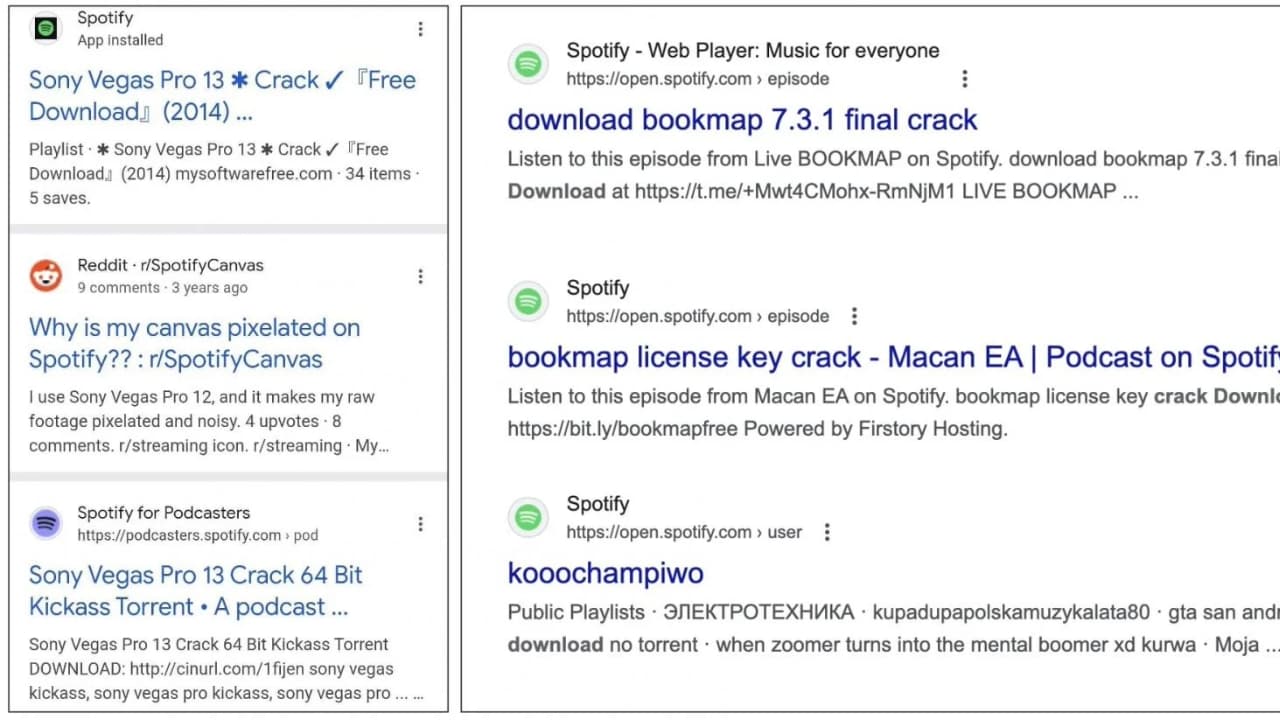
As reported by BleepingComputer, this scam works by misusing Spotify’s popularity and trustworthiness. Scammers exploit Spotify playlists by injecting targeted keywords, such as “free download,” “crack,” or “warez,” into titles and descriptions.
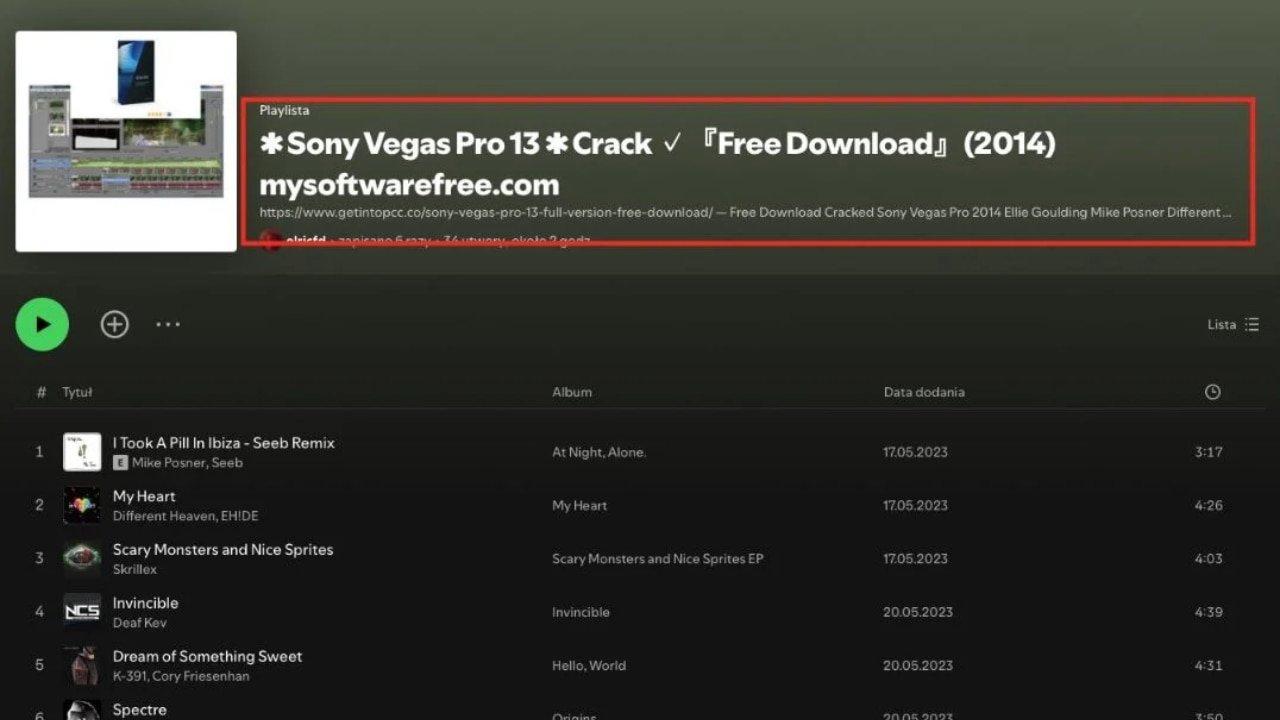
These keywords are designed to align with popular search terms. Since Spotify’s web player pages are indexed by search engines like Google, these spammy results appear in user searches, driving traffic to their links. For example, a Spotify playlist titled Sony Vegas Pro 13 Crack… was found promoting “free” software sites in its title and description, directing users to questionable external links.
The scam isn’t limited to playlists. It extends to podcasts as well. Scammers create podcasts with multiple short episodes, typically under 20 seconds, using synthesized speech to direct listeners to click links in the description for free content. These podcasts often target users searching for pirated ebooks, audiobooks, or game cheats. While the content may appear legitimate at first glance, clicking on the links often results in being redirected to unsafe pages that further exploit users.
BleepingComputer
The end goal
The main goal of this scam is to use Spotify’s trusted reputation and search engine visibility to get people to click on shady links and visit sketchy websites. Scammers make money through fake ad clicks, bogus surveys, and affiliate links, while also spreading malware by tricking users into downloading harmful software or extensions.
They also try to steal personal info through fake signup forms or phishing pages, which can lead to identity theft or be sold to others. By using Spotify’s indexed pages, they boost the search rankings of their spam sites, reaching more people. Some of these sites even run extra scams like fake crypto giveaways or phishing attempts to grab even more money or data from unsuspecting users.
BleepingComputer
Top ways to stay safe from Spotify scams
1) Avoid clicking on suspicious links, use strong antivirus software: Be cautious when you come across playlists or podcasts with titles like “Sony Vegas Pro 13 Crack” or other promises of free software, audiobooks, or game cheats. These often include links in the description that redirect to unsafe sites hosting malware, adware, or phishing pages.
The best way to safeguard yourself from malicious links that install malware, potentially accessing your private information, is to have antivirus software installed on all your devices. This protection can also alert you to phishing emails and ransomware scams, keeping your personal information and digital assets safe.
TotalAV is easy to set up and offers real-time protection for paid users, keeping your devices safe around the clock. It includes tools to block phishing scams, remove ransomware and spyware, and clean up adware and junk files. The software also features a browser manager, system tune-up tools, and protects across Windows, Mac, Android, and iOS devices.
GET MY EXCLUSIVE CYBERGUY TOTALAV DEAL:
Please note:
1) If you're having difficulty seeing either of the above deals, do this:
- If you're on a mobile device, hold down the link above, "Copy Link", and then paste it into a private or incognito browser.
- If you're on a laptop or desktop, right click the link, "Copy Link", and then paste it into a private or incognito browser.
2) During registration you may see optional upsells you can decline. Our top pick is the core antivirus product.
3) If you need help after your purchase, you can reach TotalAV directly through their official support page here.
2) Stick to official sources: Always download software, eBooks, or other digital content from trusted official websites or reputable platforms. If you see a Spotify playlist or podcast offering “free” versions of paid content, it’s likely a scam. Cross-check the legitimacy of the content through known channels instead of relying on unverified links.
3) Use strong, unique passwords: Create complex and unique passwords for your Spotify account and avoid using personal information like birthdays or pet names. Consider using a password manager to generate and store complex passwords.
4) Be skeptical of synthesized speech and short episodes: Many scam podcasts feature short episodes (10-20 seconds) with synthesized speech directing you to click on a link in the description. These are a common tactic used to trick users into visiting unsafe pages. If the content feels automated, vague, or overly promotional, it’s best to avoid it.
Is it happening to me?
1) Verify curator credentials: Check the credentials of playlist curators. Legitimate curators usually have a verifiable online presence. If you can’t find any information about them, it’s best to avoid engaging with them.
2) Recognize phishing attempts: Be cautious of emails claiming to be from Spotify that ask you to confirm account details or click on suspicious links. These are often phishing attempts designed to steal your credentials.
3) Report and block suspicious content: If you come across playlists or podcasts that seem fraudulent or inappropriate, report them directly to Spotify. Use Spotify’s reporting tools to flag content that violates its platform rules. Blocking suspicious accounts or playlists also ensures you won’t accidentally interact with them in the future, and reporting helps Spotify improve its filtering and moderation systems.
Related Links:
- 4.3 million americans exposed in massive health savings account data breach
- How to remove your private data from the internet
- Massive security flaw puts most popular browsers at risk on mac
Kurt’s key takeaway
Scammers will use any means possible to trick you. In the past, we’ve seen bad actors weaponize Google search results with malicious websites that install malware when links are clicked on. There have also been plenty of SEO scams targeting users. Companies like Spotify need to implement measures to prevent their platforms from being misused by scammers. Google also has a responsibility to ensure the quality of its search results. Just because a webpage comes from a well-known organization doesn’t mean it deserves to rank highly on the search results pages.
Do you think platforms like Spotify and Google are doing enough to prevent scams, or could they improve? Let us know in the comments below.
FOR MORE OF MY SECURITY ALERTS, SUBSCRIBE TO MY FREE CYBERGUY REPORT NEWSLETTER HERE
Copyright 2025 CyberGuy.com. All rights reserved. CyberGuy.com articles and content may contain affiliate links that earn a commission when purchases are made.
🎙 Now Streaming: My New Podcast: The CyberGuy Report
Kurt’s Top Deals
Deals move fast and inventory can be limited, so don’t wait too long.
| 🔥 Editor’s pick  Summer entertaining Ninja SLUSHi Machine (26% off) Frozen drinks and slushies at home in minutes. | |
| 💰 Top deal  Outdoor essential TYPEC Solar Bug Zapper (36% off) Solar-powered bug zappers for patios and camping. |