Google captures everything it can about you.
Now that people are more aware of how much of their lives are being scalped for profits that you and I will never see and at a cost that we may one day regret, we can do one thing to delete our search history. Google is the masterful example of leveraging our most private and personal details in life and selling them on the open market.
Let’s be honest, of all tech companies Google owns you more than anyone else.

It creeps me out when I’m reminded that the trade-off for free searches on the internet from Google and the array of Google products that dominate the digital landscape come with a price that makes me feel like strangers are watching our every move.
You have every reason to have the same privacy concerns since Google is amongst the biggest culprits in the world of scraping every last personal detail from your existence into a product ready for advertisers to buy. It’s how they operate and how we have blindly been taken down a path of the most meaningful option to searching for things on the internet.
Dare I mention the R word? Regulation seems inevitable for Google at some point since they have made it impossible for anyone else to compete with the tech giant. For now, allow me to help you regain a little of your privacy and dignity.
And not that anyone made them do it, Google currently offers a way to delete what YOU see from your past searches. Does it mean that Google will no longer own and control that part of your life? Probably not.
Google owns you, period.
And they care about as much about you as the amount of money you mean to their stockholders’ bottom line.
Here’s the quick and easy way to delete your Google search history.
How to Delete everything you’ve ever searched on Google
1) Log in to your Google account.
2) Locate and click your initials (or image if you uploaded one) inside the circle in upper corner. Then click “Manage your Google Account” or “Google Account” (on mobile) in the menu underneath. Or you can directly get to the My Google Activity page by clicking this link.
3) Scroll down the page and select “Manage your data & privacy”.
4) In the “Things you’ve done and places you’ve been” section, click the “My Activity” button
5) Review everything you’ve searched for and visited.
Google will list out all your searches chronologically. There are several ways you can review and delete information:
A Texas mom says she spent the night in jail after speaking up online about dirty water in her town. The case was later dropped, but her story raises a troubling question: could something you post online ever put you at risk?

Join Kurt this Saturday, June 13 at 10 AM ET for quick phone privacy and security fixes.
See Kurt’s 2026 picks for practical tech and everyday upgrades.
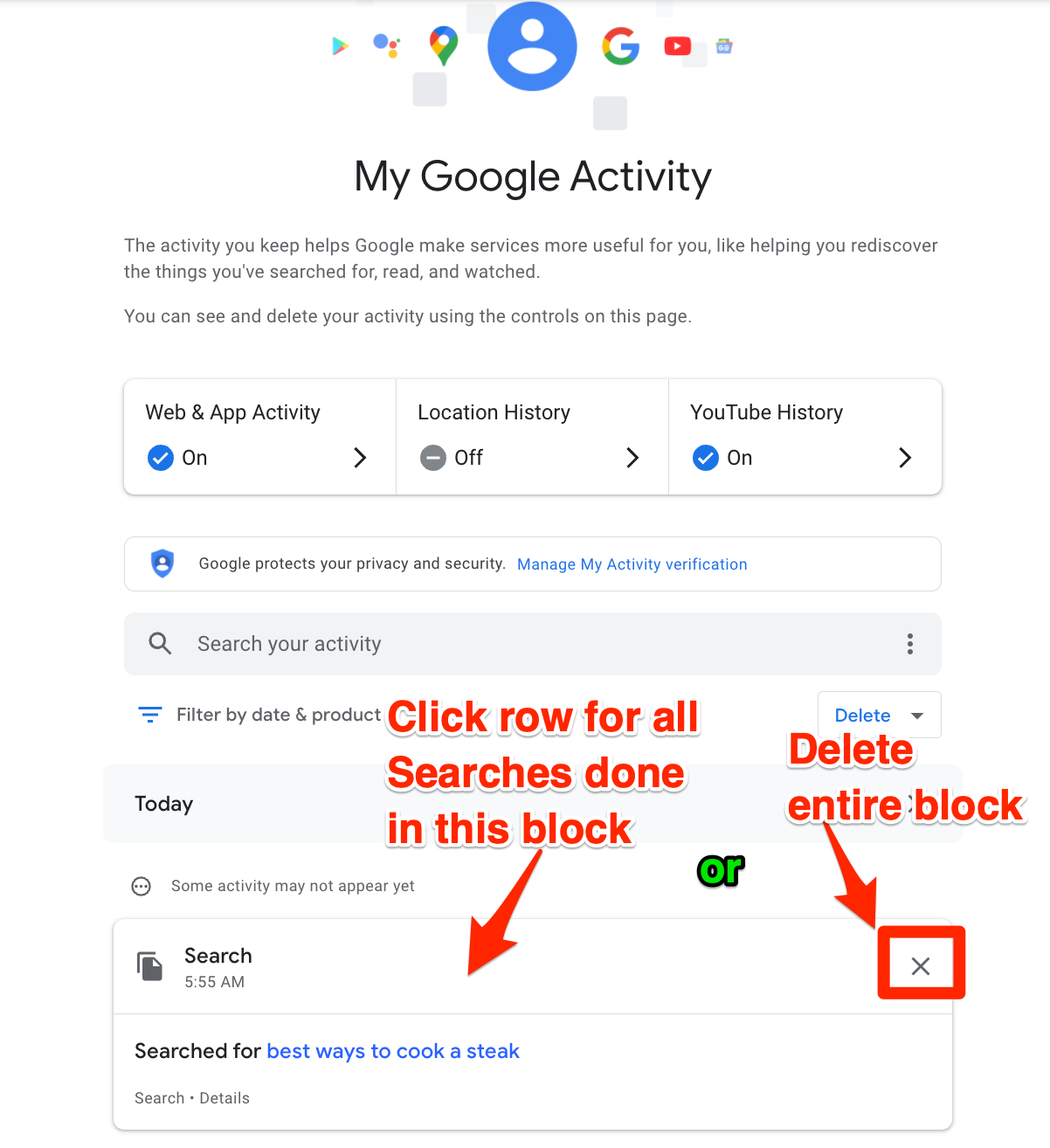
Review “Blocks” of your searches
a) You’ll notice there are many “blocks” of searches on the page. These blocks are usually associated with when you opened your browser to do a variety of searches. You can either delete these entire blocks by clicking the “x” at the end of the first row of each block, or you can click that first row of each block to see all the individual searches.
b) If you click that first row, in the pop-up box, you will see all the individual searches you’ve done. You can manually delete each one by clicking the 3 vertical dot menu and then clicking “Delete” in the menu.
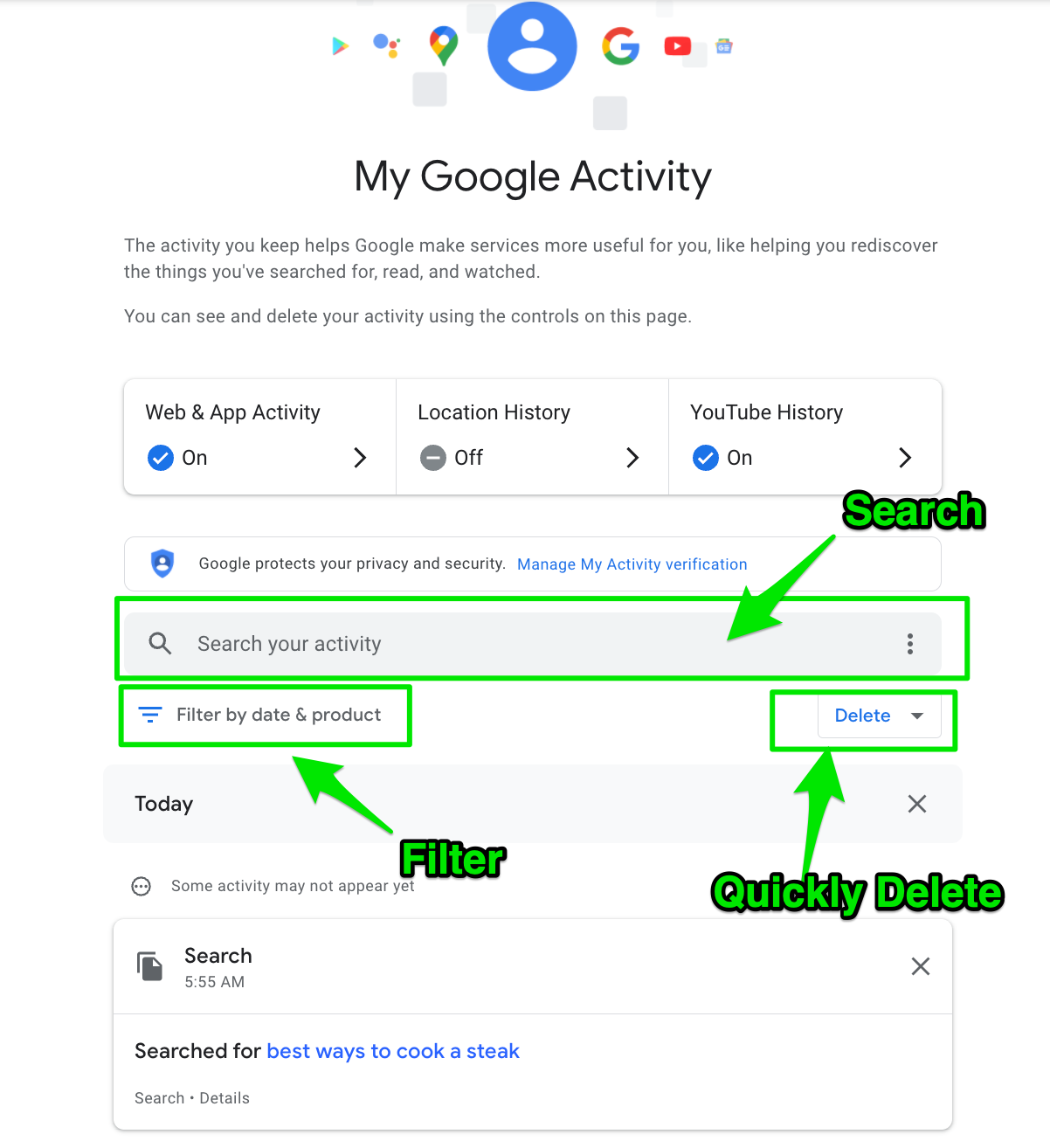
Review your searches by using Filters
Try any of these 3 options
- Go to the top of the list and search for specific activity to locate and then delete
- Filter by date, or search within a specific google product
- or use the pull down to the right of the “filter” area to quickly delete activity from the last hour, last day, all time, or a custom range.
How to prevent Google from saving your search history from now on
Instead of manually deleting the searches mentioned above, you can also have Google stop saving your searches and auto-deleting any previous history.
1) On the Google Activity page, click the web and activity button.
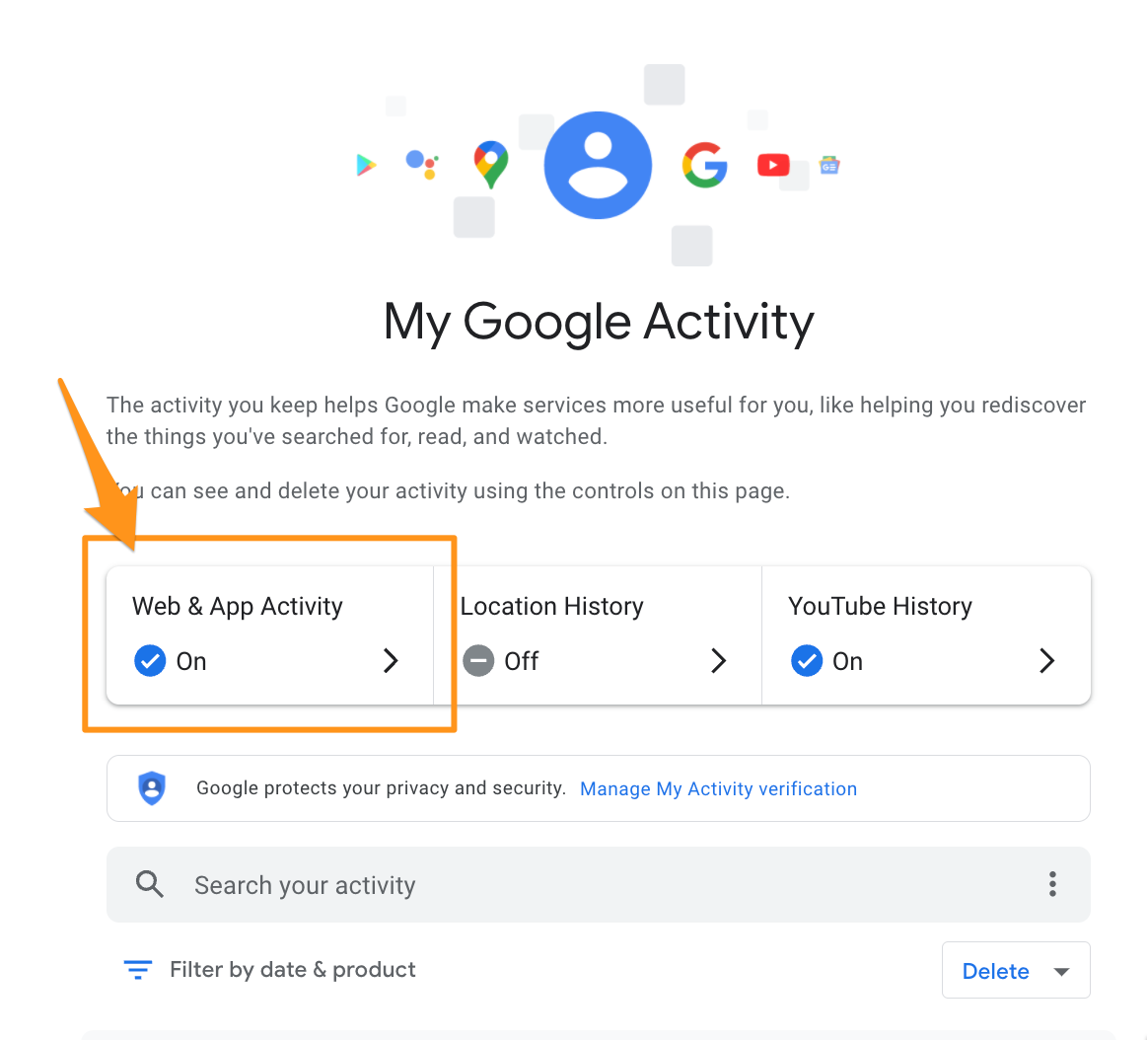
2) On the next page, you can turn off “web and app activity” by clicking the “turn off” button
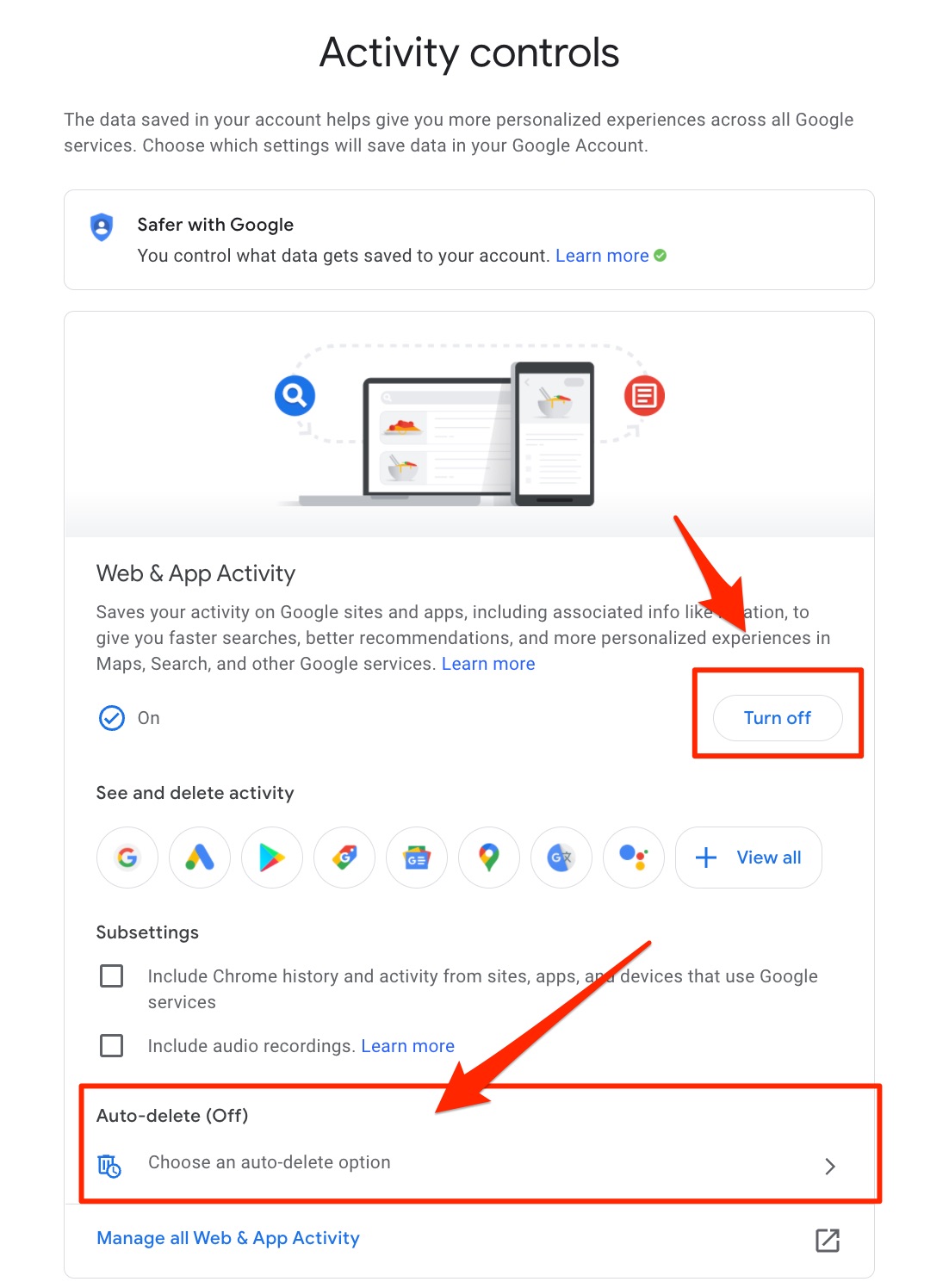
3) Instead of repeatedly deleting searches, you can also set up an auto-delete option so that Google deletes your searches every 3, 18, or 36 months.
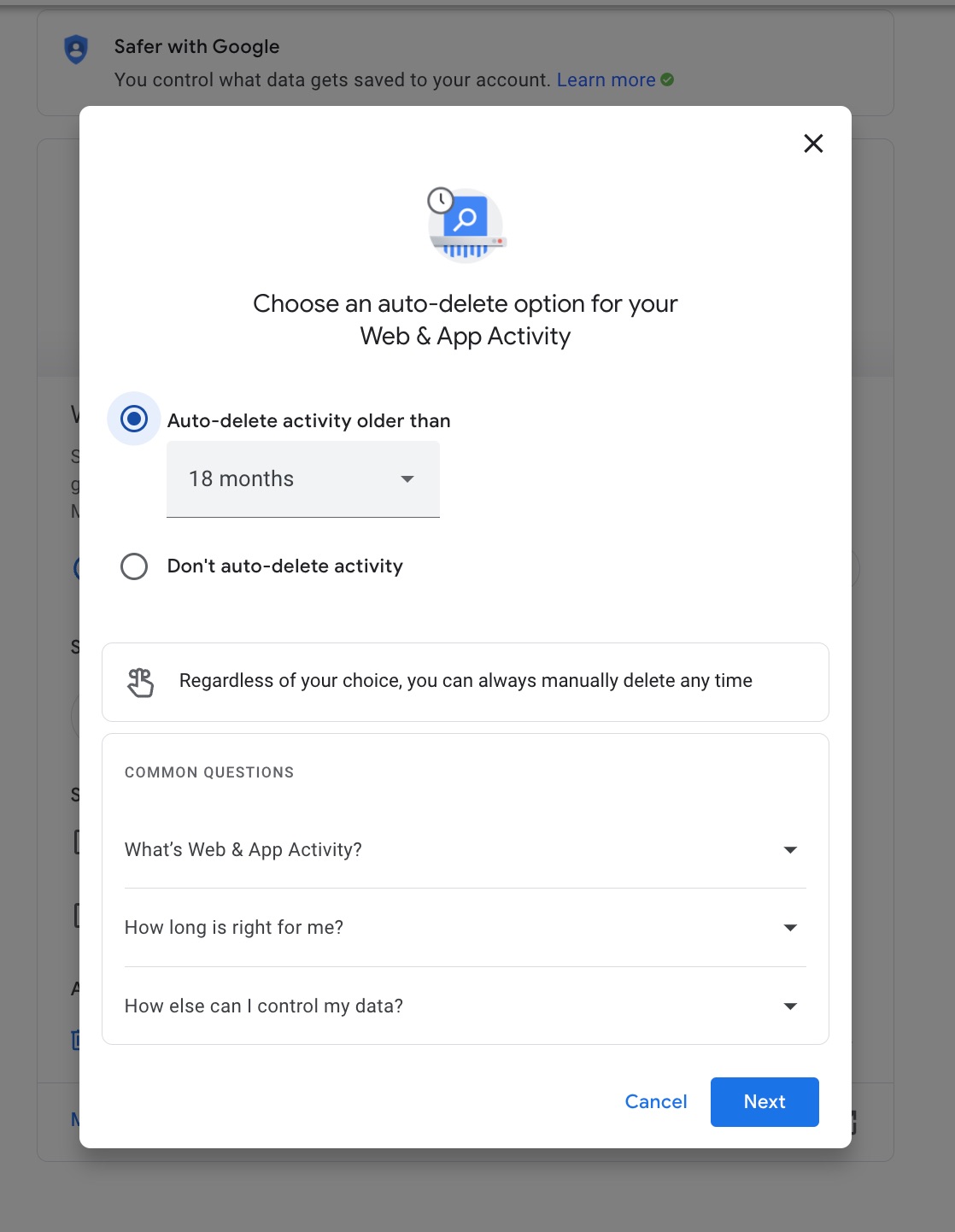
Be very careful to examine everything you will be deleting. Once it’s done. It is done.
For me, I couldn’t hit Delete fast enough.
Get your personal data removed from public sites
Even if you delete your Google search history, that doesn’t stop your personal information from circulating all over the internet. Countless data broker sites collect and sell your name, home address, phone number, email, and even information about your family and finances to advertisers, marketers, and anyone willing to pay.
Manually removing yourself from these sites is time-consuming and nearly impossible to keep up with because your information keeps getting republished. That’s where a service like Incogni comes in. It’s an automated personal data removal service that contacts these data brokers on your behalf and requests deletion of your information under privacy laws like GDPR and CCPA.
Here’s how to use Incogni:
- Go to Incogni’s website and sign up.
- You’ll authorize them to work on your behalf to send removal requests to data brokers.
- Once set up, Incogni will continually monitor and repeat removal requests to keep your data off these sites.
- It’s a simple way to reclaim more privacy without the endless task of reaching out to dozens or hundreds of companies yourself.
Incogni, a service I trust 100% and use myself, helps automate the process by submitting removal requests to hundreds of data brokers and people-search sites on your behalf.
Incogni automatically contacts data brokers on your behalf and requests the removal of your personal information. It also continues monitoring those sites and submits new removal requests if your data reappears.
- Incogni currently removes personal data from 420+ data broker and people-search websites, and its Unlimited plan allows you to request removals from as many additional sites as you need.
- Incogni has also received third-party assurance from Deloitte, validating its marketing claims.
- The goal is simple: make it much harder for strangers, scammers, and cybercriminals to find your personal information online.
CyberGuy readers get 60% off Incogni’s annual plans using the links in this article.
The service also includes a 30-day money-back guarantee, so you can try it risk-free and see how much of your information is exposed online.
Is your personal information exposed online?
Run a free scan to see if your personal info is compromised. Results arrive by email in about an hour.
MORE:
Ask Kurt: How to navigate Google’s privacy settings
Copyright 2025 CyberGuy.com. All rights reserved. CyberGuy.com articles and content may contain affiliate links that earn a commission when purchases are made.
🎙 Now Streaming: My New Podcast: The CyberGuy Report
Kurt’s Top Deals
Deals move fast and inventory can be limited, so don’t wait too long.
| 🔥 Editor’s pick  Summer entertaining Ninja SLUSHi Machine (26% off) Frozen drinks and slushies at home in minutes. | |
| 💰 Top deal  Outdoor essential TYPEC Solar Bug Zapper (36% off) Solar-powered bug zappers for patios and camping. |