



Imagine strolling through the bustling streets of Tokyo, ordering a delicious bowl of ramen, or navigating the charming alleyways of Rome, all while effortlessly communicating with locals in their native tongue. With the release of watchOS 26, your Apple Watch has evolved beyond the standalone Translate app; now, translation is built right into your daily communication. From Messages to FaceTime, your watch and iPhone work together to bridge language barriers in real time.
Say goodbye to language barriers
Gone are the days of fumbling with translation books or frantically typing into your smartphone. With Apple’s new Live Translation features in watchOS 26, you can have live, two-way conversations in up to 20 languages using the Translate app, or see instant translations appear right inside Messages, Phone, and FaceTime. It’s like having a personal interpreter always at your service.
Ensure your Apple Watch is running WatchOS 26 or higher
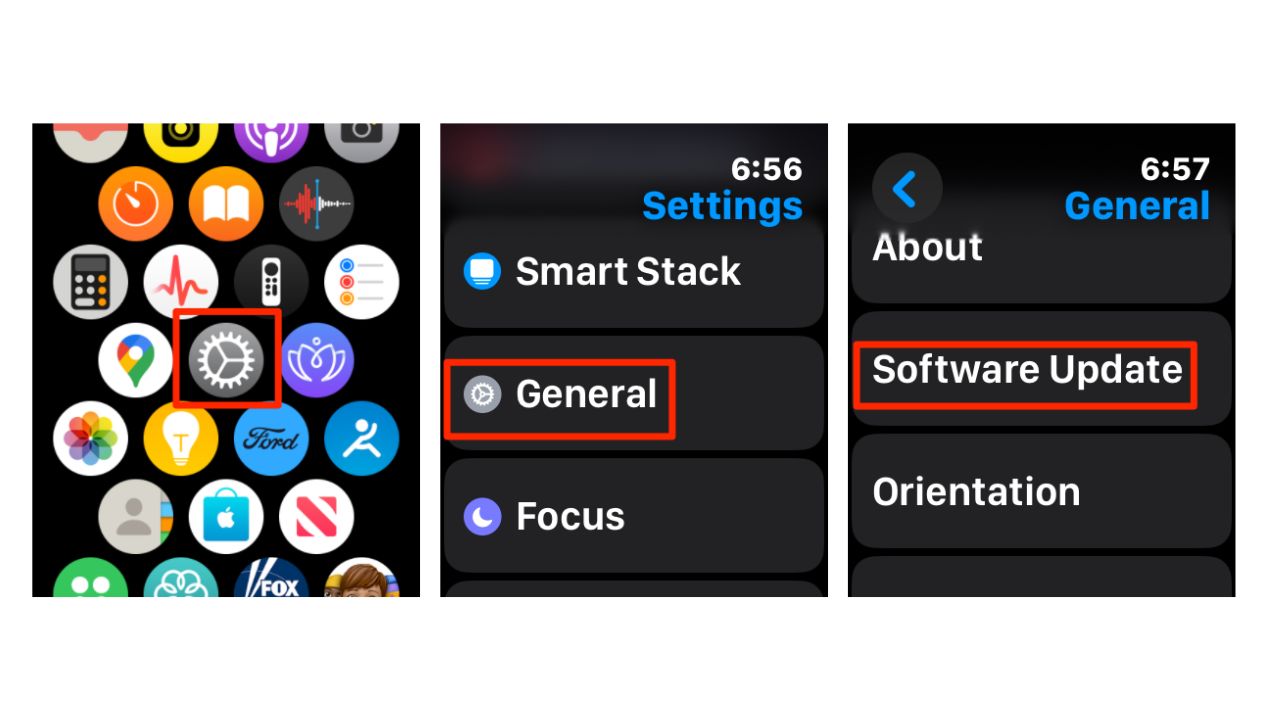
Getting started with this feature is a breeze, but first, ensure your Apple Watch is running WatchOS 26 or higher. To do this:
- Go to Settings
- Tap General
- Then tap Software Update to check for and install any available updates.
Note: Live Translation in Messages, Phone, and FaceTime requires an Apple Watch Series 9, Series 10, Series 11, or Ultra 2/3, paired with an iPhone 15 Pro, iPhone 16, or later that supports Apple Intelligence.
New: Live Translation in Messages, Phone, and FaceTime
watchOS 26 and iOS 26 introduce system-wide Live Translation. You can now see translated text directly in Messages or hear real-time speech translations during phone or FaceTime calls.
- In Messages: Incoming messages can appear in your preferred language, and your replies are automatically translated for the recipient.
- In Phone and FaceTime: Conversations can display live captions with translations on both your iPhone and Apple Watch.
- These features rely on Apple Intelligence on-device AI for privacy-focused, real-time processing.
This deeper integration makes communicating across languages smoother than ever, no extra app required.
Setting up Apple Watch’s Translate app
The original Translate app remains a powerful option for quick wrist-based translations.
Watch the latest episode of The CyberGuy Report.

Missed this event? Sign up via the registration form and see our live recording.
See Kurt’s latest Amazon picks for useful gadgets, smart home upgrades and everyday tech worth grabbing while the deals last.
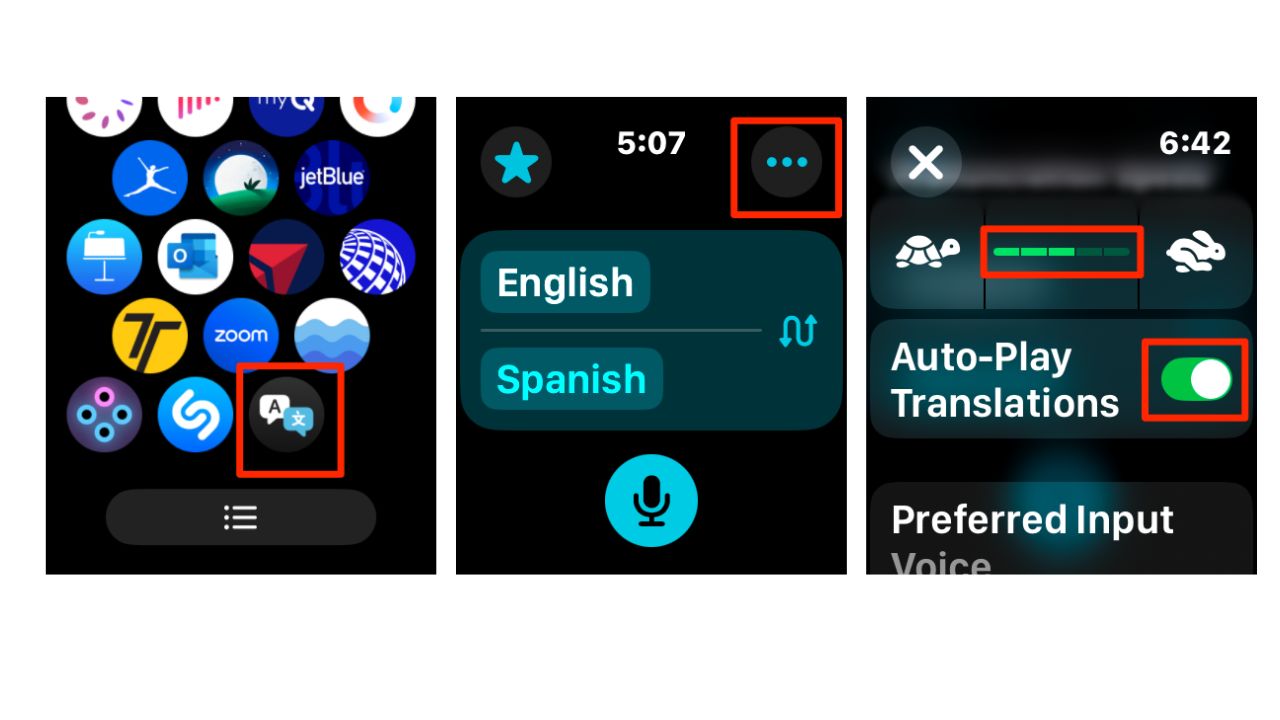
- Open the Translate app from your Apple Watch’s Home Screen.
- Tap the ellipsis icon.
- Next, adjust the playback speed and enable Auto-Play Translations, which will automatically play the translated phrases out loud, ensuring that both you and the person you’re communicating with can hear and understand the translations without needing to look at the screen.
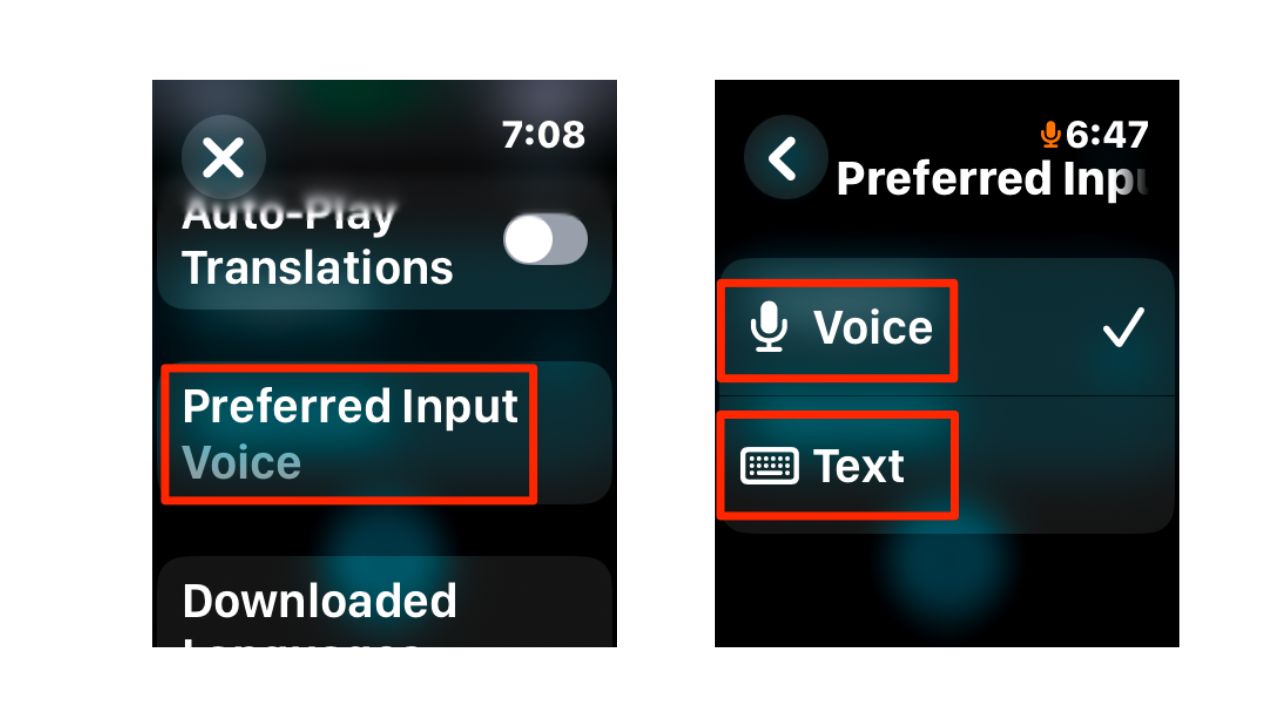
- Scroll down and tap Preferred Input.
- Then tap Voice or Text, whichever you prefer.
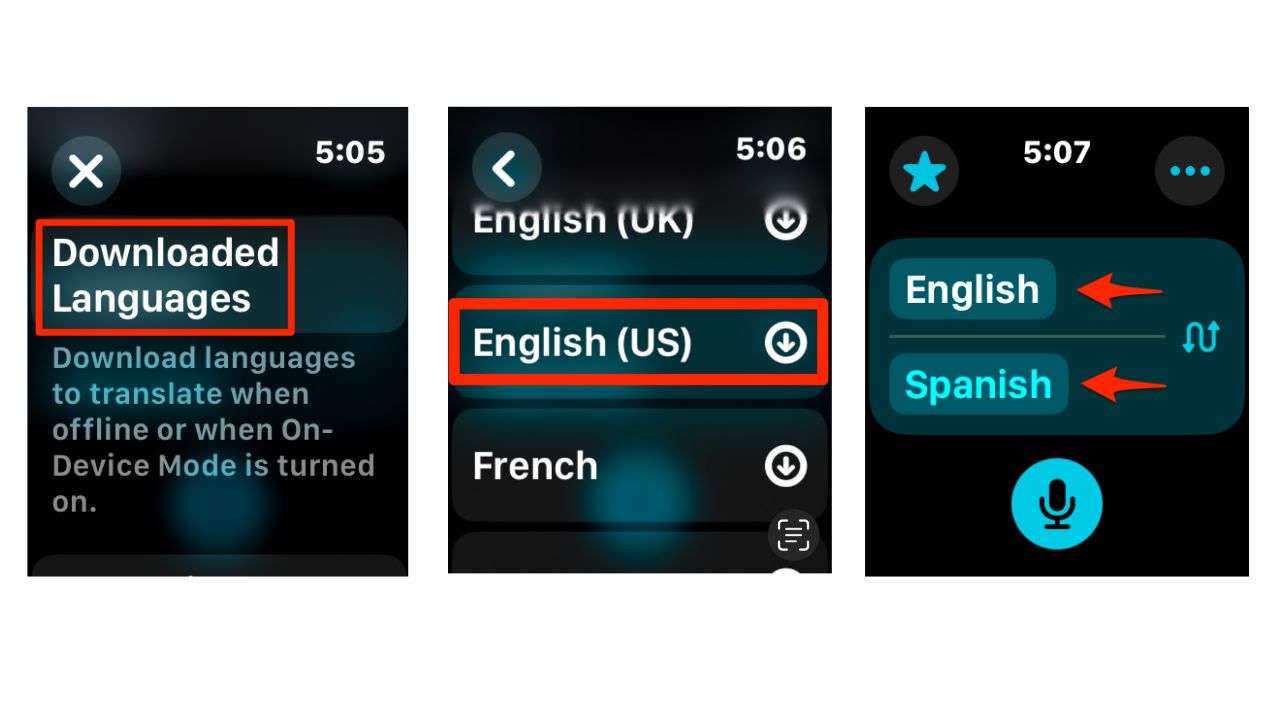
- Now, scroll down and tap on Downloaded Languages.
- Select and download your preferred languages for offline use.
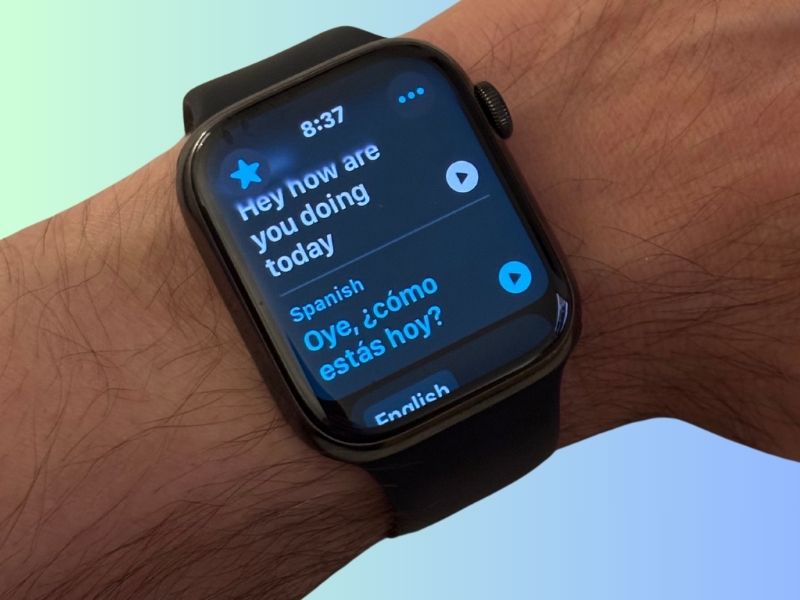
- Set your input and output languages for conversation. As you can see below, we selected English as our input language and Spanish as our output language.
How to use real-time translation on your Apple Watch
- Open the Translate app on your Apple Watch.
- Tap on the microphone icon and speak or type your phrase into the app.
- Your Apple Watch will automatically translate the phrase into the selected output language.
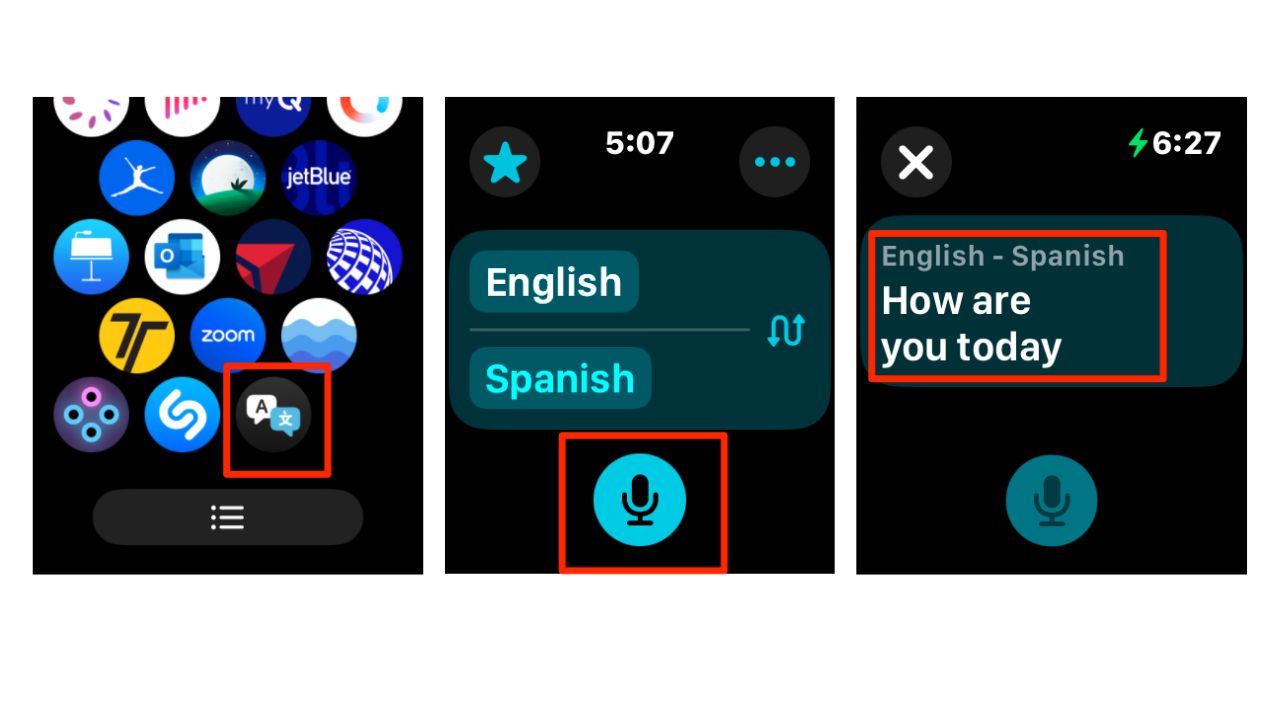
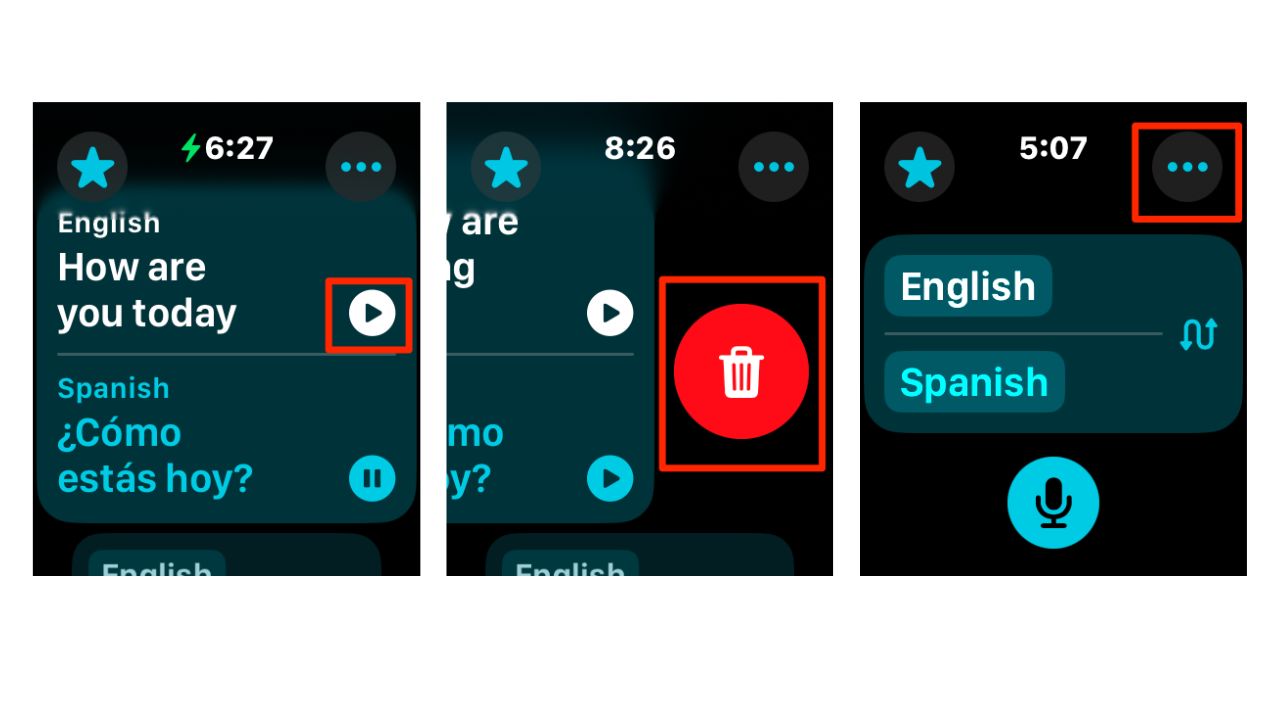
- Now, you can listen to the translation or read it on the screen. You can also hit play to replay the audio translation.
- To delete the translation, swipe left, then tap trash to delete it.
- Adjust settings if needed using the ellipsis icon for playback speed and Auto-Play Translations.
Tip: For offline use, download languages in advance before you travel. The Translate app currently supports around 20 languages, while Live Translation in Messages and Calls supports English, French, German, Brazilian Portuguese, and Spanish at launch, with more languages coming later in 2025.
Tips for smooth conversations
To get the most out of your new linguistic superpower, remember to:
- Always double-check the input language before speaking.
- Adjust the volume for clear audio in noisy environments.
- Experiment with translation speed to find your sweet spot.
Apple Watch Series 11

Credit: Apple
The Apple Watch Series 11 continues Apple’s push into health technology. It runs on watchOS 26 and introduces monitoring for possible hypertension and sleep apnea, with alerts designed to prompt users to seek medical care. Apple noted that FDA clearance is still pending for hypertension notifications, but the company clearly sees the watch as a serious medical tool.
The watch also includes Sleep Score, which breaks down sleep stages such as core, deep, and awake to give users a clearer picture of rest quality. Battery life reaches up to 24 hours, and the watch remains efficient even with 5G connectivity.
Apple built the Series 11 with 100% recycled aluminum and titanium cases, expanding its sustainability pledge. Color options bring a refreshed look, while pricing starts around $399, depending on configuration.
Apple Watch Ultra 3

Credit: Apple
At the top end, Apple introduced the Apple Watch Ultra 3. This model pushes the limits of durability and outdoor performance. The Ultra 3 features the largest and brightest display ever put on an Apple Watch, making it easier to read data during workouts or in direct sunlight.
It includes a redesigned radio and antenna system capable of connecting with satellites orbiting 800 miles above Earth. That means users can send messages or use Find My features even without cell service, making it a true companion for extreme adventures.
The Ultra 3 packs a larger battery that runs up to 42 hours on a single charge. With Low Power Mode enabled, Apple says the battery can extend to as much as 72 hours, making it the longest-lasting Apple Watch to date. It also introduces new Workout Buddy tools for training and enhanced hypertension notifications, further pushing Apple’s reputation in health tech. Available in black or natural titanium, the Ultra 3 blends rugged design with cutting-edge features.
Apple Watch Series 10

The Apple Watch Series 10 introduces several exciting features and enhancements, making it the most advanced model to date. It boasts the largest screen area of any Apple Watch, with up to 75% more display space than Series 3 and 30% more than Series 4-6 and SE, complemented by a wide-angle OLED display that is 40% brighter, especially from an angle. This model is also the thinnest Apple Watch ever, thanks to re-engineered components.
New features include a water temperature sensor for improved swim workout tracking, a depth sensor for swimming and snorkeling, and a Tides app that provides conditions for over 115,000 beaches and 5,000 surf spots. Powered by the S10 SiP (System in Package), the watch delivers enhanced performance and includes on-device Siri access to health data, along with a Precision Finding feature for locating your iPhone. New finishes include a striking Jet Black aluminum option and three polished titanium finishes that are 20% lighter than stainless steel. The Series 10 also introduces a training load feature to monitor workout intensity over time and remains compatible with Apple Fitness+ for on-screen metrics during workouts, making it a comprehensive tool for health and fitness enthusiasts.
Apple Watch Ultra 2
Credit: Apple
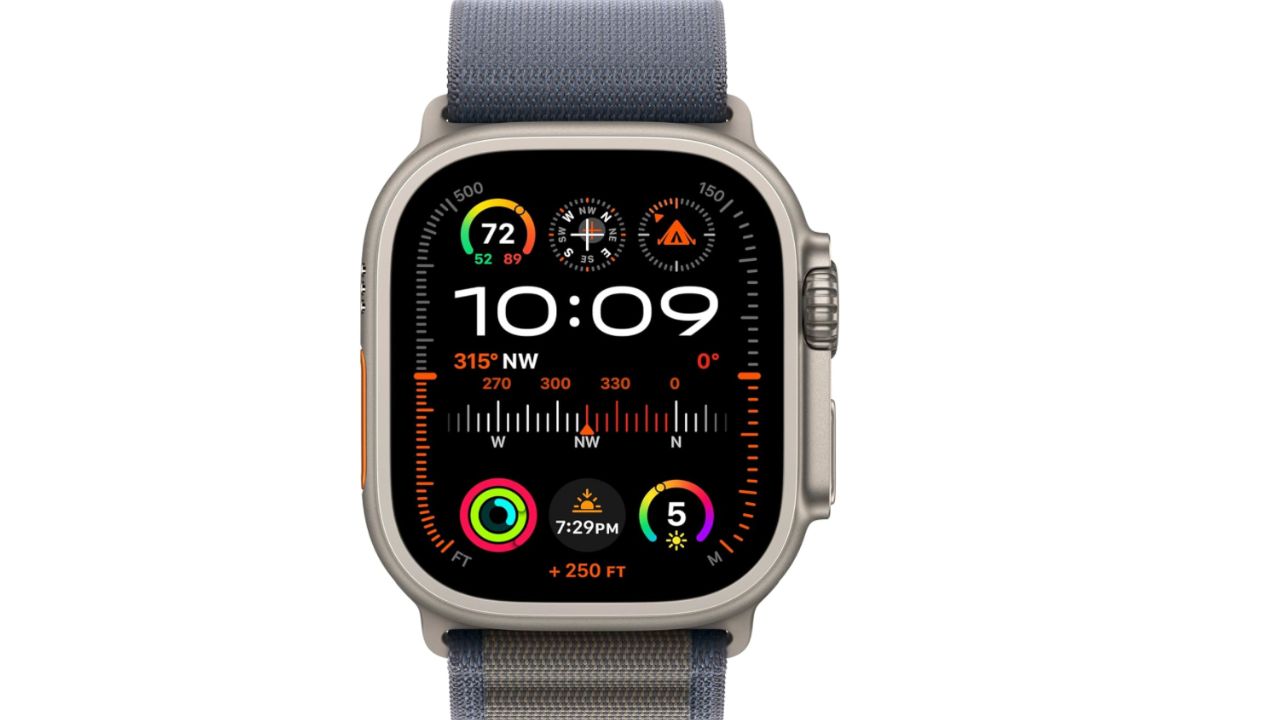
If you really want to get fancy this holiday season, you can get the Apple Watch Ultra 2 for your loved one. This one is carbon neutral and can meet the demands of the most athletic people with its workout settings. It has the biggest and brightest display of any other Apple Watch model and you can even call and text on it without having your phone on you. At the time of publishing, this product had over 100 global reviews, with 81% giving it 5 stars.
Related Links:
- Talk across languages with iOS 26 Live Translation
- Best language translation earbuds for travelers
- 10 iOS 26 tricks that help you get more out of your iPhone
Kurt’s key takeaways
With Live Translation and Apple Intelligence, your Apple Watch and iPhone now make the world feel smaller and more connected than ever. Whether you’re exploring new cities, mingling with locals, or conducting business abroad, you can now translate messages, calls, and conversations naturally, right from your wrist. No more fumbling through apps or guessing at phrases. watchOS 26 and iOS 26 turn your Apple devices into real-time communication tools that let you focus on the moment, not the barrier.
What other features would you like to see added to translation apps to enhance your communication experience? Let us know in the comments below.
TO GET MORE OF MY SECURITY ALERTS, SUBSCRIBE TO MY FREE CYBERGUY REPORT NEWSLETTER
Copyright 2024 CyberGuy.com. All rights reserved. CyberGuy.com articles and content may contain affiliate links that earn a commission when purchases are made.
🎙 Now Streaming: My New Podcast: The CyberGuy Report
Kurt’s Top Deals
Deals move fast and inventory can be limited, so don’t wait too long.
| 🔥 Editor’s pick  Summer entertaining Ninja SLUSHi Machine (26% off) Frozen drinks and slushies at home in minutes. | |
| 💰 Top deal  Outdoor essential TYPEC Solar Bug Zapper (36% off) Solar-powered bug zappers for patios and camping. |


1 comment
Would love to see the Blood Pressure on Apple Watch