A new study from Cyble has found that a new information-stealing malware is targeting macOS devices. The malware, which is called Atomic macOS Stealer (AMOS), was specifically designed to only target Macs and steal sensitive information from Apple devices.
Here’s what we know so far and how you can protect your Mac computer.
What does AMOS do?
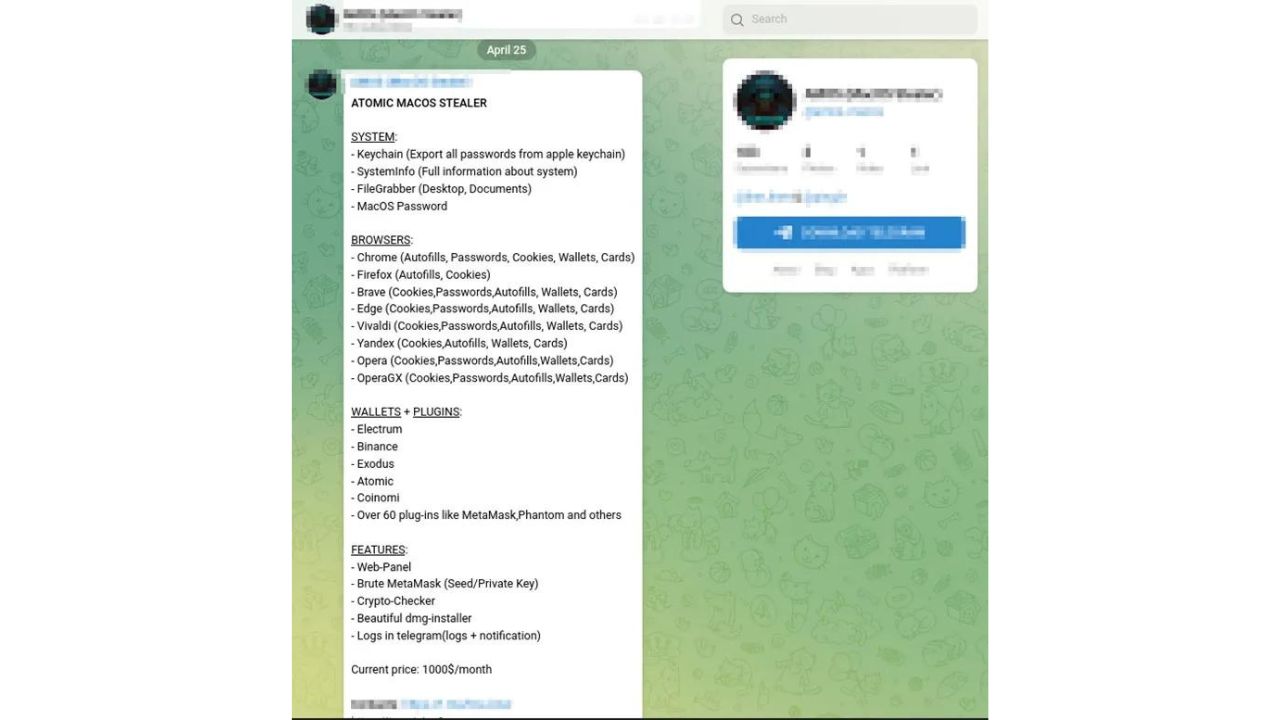
AMOS malware was found on a Telegram app channel being sold to hackers looking to wreak havoc. This malware’s main purpose is to infiltrate your device and obtain confidential data such as keychain passwords, complete system information, files from your desktop and documents folder, and the macOS password.
This malware scarily has the ability to infiltrate popular browser apps such as Chrome and Firefox, quietly extracting sensitive information like autofill data, passwords, cookies, and even credit card information.
And if that wasn’t bad enough, it specifically targets popular crypto wallets like Electrum, Binance, and Atomic.
Credit: Cyble
Who’s spreading this malware?
A hacker can purchase AMOS through Telegram for a monthly fee of $1,000. It comes with a web interface (web panel) that simplifies the management of malware targets, as well as tools to guess private keys (brute-forcing)
MORE: CRYPTO-MINING MALWARE ATTACKING APPLE MAC WITH PIRATED SOFTWARE
How does AMOS spread?
This malware is spread through a .dmg file, which macOS users may be familiar with as they are the files that install software onto their computers.
Once the .dmg is opened, the software may display a fake prompt that looks like it’s part of the computer’s system. This prompt may ask for permission to access files stored on your desktop or in your documents folder. Once installed, it gets right to business quickly starting to gather private information and sending it to a faraway server.
Since it requires you to click on the .dmg file to install, you can avoid the malware completely by not installing any kind of untrusted software from an unverified source.
Tips for keeping your Mac safe from this malware
Be careful what you download
When downloading a new app or any other file to your computer, double-check the source. You should only be downloading apps directly from the Apple Store and you want to make sure that any app you download has good ratings. And when it comes to downloading other files like a document, picture, or something else, make sure it’s coming from a legitimate source.
Avoid clicking unknown links in emails
Before you click that link, double-check that the email you’re reading is coming from a legitimate source by checking the sender’s email address. Look for misspellings and use caution whenever an app asks for you to grant it permission to run on your computer.
Make sure your devices, operating systems, and apps are up-to-date
Always keep your devices, operating systems, and apps up to date. Apple is regularly making updates to its software for all devices, and you should always make sure that you have the latest software version available. These updates have stronger security features, so the newer the software, the better protected your Mac will be.
Here’s how to check if you need to update your Mac computer.
- Open your Settings app
- Click General
- Click Software Update
- If an update is available, click Install
Have good antivirus software on all your devices
This story is also another reminder to always have good antivirus software running on your devices, as malware scams like this one may ask you to click a suspicious link or download an infected file. Having antivirus software on your devices will make sure you are stopped from clicking on any malicious links or from downloading any files that will release malware into your device.
Special for CyberGuy Readers: My #1 pick is TotalAV, and you can get a limited-time deal for CyberGuy readers: $19 your first year (80% off) for the TotalAV Antivirus Pro package.
Find my review of Best Antivirus Protection here.
| 🎙 Now Streaming [Ep. 34] Is that Social Security email in your inbox real? How one convincing SSA scam nearly tricked a reader, and the five red flags to check before you click |

| 📱 Lock down your phone in 30 minutes: Join Kurt “CyberGuy” Knutsson for a free live class on Saturday, June 13 at 10 AM ET and learn simple, real-time steps to protect your personal data and stay safer from scams. Register free: CyberGuyLive.com |
Final thoughts
To protect your Mac from the Atomic macOS Stealer malware and other cybersecurity threats, it’s important to be cautious when downloading files, keep your software up-to-date, and have good antivirus software installed on all of your devices.
Have you encountered malware on your Mac? Let us know your story by commenting below.
FOR MORE OF MY TIPS, SUBSCRIBE TO MY FREE CYBERGUY REPORT NEWSLETTER HERE
Related:
- Crypto-mining malware attacking Apple Mac with pirated software
- Russian ransomware attack software targets Apple Mac and MacBook
🎙 Now Streaming: My New Podcast: The CyberGuy Report
Kurt’s Top Deals
Deals move fast and inventory can be limited, so don’t wait too long.
| 🔥 Editor’s pick  Summer entertaining Ninja SLUSHi Machine (26% off) Frozen drinks and slushies at home in minutes. | |
| 💰 Top deal  Outdoor essential TYPEC Solar Bug Zapper (36% off) Solar-powered bug zappers for patios and camping. |