



- Scammers use AI, altered celebrity videos and copied websites to make Facebook ads appear legitimate.
- Fraudulent ads can lead to phishing pages, malware downloads and fake investment groups.
- Meta is expanding advertiser verification and scam detection, but deceptive ads still reach users.
- Verify offers independently and never download files or send money through a social media ad.
Scam ads on Facebook have moved far beyond misspelled headlines and obviously fake product photos. Today, scammers can use AI-generated content, altered celebrity videos and convincing copies of legitimate websites to make an offer appear real.
The ad may promise free money, an exclusive investment opportunity or early access to a new video game. However, one click can lead to a phishing page, a malware download or a private messaging group run by criminals.
Facebook’s advertising platform gives legitimate businesses powerful tools to reach customers. Scammers try to exploit those same tools to find people who are most likely to respond.

How Facebook scam ads have evolved with AI and deepfakes
Scammers once depended on stolen photos, clumsy writing and poorly designed websites. Those warning signs still exist, but newer campaigns can look much more polished.
AI tools can generate convincing sales copy, fake product reviews and realistic images within seconds. Voice-cloning software can imitate a public figure, while deepfake tools can place that person’s face into a fabricated video.
However, not every fake celebrity ad uses a true deepfake. Some campaigns rely on edited clips, stolen images or misleading captions. The goal is the same: borrow the credibility of someone you recognize to make an unfamiliar offer feel legitimate.
Meta calls this tactic “celeb-bait.” In February 2026, the company said its protection program covered the images of more than 500,000 celebrities and public figures. Meta has also filed lawsuits against advertisers accused of using altered images, voices and deepfakes to promote fraudulent health products and investment groups.
Real examples of Facebook scam ads using celebrity images
Users on Reddit have posted screenshots of suspicious Facebook ads that appeared to use well-known celebrities. The screenshots alone do not establish who created the ads or whether every image was generated with AI. Still, they illustrate the tactics scammers frequently use.
One ad appeared to show Kelly Clarkson promoting a cash giveaway. According to the Reddit user who posted it, more than 20 accounts were using variations of the name “Kelly Clarkson Live.”
The ad reportedly asked people to comment “Christmas” before directing them to a WhatsApp number to claim money. Moving someone away from Facebook and into a private conversation can make it easier for a scammer to request personal details, collect a fee or pressure the victim into sending money.

Credit: Reddit
Another ad appeared to use Billie Eilish’s image to promote an unfamiliar shopping website. The layout resembled a standard e-commerce advertisement, which could make the offer look legitimate to fans or younger users.
Watch the latest episode of The CyberGuy Report.

Missed this event? Sign up via the registration form and see our live recording.
See Kurt’s latest Amazon picks for useful gadgets, smart home upgrades and everyday tech worth grabbing while the deals last.
Before trusting an endorsement like this, check the celebrity’s official website and verified social media accounts. You should also search for the company independently rather than using the link in the ad.
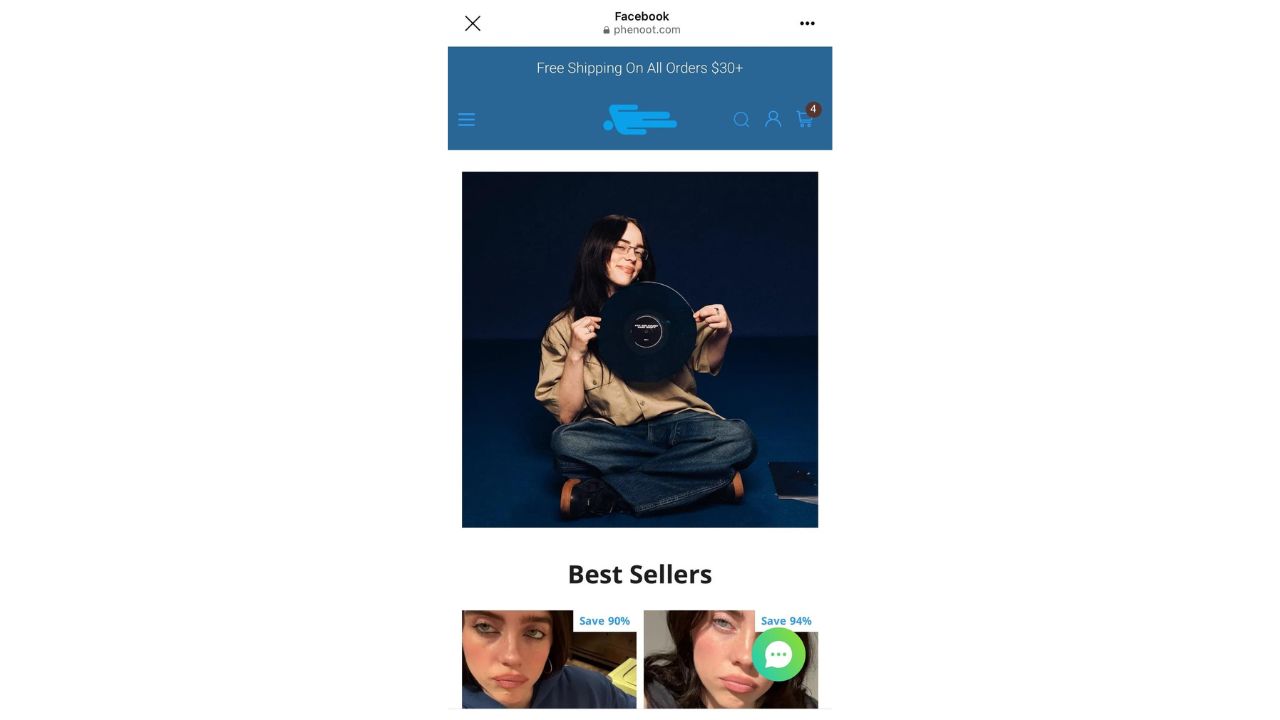
Credit: Reddit
How AI tools power Facebook scam campaigns
Many scam campaigns operate more like digital marketing businesses than isolated attempts by a single fraudster. Criminal groups can test different images, headlines and audiences until they find a combination that attracts clicks.
These campaigns may use:
- Altered or AI-generated videos that appear to feature celebrities
- Voice-cloning tools that imitate a recognizable person
- Text generators that create fake reviews, comments and testimonials
- Copied websites designed to resemble stores, news outlets or financial services
- Automated tools that quickly produce multiple versions of the same ad
- Fake social media accounts that make an offer appear popular or established
The ad is often only the first stage. After you click, the landing page may imitate a well-known news organization or display fabricated customer testimonials. The site may then ask for your contact information, payment details or permission to download a file.
How scammers hide what an ad really contains
Some scammers use a technique called cloaking to get around an advertising platform’s review system. The advertiser shows Meta’s review system a harmless version of a website while sending real users to a different page containing a scam.
Meta says it has developed AI tools to detect cloaking and identify ads that redirect people to harmful websites. The company has also taken legal action against advertisers accused of using the technique to promote fake discounts and subscription schemes.
Scammers can also switch domains, accounts and payment methods after an ad gets removed. Some campaigns run briefly, collect as many clicks as possible and disappear before users have time to report them.
How Facebook’s ad targeting can reach potential victims
Scammers do not have to show the same ad to everyone. Meta’s advertising tools allow advertisers to build audiences using factors such as age, gender, location, interests and online behaviors. Certain sensitive categories and ads aimed at minors face additional restrictions. A scammer could design different campaigns around retirement income, health concerns, gaming, cryptocurrency or a specific celebrity. Meta’s delivery system may then optimize the campaign toward people most likely to interact with it.
Reuters reported that internal Meta documents said users who click scam ads may be more likely to see similar ads because the platform’s personalization system tries to serve content based on their apparent interests. That does not mean Facebook intentionally identifies people as vulnerable. However, normal advertising tools can still help a dishonest advertiser find an audience that responds to a particular promise.
Why Facebook scam ads keep getting past Meta
Meta says its systems analyze text, images, videos, links and surrounding context to identify scams. It also uses automated tools to review enormous numbers of ads before they appear. Still, automation has limitations. A fake endorsement may use subtle edits that are difficult to spot. A scam website can resemble a legitimate store, while cloaking can hide the page’s real contents during the review process.
Scammers may also use compromised business accounts or create many variations of the same campaign. When one account disappears, another can take its place. Meta says it removed more than 159 million scam ads during 2025 and took down 92% of them before a user reported them. The company also said it removed 10.9 million Facebook and Instagram accounts connected to criminal scam centers.
In March 2026, Meta announced expanded AI systems designed to detect celebrity impersonation, brand impersonation and deceptive links. The company also said verified advertisers accounted for about 70% of its advertising revenue. Meta aims to increase that figure to 90% by the end of 2026, with a focus on higher-risk advertising categories. Those numbers show that Meta is investing in enforcement. They also reveal the enormous scale of the problem.
Why Meta faces questions about scam-ad revenue
Meta says scams are bad for users, legitimate advertisers and its business. The company argues that it aggressively fights fraud and continues to invest in detection, account removal and advertiser verification. However, a November 2025 Reuters investigation raised questions about the financial incentives surrounding scam ads. Internal documents reviewed by Reuters showed that Meta had projected about 10% of its 2024 revenue, or roughly $16 billion, could come from advertising connected to scams and banned goods.
The documents also estimated that users were being shown about 15 billion higher-risk scam advertisements each day. Meta told Reuters that the revenue estimate was rough, overly inclusive and included many legitimate ads. The company said the true figure was lower but did not provide an updated number. The issue remains current. On July 13, 2026, Reuters reported on lawsuits involving Facebook and Instagram ads that allegedly used fake celebrity endorsements to direct users into fraudulent investment groups on WhatsApp.
In one case, a Wisconsin retiree and his wife allegedly lost $715,000 after clicking an ad that appeared to feature a host from “Shark Tank.” Meta denies wrongdoing in the litigation, and the lawsuits contain allegations that have not been decided at trial.
Common signs of Facebook scam ads
A professional design does not prove that an ad is legitimate. Watch for these warning signs:
- A celebrity promoting an offer that does not appear on their official accounts
- A page name that adds words such as “live,” “official,” “support” or “giveaway”
- A new or unfamiliar website that imitates a recognizable retailer
- A web address that does not match the company shown in the ad
- Requests to continue the conversation on WhatsApp or Telegram
- Promises of guaranteed investment returns or free money
- A demand for payment through cryptocurrency, gift cards or wire transfers
- Fake news articles featuring copied media logos
- Urgent countdowns, miracle results or claims that an offer will disappear immediately
- Downloads involving compressed files such as .zip or .rar archives
An unexpected download is a major warning sign. Verify the offer through the developer or company’s official website before installing anything.
How to protect yourself from Facebook scam ads
A few extra checks can help you avoid handing your money, passwords or personal information to a scammer.
1) Check who placed the ad
Tap or click the advertiser’s name and review the page carefully. Look at when the page was created, whether its name has changed and whether its posts match the product being advertised. You can also look for the advertiser in Meta’s Ad Library. However, appearing in the library only confirms that an ad ran. It does not prove that the offer is legitimate.
2) Search for the offer independently
Do not rely on the website address, phone number or contact information shown in the ad. Open a new browser tab and search for the company, celebrity or product yourself. Look for reports from trusted news outlets, the company’s official website and warnings from other consumers.
3) Do not download files from ads
Avoid downloading software, games or browser extensions through a social media advertisement. Be especially careful with .zip, .rar, .exe and .dmg files. For a game or application, visit the developer’s official website or a trusted app store instead.
4) Verify celebrity endorsements
Check the public figure’s verified social media accounts and official website. Search for the endorsement outside Facebook. A realistic face or familiar voice no longer proves that the person actually recorded the message.
5) Do not move money based on a social media ad
Never send cryptocurrency, gift cards or wire transfers to claim a prize or unlock an investment opportunity. Be suspicious when someone moves the conversation to WhatsApp, Telegram or another private platform and begins applying pressure. Legitimate financial professionals should be independently verified through official regulatory databases.
6) Report and block suspicious advertisers
Select the three-dot menu on the ad and choose the option to report it. You can also block the advertiser or page. Reporting does not guarantee immediate removal, but it gives Meta additional information that may help connect the ad to a larger scam campaign. Meta also recommends reporting suspicious messages and phishing attempts rather than opening their links or attachments.
7) Install strong antivirus software
Scammers may use fake ads, Messenger messages or friend requests to spread phishing links and malicious downloads. Strong antivirus software can help identify dangerous websites, suspicious downloads and malware. It can also provide an extra warning when a convincing ad directs you somewhere unsafe.
- Strong real-time protection against viruses, malware, ransomware and hacking attempts
- AI-powered scam protection to help identify suspicious emails, texts and websites
- Built-in password manager to securely store and manage logins
- 2 GB PC cloud backup to help protect important files from ransomware or hardware failure
- Smart firewall and phishing protection
- Protects 1, 3 or 5 devices
- Available for Windows, macOS, Android and iOS
- Includes real-time threat protection, smart firewall and phishing protection to guard against online attacks
8) Use unique passwords and turn on 2FA
A password manager can create and store a different password for every account. That limits the damage if a phishing page captures one of your passwords. The password manager also fills in credentials only on recognized websites, which may help you notice when a fake login page uses the wrong web address.
- Unlimited password storage
- Secure sharing
- Password health reports
- Auto-fill and emergency access
- Data breach monitoring to alert you if your credentials have been exposed
- A Security Dashboard with tools like the Data Breach Scanner and Password Health Checker to identify weak, reused, or compromised passwords
CyberGuy Exclusive Deal: Save 52% now with CyberGuy’s exclusive NordPass offer – Get 1 extra month FREE with a 2-year plan. Try 30 days risk-free for only $1.43 per month!
Next, turn on two-factor authentication for Facebook, your email account and financial services. Two-factor authentication can block many unauthorized login attempts even when someone has stolen your password.
9) Keep your devices updated and warn your family
Install updates for your operating system, browser, security software and Facebook app. Updates can close vulnerabilities that malware attempts to exploit. Talk with friends and family members about celebrity impersonation, fake giveaways and investment ads. A quick conversation may help someone pause before sending money or sharing personal information.
Related Links:
- Meta Verified scam threatens Facebook deletion
- Texas mom jailed over dirty water Facebook post
- Lost access? Here’s how to reclaim your Facebook account
Kurt’s key takeaways
The word “Sponsored” does not make an offer trustworthy. It only means someone paid to place it in front of you. AI now helps scammers improve nearly every part of a campaign. They can imitate a celebrity, generate realistic comments and create a polished website faster than ever. Facebook is expanding advertiser verification and using new detection tools, but fraudulent ads continue to reach users. Slow down before you click. Search for the company independently, verify celebrity endorsements and never download a file or send money because an ad creates a sense of urgency. Most importantly, talk with family members who may not realize how convincing these ads have become.
Given the scale and sophistication of scam ads on Facebook, do you think Meta should face greater responsibility when an advertisement leads to fraud? What additional protections would you like to see? Let us know in the comments below.
FOR MORE OF MY TECH TIPS & SECURITY ALERTS, SUBSCRIBE TO MY FREE CYBERGUY REPORT NEWSLETTER HERE
Copyright 2026 CyberGuy.com. All rights reserved. CyberGuy.com articles and content may contain affiliate links that earn a commission when purchases are made.
🎙 Now Streaming: My New Podcast: The CyberGuy Report
Kurt’s Top Deals
Deals move fast and inventory can be limited, so don’t wait too long.
| 🔥 Editor’s pick  Summer entertaining Ninja SLUSHi Machine (26% off) Frozen drinks and slushies at home in minutes. | |
| 💰 Top deal  Outdoor essential TYPEC Solar Bug Zapper (36% off) Solar-powered bug zappers for patios and camping. |


1 comment
Thank you so much for the info on scams.