



If something is free, you’re the product being sold. This is especially true for most online services we use. For example, Google’s primary source of revenue is ads. They make money by collecting data about you and me and selling targeted advertising to companies, which then show us products relevant to our interests.
You might have noticed that the moment you search for a product on Google, you start seeing ads for it on Facebook. The same applies to apps like Instagram, Threads, and LinkedIn. In fact, research shows that the apps collecting the most data about you are also among the most widely used. Let’s look at the top 20 of them and explore how you can take control of your personal information.

The most invasive apps you’re probably using
Apps collect all sorts of data about you, but let’s get one thing straight. Not all data collection is bad. Some apps genuinely need access to certain information to function properly. For example, Uber stores your location data to help you find a ride faster, while WhatsApp requires access to your contacts so you can send messages.
The real issue is data collection that serves no purpose other than showing you ads or selling your information to third parties. According to Marin Marinčić, head of IT Infrastructure at Nsoft, the top 20 most invasive apps collect data that is not necessary for their core functions.
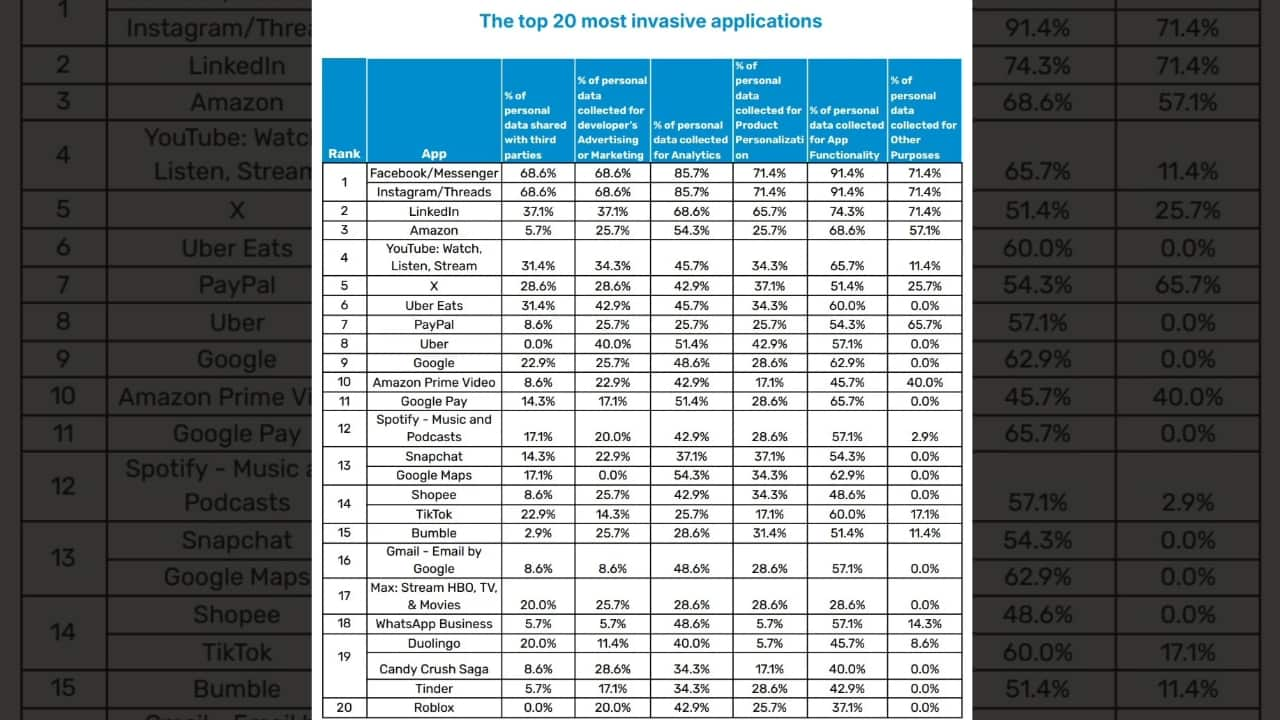
Leading the list is Meta with all four of its major apps. Facebook, Messenger, Instagram, and Threads share 68 percent of collected data with third parties while also using it for targeted ads. LinkedIn follows, sharing around 37 percent of user data, with Amazon in third place, followed by YouTube.
What makes this concerning is how deeply embedded these apps are in our daily lives, making it nearly impossible to find alternatives or avoid data collection altogether.
The list also includes Elon Musk’s X at number five, followed by Uber Eats, PayPal, Uber, Google, and Amazon Prime Video. TikTok, despite ongoing scrutiny over its data policies, ranks 14th. While many of these names were expected, one surprising entry is the mobile game Candy Crush, which uses 28 percent of collected data for ads. You can find the full list in the image below.
Nsoft
THE HIDDEN COSTS OF FREE APPS: YOUR PERSONAL INFORMATION
Looking for alternatives is the only solution
Avoiding data collection is nearly impossible if you use the apps above. The only way to dodge these invasive apps is to switch to apps that respect your privacy. While it may seem impossible to replace some of the biggest platforms, there are alternatives that collect little to no unnecessary data.
- For messaging, Signal is one of the best options. Unlike WhatsApp, it does not store metadata or share information with third parties. If you need a search engine that does not track your activity, check out these options instead of Google.
- When it comes to social media, Mastodon and Bluesky offer decentralized alternatives to Twitter.
- For those looking to replace YouTube, PeerTube and Nebula are worth exploring.
- If you shop frequently on Amazon, consider smaller online retailers or direct brand websites that may be less likely to track your every move.
- Instead of Google Drive, consider these solutions which offer cloud storage with strong encryption.
Switching to these alternatives may require some effort, but it is the best way to limit how much of your personal data is being collected. Taking control of your privacy starts with making conscious choices about the apps you use.
5 ways to reduce data sharing
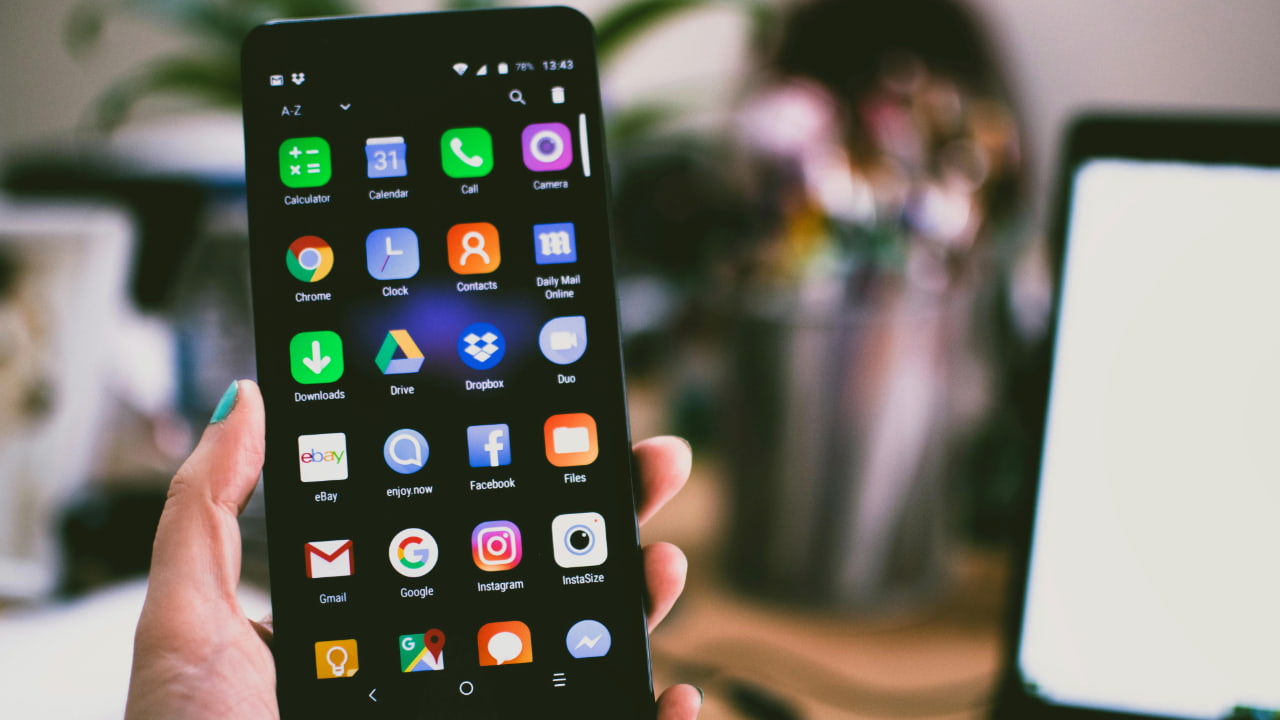
If you’re not able to delete the apps listed above, follow the simple steps below to minimize how much information is being collected and shared.
Watch the latest episode of The CyberGuy Report.

Missed this event? Sign up via the registration form and see our live recording.
See Kurt’s Prime Day picks for useful gadgets, practical upgrades and everyday tech while the deals last.
1) Review app permissions: Most apps request access to data they do not actually need. Go to your phone settings and check app permissions on your iPhone and Android. Disable access to location, microphone, contacts, and other sensitive data unless absolutely necessary.
2) Turn off ad personalization: Many companies track your online activity to show targeted ads. You can limit this by disabling ad personalization in Google, Facebook, and other accounts. This reduces the amount of data collected about your interests and behavior.
3) Limit social media tracking: Social media platforms track your activity even when you are not using them. Adjust privacy settings to restrict data collection.
4) Avoid signing in with Google or Facebook: Many websites offer login options using Google or Facebook. While convenient, this shares even more data with these platforms. Instead, create separate accounts using email whenever possible.
5) Use a Virtual Private Network (VPN) and private browsing mode: A VPN hides your IP address, helping to obscure your location and online activity, making it harder for websites to track you. Combined with private browsing or incognito mode, this reduces the amount of data companies can collect about your online activity. Using a VPN (Virtual Private Network) service can also enhance your privacy by encrypting your internet traffic, making it harder for hackers and third parties to intercept your data, especially on public Wi-Fi. While VPNs don’t directly prevent phishing emails, they reduce the exposure of your browsing habits to trackers that may use this data maliciously. With a VPN, you can securely access your email accounts from anywhere, even in areas with restrictive internet policies.
Here are my top recommendations:
ExpressVPN is the go-to choice for those who prioritize ultra-fast speeds, reliability, and top-tier security. With servers in 105 countries, ExpressVPN delivers blazing-fast performance for streaming, gaming, and secure browsing. It supports P2P file sharing, offers best-in-class encryption, and maintains a strict no-logs policy—with all servers running on RAM for enhanced privacy. You can connect up to 10 devices simultaneously, and setup takes under 2 minutes. Plus, with 24/7 live customer support and a 30-day money-back guarantee, ExpressVPN is a premium choice for security-focused users who want speed without compromise.
CyberGuy Exclusive ExpressVPN Deals:
✅ Save 75% – Get 3 months FREE with 12-month plan for $3.99/month. Try 30 days risk-free.
✅ Save 84% – Get 4 months FREE with 24-month plan for $2.49/month. Try 30 days risk-free.
Surfshark – Best for Unlimited Devices & Budget-Friendly Security
If you're looking for a more affordable VPN without sacrificing security, Surfshark is an excellent choice. Surfshark operates under a strict no-logs policy and offers top-notch encryption to keep your data safe. However, Surfshark stands out by allowing unlimited devices on a single account - making it perfect for families, small businesses, or users with multiple gadgets. If you're looking for a more affordable VPN without sacrificing security, Surfshark is an excellent choice. Surfshark operates under a strict no-logs policy and offers top-notch encryption to keep your data safe. It now runs on upgraded 100 Gbps servers, delivering faster speeds, smoother streaming, and greater reliability even during peak hours. The upgrade also makes Surfshark more future-proof with improved stability, scalability, and load balancing for growing bandwidth demands.
Surfshark stands out by allowing unlimited devices on a single account—making it perfect for families, small businesses, or users with multiple gadgets. It also includes features like MultiHop (double VPN) and Camouflage Mode to bypass VPN restrictions in censored regions. With a budget-friendly price and feature-rich security, Surfshark is ideal for those who want privacy on a budget.
CyberGuy Exclusive Surfshark Deals:
✅ Save 81% – Get 3 extra months FREE with 12-month plan for $2.98/month. Try 30 days risk-free.
✅ Save 88%/b> – Get 3 extra months FREE with 24-month plan for $1.78/month. Try 30 days risk-free.
For best VPN software, see my expert review of the best VPNs for browsing the web privately on your Windows, Mac, Android & iOS devices
6) Regular app clean-up: Uninstall apps you no longer use to reduce passive data collection.
App-specific suggestions to safeguard your digital footprint
Protect your personal information across the popular platforms mentioned above with these essential privacy adjustments.
Facebook/Instagram/Threads:
- Disable activity tracking by going to Settings > Privacy > Activity Tracking.
- Turn off “Apps, Websites, and Games” to limit third-party data sharing.
LinkedIn:
- Turn off ad targeting in Settings > Advertising preferences.
- Disable profile viewing history.
Amazon/Prime Video:
- Opt-out of personalized ads in your account settings.
- Limit sharing by disabling Alexa voice data storage (if applicable).
YouTube/Google Products (e.g., Gmail, Google Maps):
- Disable ad personalization under Google Account > Data & Personalization > Ad Settings.
- Turn off location history and web/app activity tracking.
Uber/Uber Eats:
- Use the app only when needed, and avoid storing payment methods if possible.
- Disable tracking after rides/deliveries are complete.
PayPal:
- Restrict sharing under Settings > Privacy & Security by opting out of data sharing for marketing purposes.
Snapchat:
- Disable location sharing via Snap Map and turn off ad personalization under Ad Preferences.
TikTok:
- Restrict personalized content recommendations in Privacy > Personalization and Data.
- Avoid posting unnecessary personal information.
Spotify:
- Adjust data sharing preferences in Account Settings > Privacy Settings.
- Opt out of tailored ads.
Roblox:
- Set strict privacy controls in the account settings, especially for children.
- Use a separate, disposable email for account registration.
Related Articles:
- Which apps are draining your phone’s battery?
- The hidden costs of free apps: Your personal information
- Hide and lock your apps on your iPhone with iOS 18
Kurt’s key takeaway
The best way to reduce companies from collecting your data is to remove invasive apps from your phone. Many apps request unnecessary permissions that can track your activity, so deleting them limits exposure. Instead of downloading standalone apps, try using the browser versions of popular social media platforms, as they typically have fewer permissions. However, web tracking still exists through cookies and fingerprinting, so using a privacy-focused browser like Brave, Firefox with enhanced tracking protection, or Safari with Intelligent Tracking Prevention (ITP) can further reduce data collection. However, some apps are so deeply integrated that replacing them is difficult. For example, if you use an Android phone, avoiding Google’s ecosystem is nearly impossible. Apple, on the other hand, offers more privacy controls, giving users better options to limit data collection.
Do you check app permissions before installing? How do you decide which permissions are acceptable? Let us know in the comments below.
FOR MORE OF MY SECURITY ALERTS, SUBSCRIBE TO MY FREE CYBERGUY REPORT NEWSLETTER HERE
Copyright 2025 CyberGuy.com. All rights reserved. CyberGuy.com articles and content may contain affiliate links that earn a commission when purchases are made.
🎙 Now Streaming: My New Podcast: The CyberGuy Report
Kurt’s Top Deals
Deals move fast and inventory can be limited, so don’t wait too long.
| 🔥 Editor’s pick  Summer entertaining Ninja SLUSHi Machine (26% off) Frozen drinks and slushies at home in minutes. | |
| 💰 Top deal  Outdoor essential TYPEC Solar Bug Zapper (36% off) Solar-powered bug zappers for patios and camping. |


1 comment
The easiest thing to do is delete all social media apps. I have , l came to the conclusion that l grew up without them and l didn’t even want them.