With so many antivirus software programs on the market, it’s hard to know which is right for you. With new scams and increased amount hacks popping up all the time, it’s important to protect your personal information and devices.
We’ve picked our Top 5 best contenders when it comes to Antivirus Software for PCs. We’ve made it easy by breaking down the prices, pros, and cons, and giving my top overall pick.
Why install Antivirus Software and Apps?
As technology advances, so do the tactics cybercriminals use to exploit it. Hackers are constantly developing new ways to infiltrate your devices, steal sensitive data, and compromise your online security.
You’ve probably encountered suspicious emails or text messages that look legitimate but are actually phishing attempts. Clicking on these links can inadvertently install malware on your device, exposing your personal data and leaving you vulnerable to attacks.
This is where antivirus software steps in. Its primary goal is to prevent, detect, and remove malicious software before it can do any harm. Antivirus programs act as a robust shield, protecting your computer, smartphone, and other devices from viruses, ransomware, spyware, and more.
It’s the best layer of protection between you and the malicious attacks that target all of our devices.
And if you’re using free antivirus software, be aware that you’re getting basic protection without real-time monitoring. It’s time to ditch a free antivirus product for these reasons.
CyberGuy’s Top Choices for Antivirus Software:

Editor’s Choice: Norton AntiVirus Plus [BEST CHOICE WINNER]

If you want powerful protection from today’s most common online threats, without complicated setup,
Norton AntiVirus Plus is the clear choice.
- Award-winning protection trusted by millions to stop viruses, malware, ransomware, spyware, and hackers in real time
- Advanced AI scam protection helps catch dangerous text messages and fake websites before you click, one of the biggest threats people face today
- 100% Virus Protection Promise: If Norton can’t remove a virus, you get your money back, peace of mind most antivirus brands don’t offer
- Strong, always-on protection that runs quietly in the background, so you stay protected without slowing down your computer
- Protection Score shows how safe you are at a glance, with a personalized score and simple guidance to help you strengthen your protection over time
- Smart firewall and phishing protection help keep scammers and criminals from stealing your passwords, personal information, or financial details
- Built-in password manager safely stores and remembers your logins, making online banking and shopping easier and more secure
- 2 GB secure cloud backup for your PC helps protect important photos and files from ransomware, computer crashes, or hard-drive failure
- Simple to use and easy to trust, backed by decades of cybersecurity expertise. Install it once and let it do the work
Coverage
- Protects 1 or up to 5 devices with a single subscription
- Works on Windows, macOS, Android, and iOS
- Includes real-time virus protection, AI scam protection, smart firewall, phishing protection, password manager, and cloud backup
Exclusive CyberGuy Deal: 58% Off
Norton was founded in the United States and operates today as a global cybersecurity company, with its global headquarters in Tempe, Arizona and offices in the U.S. and internationally.
Getting Started with Norton AntiVirus Plus
Follow these quick step-by-step videos to install, activate, and start protecting your devices in minutes.


| 🎙 Now Streaming [Ep. 34] Is that Social Security email in your inbox real? How one convincing SSA scam nearly tricked a reader, and the five red flags to check before you click |

| 📱 Lock down your phone in 30 minutes: Join Kurt “CyberGuy” Knutsson for a free live class on Saturday, June 13 at 10 AM ET and learn simple, real-time steps to protect your personal data and stay safer from scams. Register free: CyberGuyLive.com |

- Popular Questions:
- More:
Best Value Pick: TotalAV

-
- Easy setup
- Paid users receive real-time protection which is essential to be protected 24/7
- Phishing scam protection
- Ransomware protection
- Spyware removal
- Adware cleaner
- Total Adblock tool
- Advanced webshield protects you against malicious websites
- System tune-up tools
- Disk cleaner (find out which files may be wasting space and remove from your computer)
- Browser manager and cleaner
- Protects Windows, Mac, Android & iOS Devices
- Additional features like VPN and password vault come as add-ons and are inferior to core antivirus product. We only recommend TotalAV’s antivirus product. We suggest saying no to the add-ons.
EXCLUSIVE CYBERGUY DEAL
Save 80% – $19 (protects 5 devices) for year 1 (year 2: $99)
Please note that TotalAV offers several upgrades during the purchase process. If you do not want them, be sure to click the gray “No Thanks” button on each screen.
After your purchase:
- Follow these steps for installing onto your devices
- Additional questions? Contact TotalAV here.
RUNNER UPS
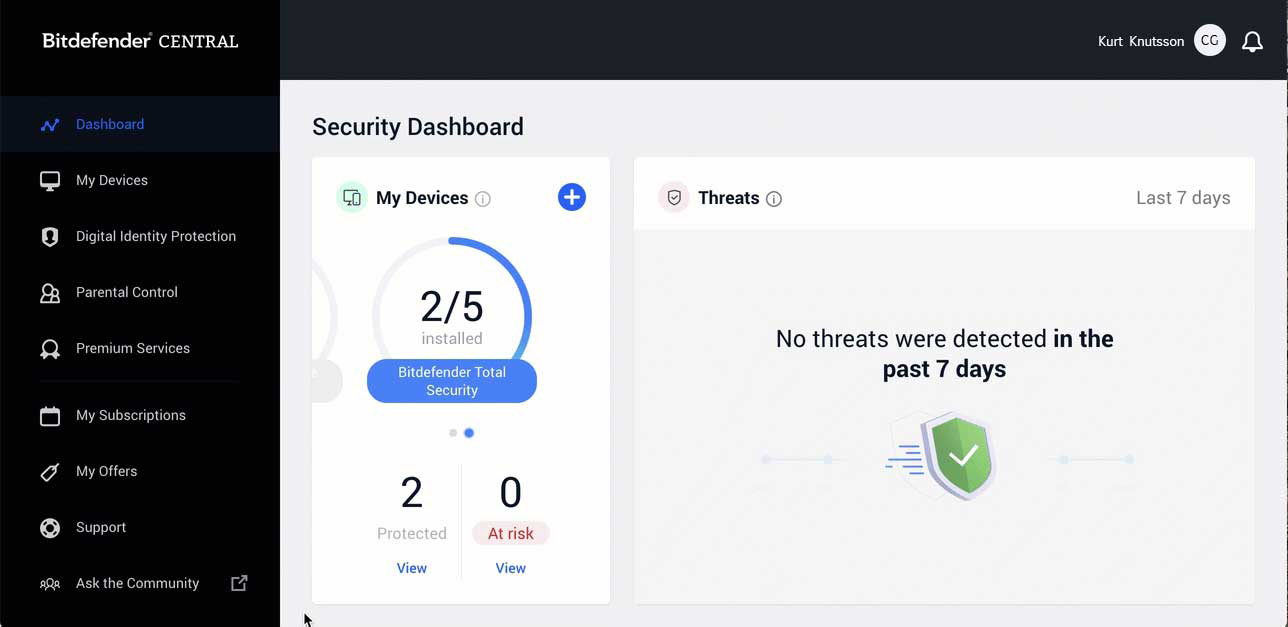
Bitdefender
PROS
- Offers a free, yet limited version for desktop and mobile. (free isn’t always better)
- Research showed Bitdefender blocked 100% of threats last year
- Offers great features, including Anti-fraud and Anti-phishing (they help stop the problem before it begins)
CONS
- Customer service isn’t as easily available to free users
- Installation isn’t as quick – it is a bit of a process to get set up
- macOS support is available only with paid plans
COVERAGE
- Bitdefender Total Security protects up to 5 devices per year
- MacOS, Windows, iOS and Android device protection available
SPECIAL CYBERGUY DEAL
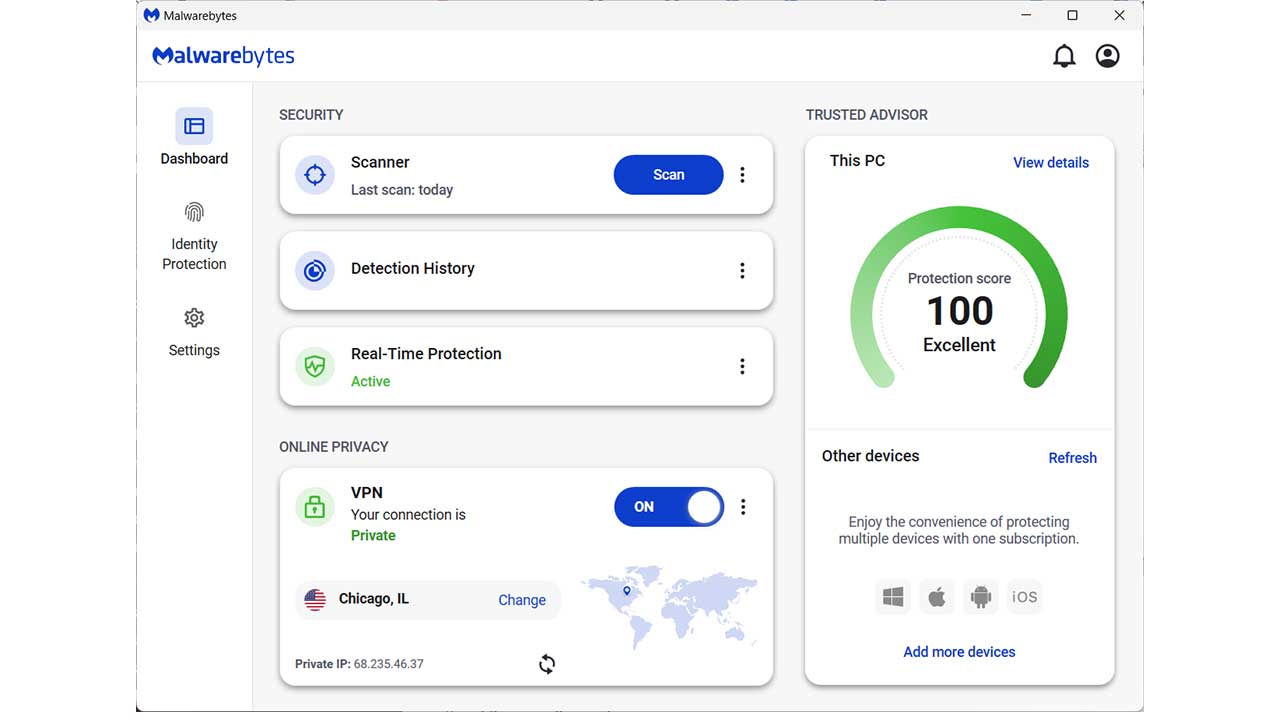
Malwarebytes
PROS
- Small-business friendly
- Easy to install
- Browser Guard extension with enhanced identity and privacy features
- Has a VPN plan available in their higher-tiered plan
CONS
- Doesn’t offer as many additional features as other Antivirus software
- Real-time protection only available in paid-for version and doesn’t have as high a performance rating as other programs. I note this because many users flock to the free version of this antivirus program. The item to note per their free download page is “After 14 days, your devices and data will not be protected in real-time.” If you’re going to protect your devices, you’ll want to keep your software up to date looking out for the latest threats. The paid plans are the way to go.
COVERAGE
- You can protect up to 20 devices with a Premium plan
- Available for Windows, Mac, Android, Chromebook, iOS
SPECIAL CYBERGUY DEAL
Get the latest Cybersecurity Threats (2026)
More ways to protect your devices and your identity
- Best VPNs for Browsing the Internet Privately
- Best Identity Theft protection services
- Best Private and Secure Email Providers
Copyright 2026 CyberGuy.com. All rights reserved. CyberGuy.com articles and content may contain affiliate links that earn a commission when purchases are made.
🎙 Now Streaming: My New Podcast: The CyberGuy Report
Kurt’s Top Deals
Deals move fast and inventory can be limited, so don’t wait too long.
| 🔥 Editor’s pick  Summer entertaining Ninja SLUSHi Machine (26% off) Frozen drinks and slushies at home in minutes. | |
| 💰 Top deal  Outdoor essential TYPEC Solar Bug Zapper (36% off) Solar-powered bug zappers for patios and camping. |