



We’ve talked repeatedly about the importance of password managers. Having a different password for each of your accounts is important because if a hacker gets ahold of one password, it won’t affect every private account you own. However, keeping track of all those passwords can be a doozy, which is why password managers are so helpful.
Passkeys are starting to gain more and more steam, and some of you might be wondering whether you should ditch your password managers altogether. Let’s dive into why passkeys are so useful and how you can use both.
What is a passkey?
Representatives from Apple, Google, and Microsoft collaborated with FIDO Alliance to conceive the concept of a passkey. With passkeys, you can sign in to apps and websites with a biometric sensor, such as a fingerprint or facial recognition, PIN, or pattern, freeing you from having to remember and manage passwords.
A passkey consists of a key pair. One key is public, registered with the website or app you’re using. The other key is private, held only by your devices. Think of it like this, A passkey is like having a pair of keys. One key is like a special code that everyone can know and use, and it’s registered with the website or app you’re using. The other key is like a secret key that only your devices have, and it’s not shared with anyone else.
Furthermore, passkeys let you sync across all your devices using a cloud service. The cloud service (iCloud, Google, etc.) keeps a copy of your credential, offering an easier way for you to log into your accounts wherever you are.
Credit: FIDO Alliance
Apple Passkey
Apple introduced the idea of Passkeys with its latest iOS 16 update, allowing iPhone users to save their login information when signing into an account and then using Face ID to be able to log back in again later.
Credit: Apple
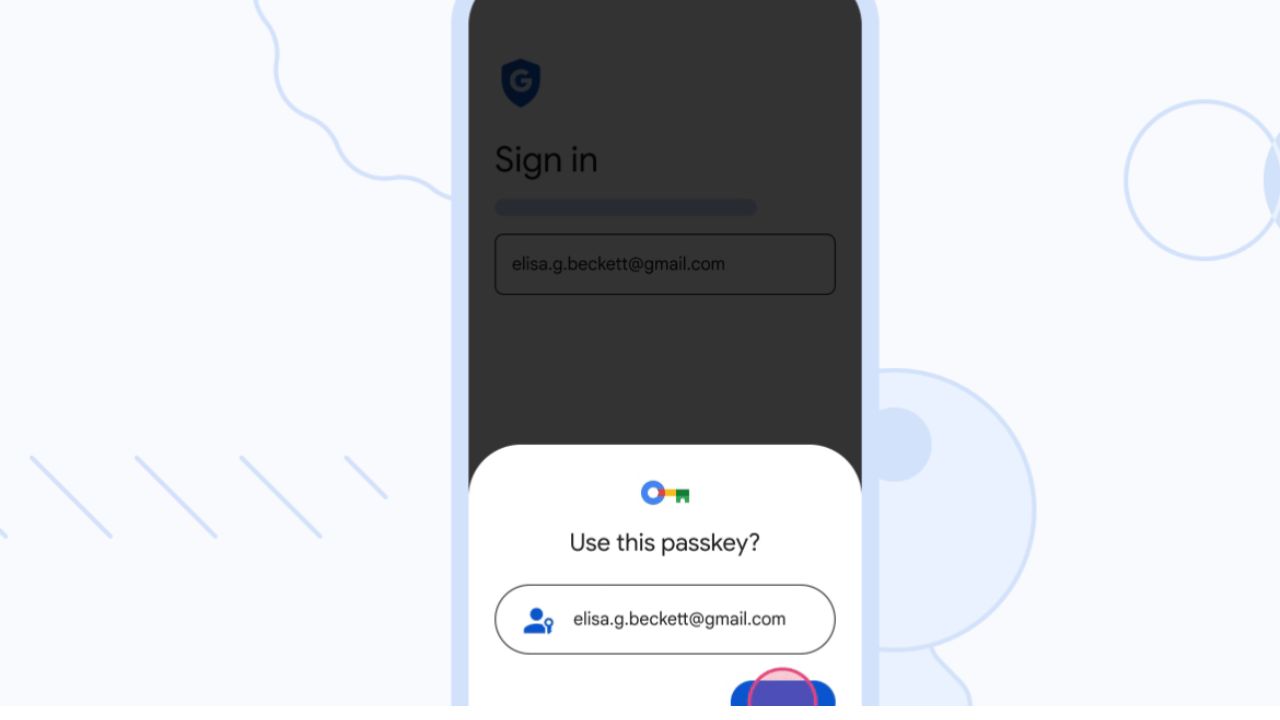
Along with Apple, earlier this month, Google also began rolling out support for passkeys across Google Accounts on all major platforms.
MORE: GOOGLE TOLD ME TO CHANGE MY PASSWORD, SHOULD I BE WORRIED?
Credit: Google
Should I stop using my password manager?
No, you should not stop using your password manager just yet. Passkeys are a very new concept, and not every website accepts them yet. So abandoning your password manager altogether would not be the best idea just yet.
For those not yet using a password manager, it is an app or software that helps you create, store, and manage your passwords in one place. With a password manager, you don’t have to worry about remembering complex passwords or typing them in whenever you want to log in. Instead, you only need to remember one master password to access your accounts.
Plus, most password managers come with a built-in password generator that can create strong, unique passwords for each of your accounts. Also, I believe trusted password managers are still the safest and most secure way to keep track of all your passwords.
A Texas mom says she spent the night in jail after speaking up online about dirty water in her town. The case was later dropped, but her story raises a troubling question: could something you post online ever put you at risk?

Join Kurt this Saturday, June 13 at 10 AM ET for quick phone privacy and security fixes.
See Kurt’s 2026 picks for practical tech and everyday upgrades.
What qualities should I look for in a password manager?
When it comes to choosing the best password manager for you, here are some of my top tips.
- Deploys secure
- Works seamlessly across all of your devices
- Creates unique complicated passwords that are different for every account
- Automatically populates login and password fields for apps and sites you revisit
- Has a browser extension for all browsers you use to automatically insert passwords for you
- Allows a failsafe in case the primary password is ever lost or forgotten
- Checks that your existing passwords remain safe and alerts you if ever compromised
- Uses two-factor authentication security
- Unlimited password storage
- Secure sharing
- Password health reports
- Auto-fill and emergency access
- Data breach monitoring to alert you if your credentials have been exposed
- A Security Dashboard with tools like the Data Breach Scanner and Password Health Checker to identify weak, reused, or compromised passwords
CyberGuy Exclusive Deal: Save 52% now with CyberGuy’s exclusive NordPass offer – Get 1 extra month FREE with a 2-year plan. Try 30 days risk-free for only $1.43 per month!
MORE: HOW TO PASSWORD-PROTECT YOUR EMAIL MESSAGES
What else can I do to protect myself?
Install strong antivirus software
Be sure to install antivirus software that will protect you from accidentally clicking on malicious links that would install malware, as well as remove any existing malware from your devices.
- Strong real-time protection against viruses, malware, ransomware and hacking attempts
- AI-powered scam protection to help identify suspicious emails, texts and websites
- Built-in password manager to securely store and manage logins
- 2 GB PC cloud backup to help protect important files from ransomware or hardware failure
- Smart firewall and phishing protection
- Protects 1, 3 or 5 devices
- Available for Windows, macOS, Android and iOS
- Includes real-time threat protection, smart firewall and phishing protection to guard against online attacks
Turn on 2-Factor Authentication (2FA)
Make sure it’s difficult for anyone to easily log into any of your accounts. 2-factor Authentication is just an extra shield that will prevent a hacker from getting into your accounts.
Keep your software updated
Keep your software and operating systems updated to better ensure you have the latest security patches.
Have you tried using Passkeys yet? How do you feel about them vs. your password manager? Let us know by commenting below.
FOR MORE OF MY TIPS, SUBSCRIBE TO MY FREE CYBERGUY REPORT NEWSLETTER HERE
Related:
- Best expert-reviewed password managers
- How to password-protect your email messages
- Apple’s replacement for the password
Copyright 2025 CyberGuy.com. All rights reserved. CyberGuy.com articles and content may contain affiliate links that earn a commission when purchases are made.
🎙 Now Streaming: My New Podcast: The CyberGuy Report
Kurt’s Top Deals
Deals move fast and inventory can be limited, so don’t wait too long.
| 🔥 Editor’s pick  Summer entertaining Ninja SLUSHi Machine (26% off) Frozen drinks and slushies at home in minutes. | |
| 💰 Top deal  Outdoor essential TYPEC Solar Bug Zapper (36% off) Solar-powered bug zappers for patios and camping. |


1 comment
Keepsss idea sounds great however I don’t trust the cloud. Hackers have done the largest hack in history, next will be hacking the cloud.