



We receive many messages from our viewers indicating either they’ve been scammed and the scammers got into their bank accounts and never knew it. We bring this up because it’s holiday season, a time when you’ll be using your credit cards on many sites with potential for credit card scams and potential identity theft.
Just recently, we received this from one of our readers:
“I almost got scammed over the phone by people posing as Social Security and the Drug Enforcement Agency. I am now in the market for the best identity theft protection. Can you advise, please? – Esther H.”
It seems inevitable to get a plain envelope from some company —you’ve worked for, frequented, or purchased from—announcing another data breach. Somewhere someone screwed up or they got hacked, and now data about you is floating around the internet and god knows where else. They offer a basic identity protection service you can enroll in. But by that point, it seems like a moot point. The moment when your data was compromised was the best moment to get the notification. A moment to take action to prevent any further consequences.
According to the Identify Theft Research Center, there has been a 14% increase in reported cyberattack data breaches during the first quarter of 2022 vs. the same period in 2021. With hackers targeting health-care establishments, financial firms, manufacturers and utility companies, it is hard to avoid being in the cross-hairs of these cybercriminal attacks.
Why not protect yourself from the get-go so you’re not reacting to these types of letters or worse financial repercussions such as random charges to your account or weird accounts being opened and closed in your name with your information.
Why is Fraud Protection vital to you?
The saying an ‘ounce of prevention is worth a pound of cure’ can not be more fitting than when thinking about fraud protection.
When you think about fraud, you might think about fraudulent credit card charges. But fraud covers a whole lot more than most people realize. Though most banks and credit card companies will issue you a refund or recoup some of the verifiable fraud charges on your account as well as replace your credit card if it was lost or stolen, they will very rarely assist you in more complex matters listed (but not limited to) below:
- Stolen social security numbers
- Credit score fluctuations because of accounts opened or closed under your information
- Negative credit reports from major credit bureau
- Prevention of further abuse of your financials with security freezes or account locks
- Reimbursement of stolen funds
- Scanning the dark web to alert you if your information is being bought or sold
Certainly, you can hope for the best and eventually be contacted by an organization you interacted with a scary letter informing you that your private data has been leaked.
The alternative is getting a fraud protection service, which will likely alert you sooner and help you deal with the repercussions. With fraud protection service, you will know who to call or what to do next as soon as you get an alert or letter about suspicious activities. While it is great to simply have a service that will alert you of problematic activity, some services guide you step-by-step when a suspicious activity or cybercriminal activity impacts you.
The importance of fraud protection is well accepted and understood. You can certainly try to manually manage your accounts and credit individually…OR you can utilize a reputable fraud protection company.
CyberGuy’s Top Choices for Fraud Protection

Top Choice: Aura – Identity Theft Protection

Aura is a comprehensive, all-in-one digital safety platform designed to protect individuals and families from identity theft, financial fraud, and online threats. Aura simplifies security by bundling essential monitoring and proactive protection tools into single plans.
Some highlights of its services include:
- Fastest alerts in the industry when new lines of credit are opened in your name
- 24/7 U.S.-based dedicated customer support for all plans
- 3-Bureau Credit Monitoring
- $1 Million Identity Theft Insurance to cover eligible identity theft-related losses and legal fees (up to $5 Million for Family plans)
- Comprehensive identity theft coverage on every plan
- Experian credit lock available with every plan
Pros:
- Alert speed: Up to 650X faster fraud alerts than competitors, notifying you of credit fraud in minutes, not days.
- Exclusive offer for CyberGuy followers: Save up to 68% off Aura’s best plan.
- Comprehensive: All-in-one solution with VPN, Antivirus, and Password Manager alongside identity protection.
- Family coverage: Covers up to 5 adults and unlimited kids, with Child Online Protection features (Parental Controls, Screen Time Limits) and Safe Gaming alerts.
Cons:
- No specific mention of AI usage comparable to IBM Watson references you may have seen from other services.
- Simplified plan structure: Great value, but fewer ultra-basic, low-tier options for users who want only minimal monitoring.
Why CyberGuy is recommending Aura now
Watch the latest episode of The CyberGuy Report.

Missed this event? Sign up via the registration form and see our live recording.
See Kurt’s latest Amazon picks for useful gadgets, smart home upgrades and everyday tech worth grabbing while the deals last.
- Unmatched alert speed: Aura’s “up to 650X faster” fraud alerts help stop damage sooner.
- White-glove support: 24/7 U.S.-based restoration with a dedicated case agent if identity theft occurs.
- Proven heritage: Aura is the parent company of Identity Guard, bringing decades of expertise into a modern, all-in-one platform.
EXCLUSIVE CYBERGUY DEAL — Get Aura – Identity Theft Protection – Save up to 68%
CyberGuy Plans include:
Individual PlanGet powerful identity and credit protection with comprehensive monitoring and security tools. | Couples PlanCovers up to 2 adults with the same top-tier protection as the Individual plan. | Family PlanCovers up to 5 adults and unlimited kids with the same top-tier protection as the Individual and Couples plans. |
| Price: $9/month | Price: $17/month | Price: $25/month |
| You Save: 62% (billed annually) | You Save: 64% (billed annually) | You Save: 68% (billed annually) |
|
|
|
Identity Theft Protection:
| Identity Theft Protection:
| Identity Theft Protection:
|
Financial Fraud Protection:
| Financial Fraud Protection:
| Financial Fraud Protection:
|
| — | — | Child Online Protection:
|
EXCLUSIVE CYBERGUY DEAL — Get Aura – Identity Theft Protection – Save up to 68%
Identity Guard
Credit: Identity Guard
Identity Guard uniquely boasts the use of Watson, IBM’s artificial intelligence, which means your data is being constantly scanned for by AI that adjusts to new threats or information consistently.
Some highlights of its services include:
- Get alerts if your identity or online accounts are compromised
- Identity theft insurance: Backed by $1 million identity theft insurance to cover losses, legal fees, and more
- Excellent customer service with a US-based restoration specialist for all plans
Pros:
- Identity Guard has many services under its plan where you only have to pay 1 subscription fee to keep your identity and finances safe. Plus, there is one-on-one customer service to help you with every step of the way to resolve identity theft.
- 3 tiers of service (Value, Total and Ultra), as well as individual and family plans
- All plans alert you of high-risk transactions, which prevents you from putting your information and self at risk (prevention)
- Monthly credit score updates (1 bureau) as well as credit monitoring (3 bureaus) for the 2 higher priced tiers
- Online dashboard and app & dark web monitoring included in all plans
- Most notable features:
- Identity theft insurance: Backed by $1 million identity theft insurance to cover losses, legal fees, and more
- Dark web monitoring: Identity Guard will monitor personal information like your Home title (with Ultra plan), Social Security Number (SSN), phone number, and email address and alert you if it is being sold on the dark web or being used to open an account.
- White Glove Fraud resolution team: This service provides a US-based White Glove case manager to help you recover your identity should it be stolen. You can work with this case manager to recover any losses associated with the identity theft you experience.
Cons:
- Previously, we would have said the interface needed a redesign, but the company just made a nice update.
CyberGuy Plans include:
Ultra Individual PlanGet the most powerful identity and credit protection, exclusively for CyberGuy fans. Includes comprehensive monitoring and security tools at the best price available. Price: $7.99/month You Save: 73% (billed annually, special intro offer) What’s Included:
| Ultra Family PlanCovers up to 5 adults and unlimited kids with the same top-tier protection as the individual plan. Price: $14.99/month You Save: 62% (billed annually, special intro offer) Includes everything in the Ultra Individual Plan for your entire family. |
EXCLUSIVE CYBERGUY DEAL – Save up to 73%
Because Identity Guard offers so many great services, we wanted to walk you through, step by step, what you need to do.
How to sign up for Identity Guard
Below is a step-by-step guide on how to sign up for Identity Guard:
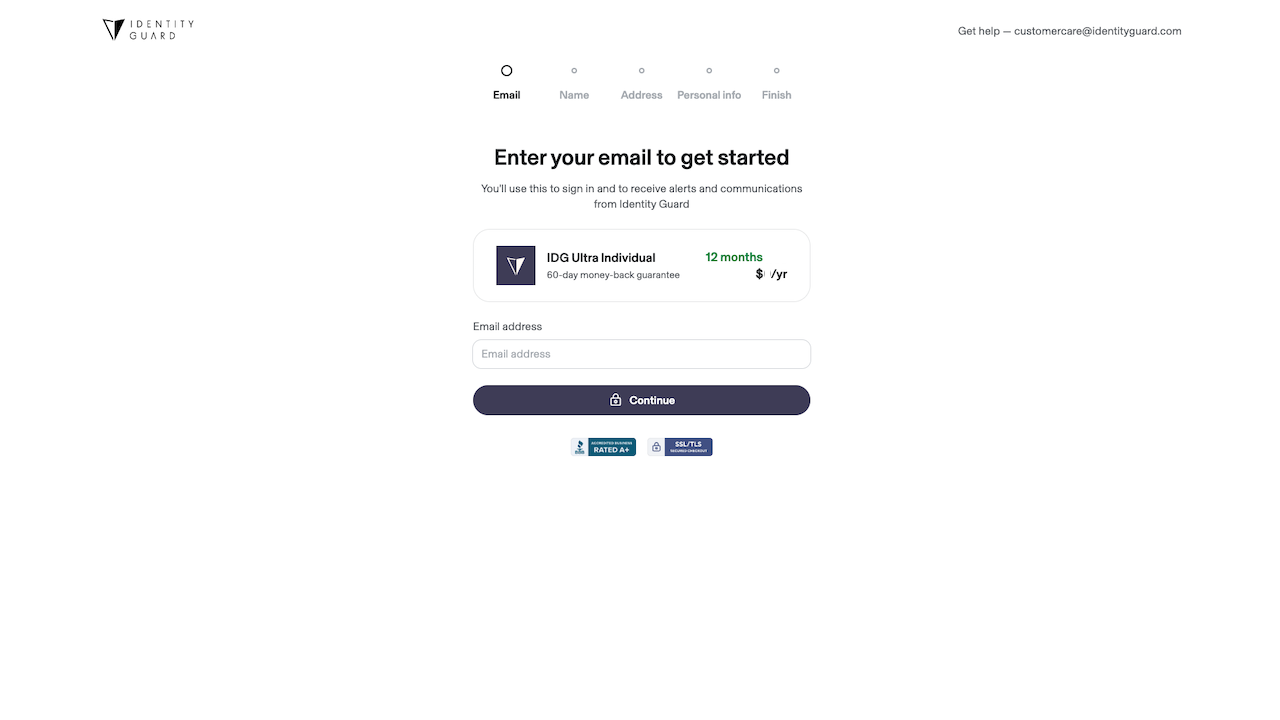
1. After selecting the plan or subscription you prefer, enter your email then click ‘Continue’
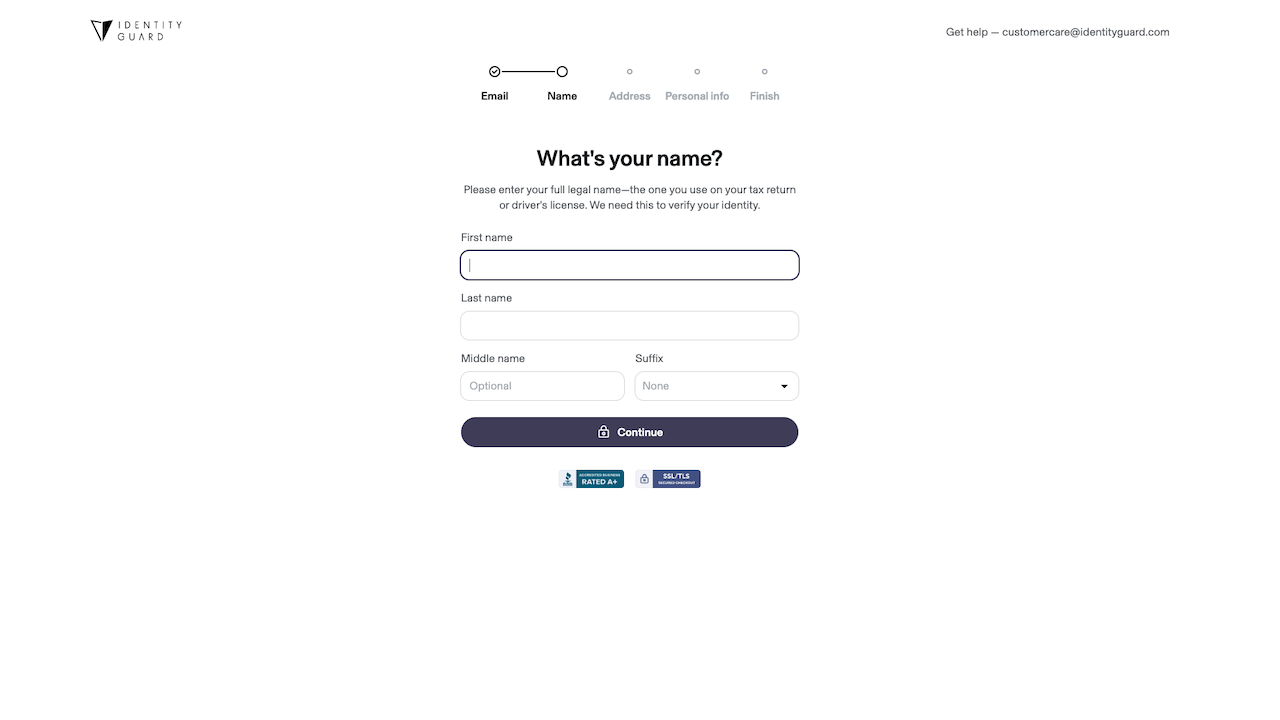
2. Enter First & Last Name as well as Middle name or Suffix then click ‘Continue’
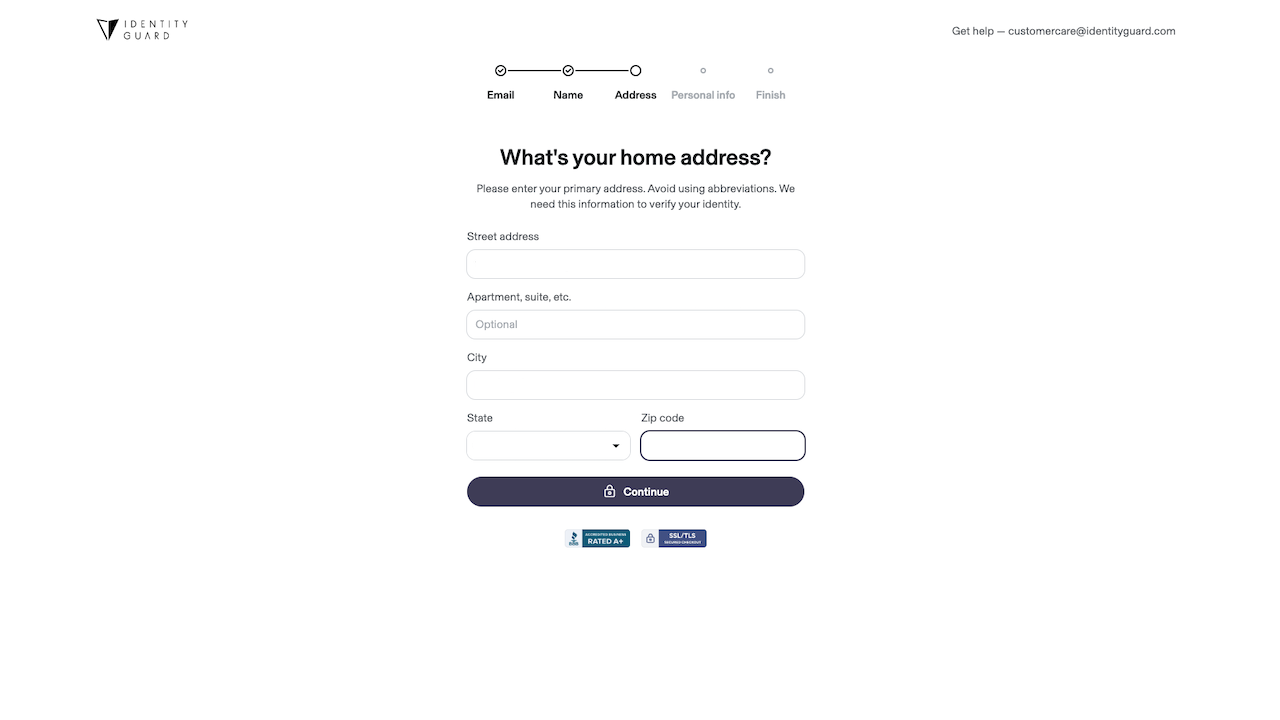 3. Enter you primary address then click ‘Continue’
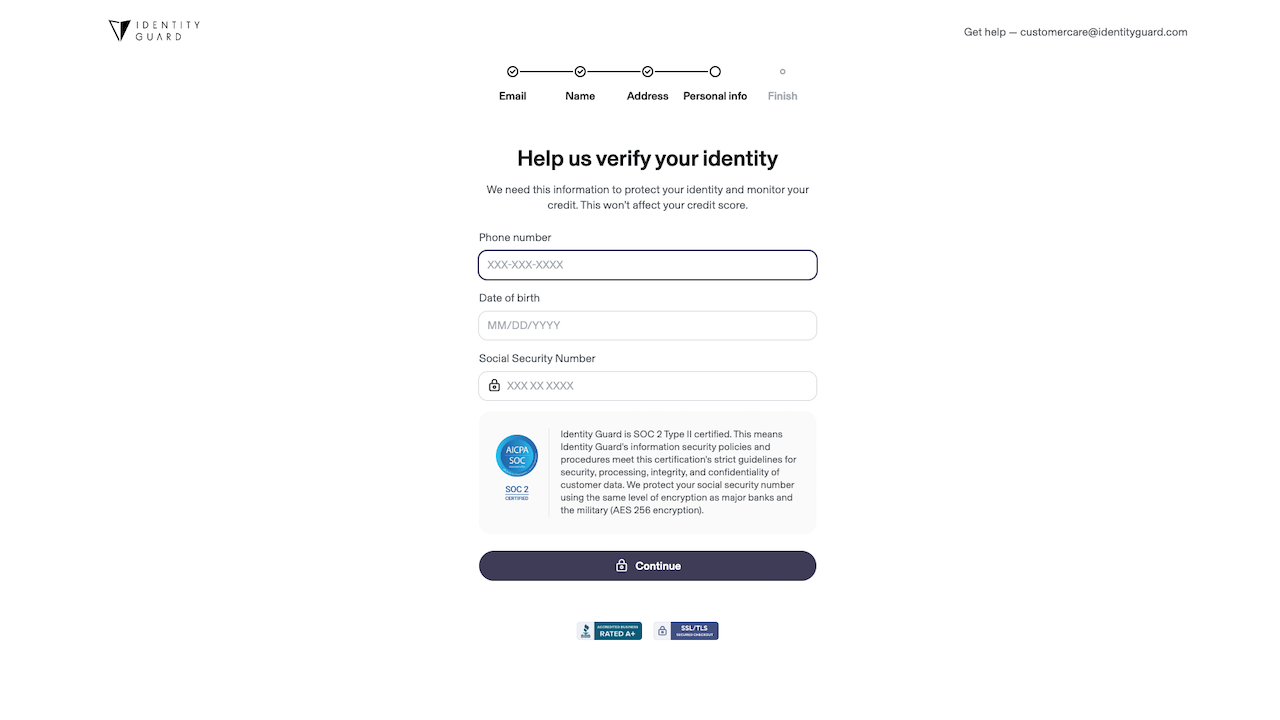
4. Enter your primary phone number, date of birth, and social security number then click ‘Continue’
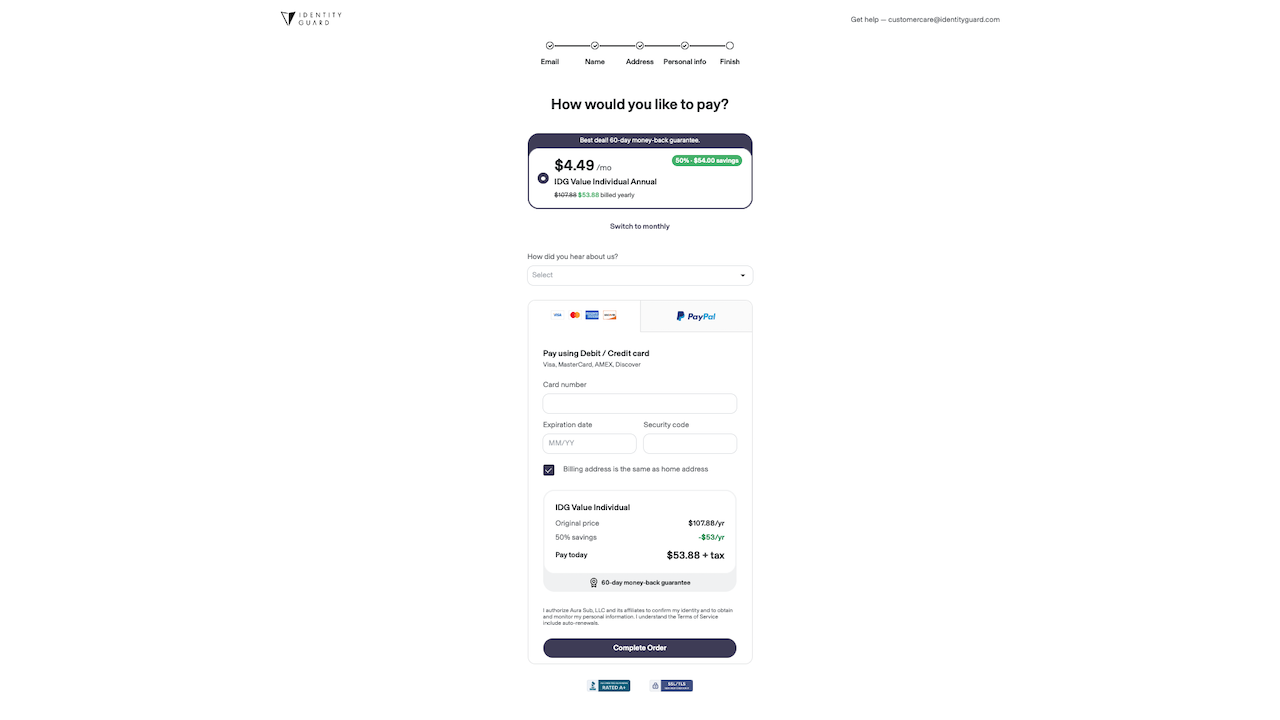
5. Double-check that you have selected the correct plan and billing cycle (monthly or annual), enter your payment information then click ‘Complete Order’
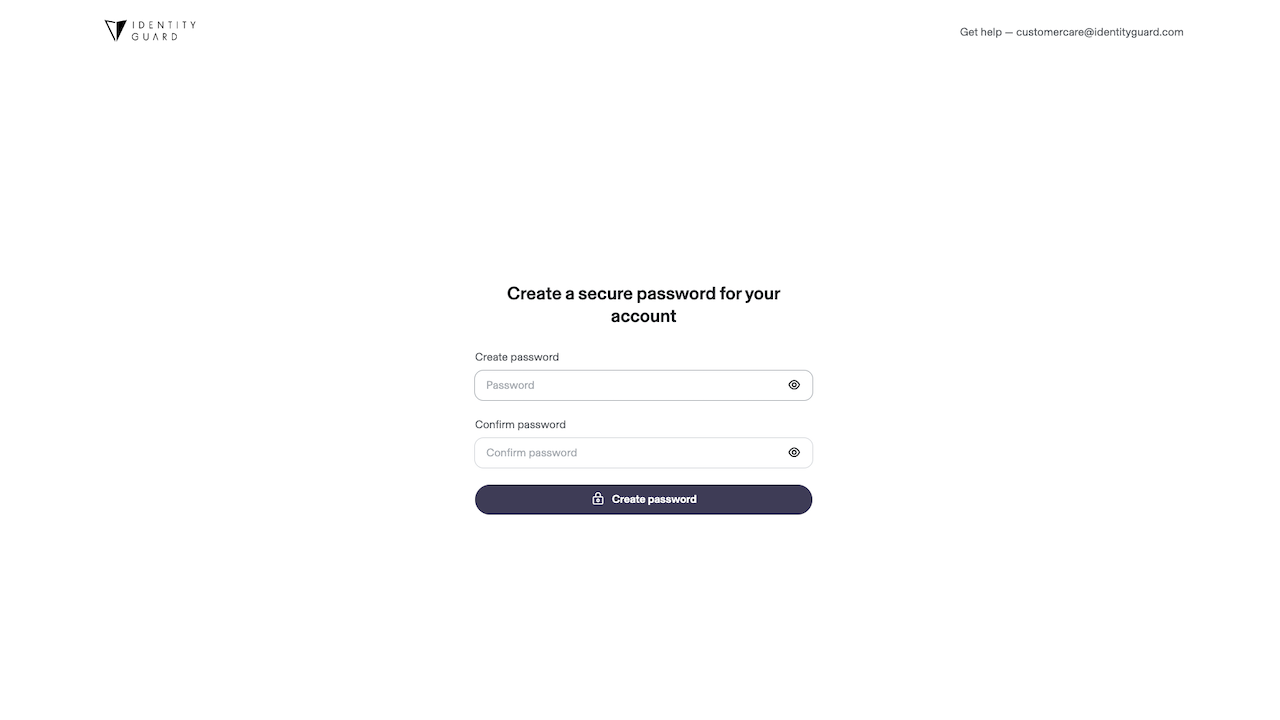
6. Create a secure password for your account, enter it again below the first box then click ‘Create Password’
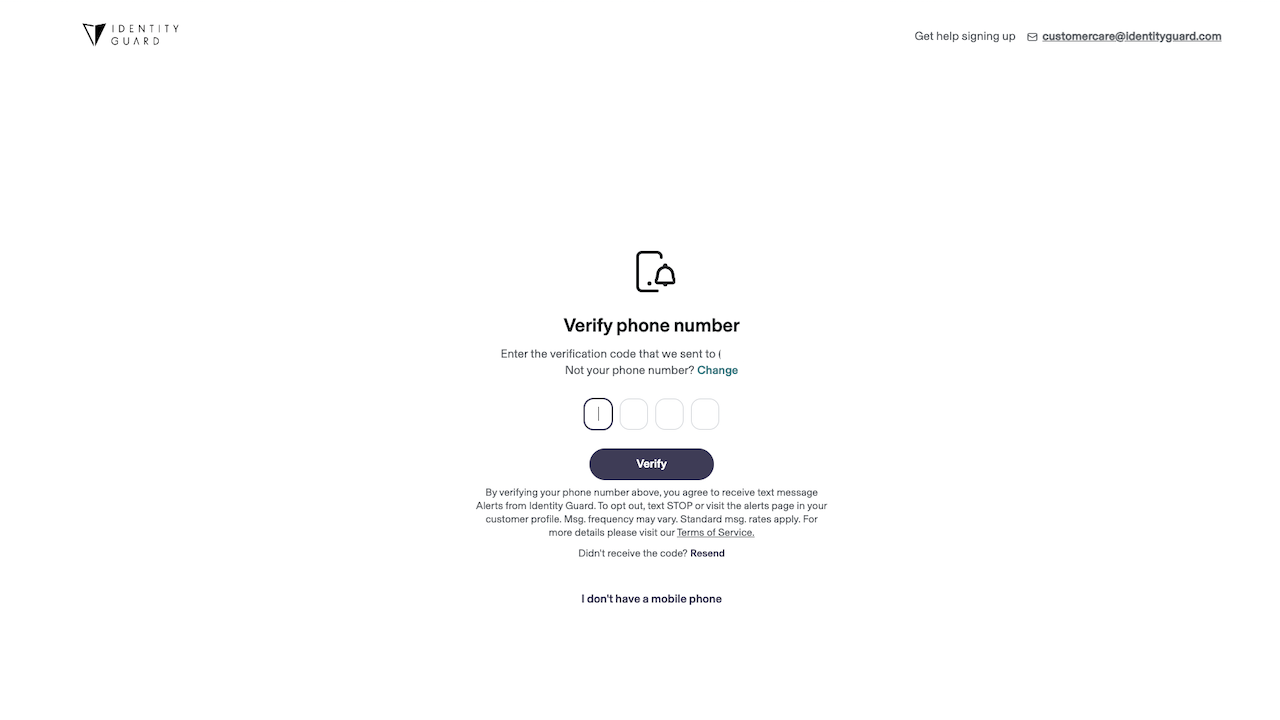
7. You’ll be sent a verification code to the number you provide in Step 4. Enter the 4 digits then click ‘Verify’ to confirm your number (or if you don’t have a mobile number, click “I don’t have a mobile phone” below & follow the prompts)
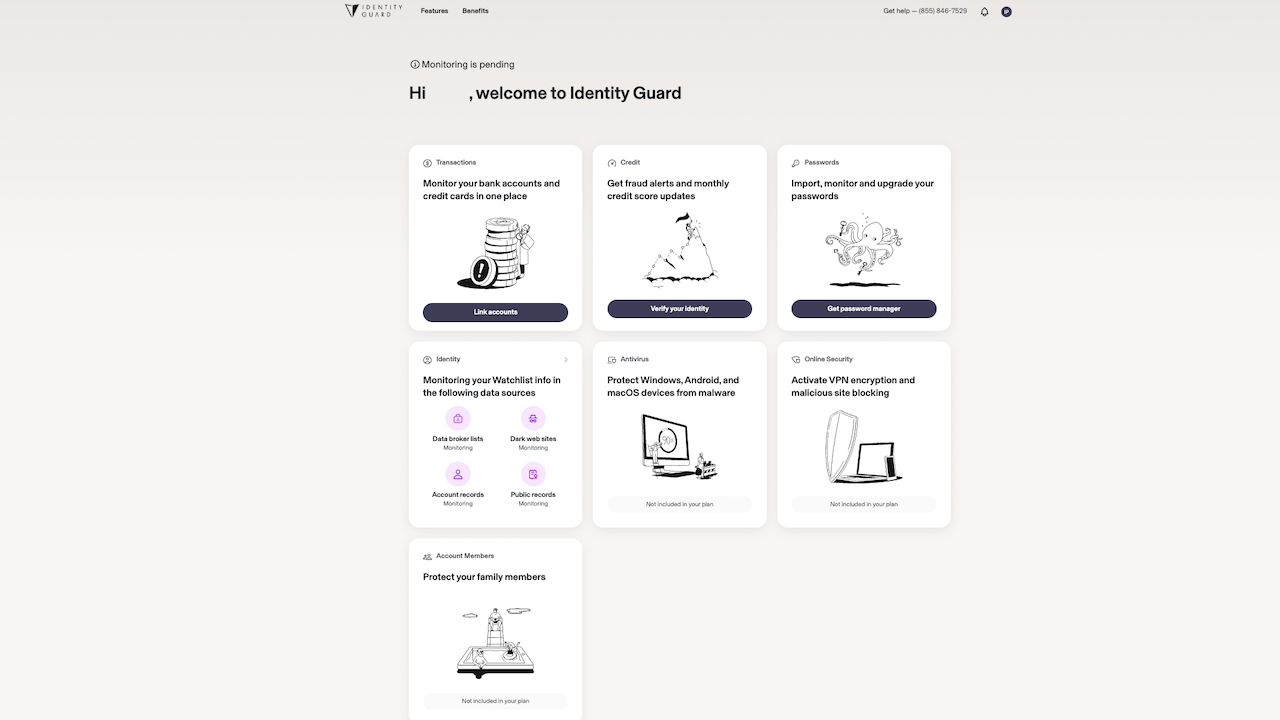
8. Once you are on the main dashboard, you can begin the verification process for each section to make sure you are maximizing your plan & staying as secure as possible.
What to do once you’ve signed up with Identity Guard
Now that you’ve finally committed toward serious fraud protection, below are steps on how to step up your account after setup. Below is a detailed video to walk you through the process of setting up credit monitoring and more.
Step 1: How to verify your identity and set up Credit Monitoring in Identity Guard
It is important to verify your identity if you want to receive fraud alert notifications. Watch the video below to guide you through and also see the steps broken out below this video.
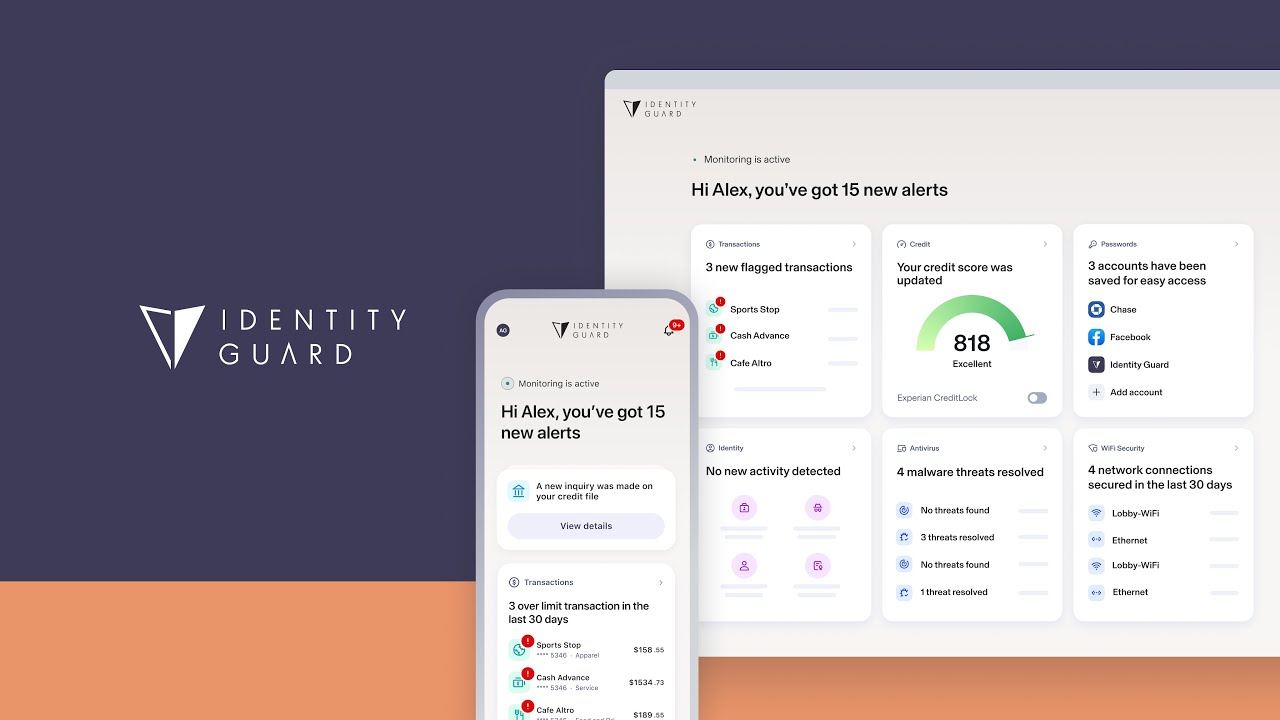
Follow these steps to verify your identity and set up your credit monitoring
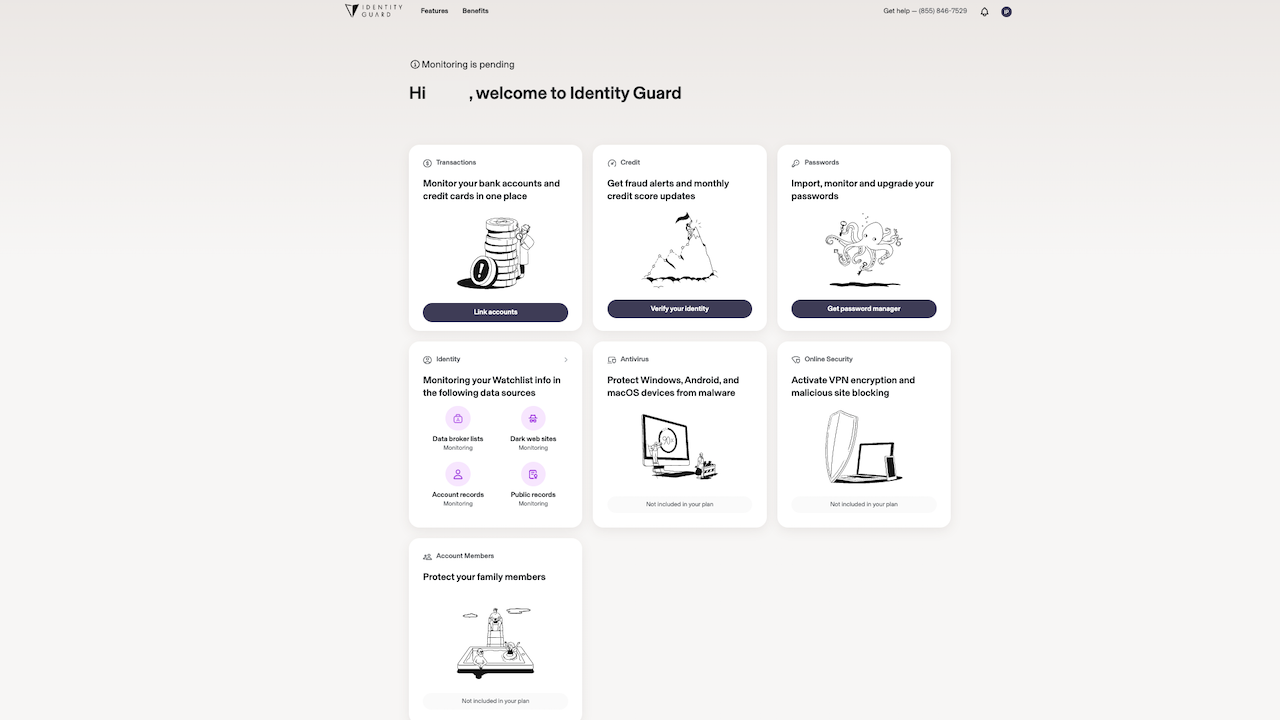
1. If you aren’t already logged into your Identity Guard dashboard, use the email address you provided at sign-up and password you created in Step 6 (above). (It may ask you to enter a security code, most likely sent to your mobile device (the phone number you provided in Step 4). If you didn’t sign up with a mobile number, it likely sent you a code to your email.
2. Click on ‘Verify your identity’ on the ‘Credit’ tile
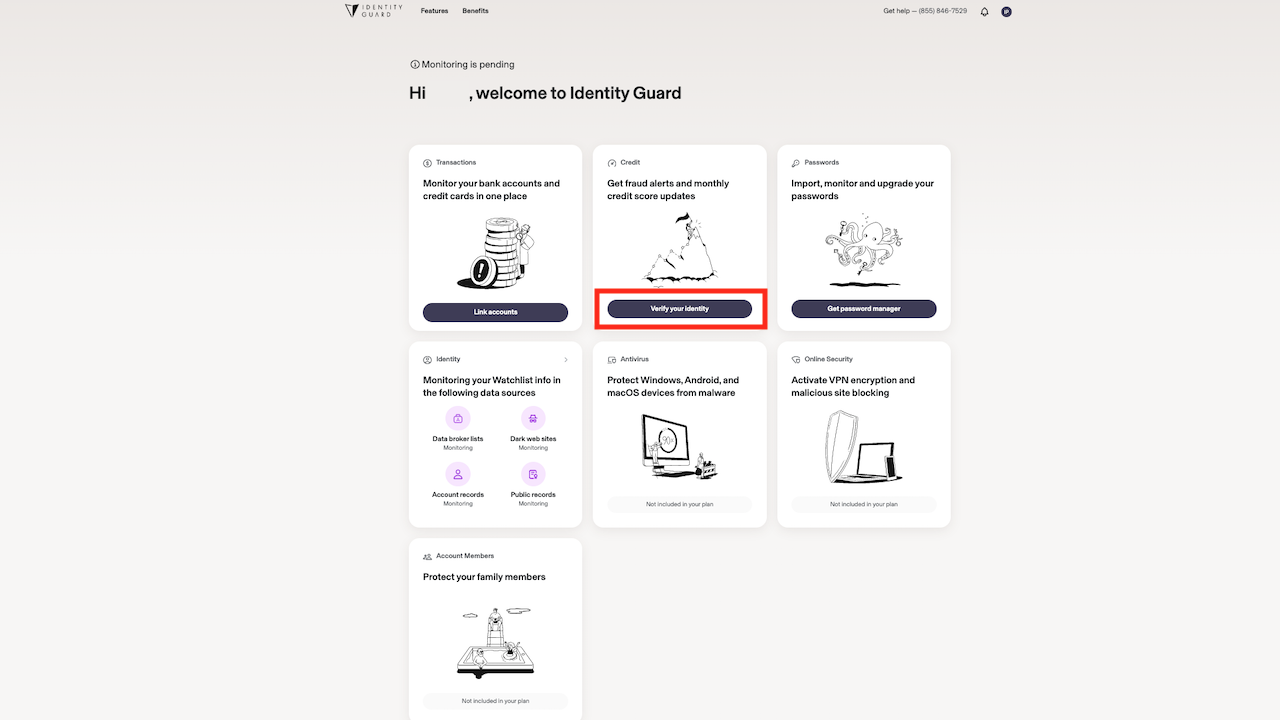
3. A pop-up window will appear, click ‘Start’ to begin verifying your identity
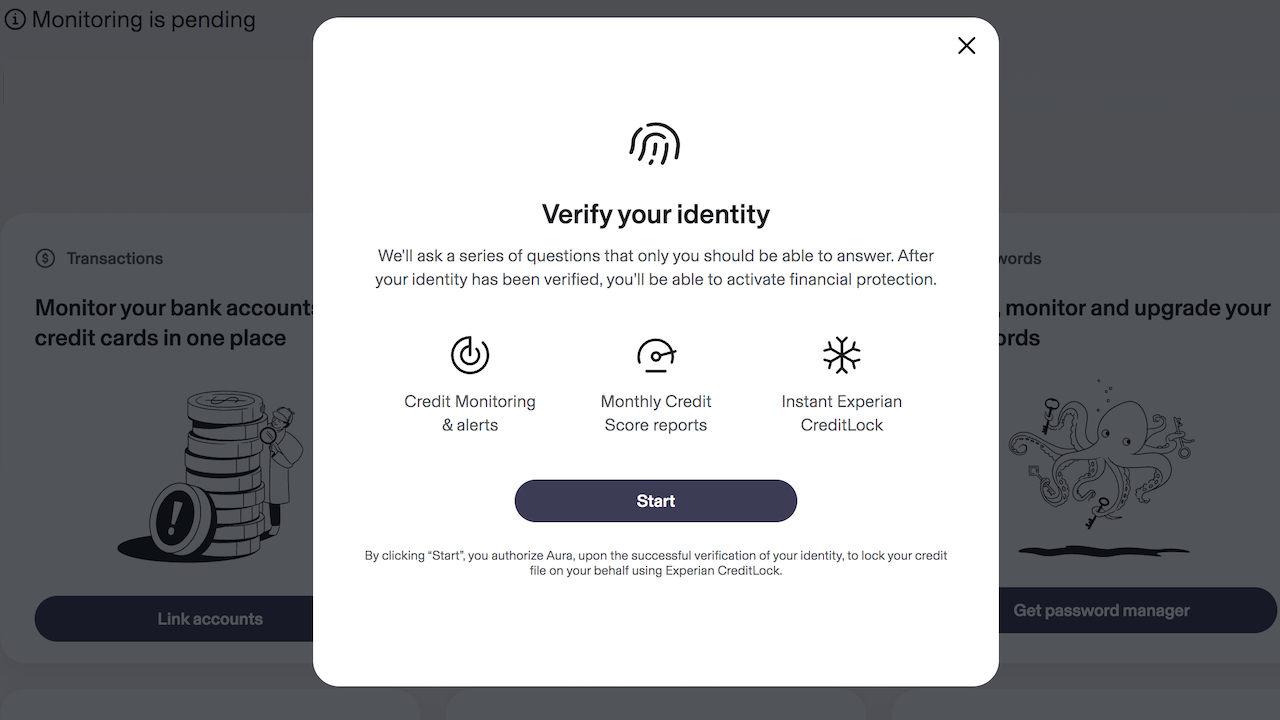
4. You will be asked questions about accounts opened, amounts paid or addresses you’ve lived or worked in. Please note, none of the options may be relevant to you. If so, then just click ‘None of the above’. You’ll be asked about 6 questions. Click ‘Next’ after each response. Once you’re finished you can click ‘Submit’
What to do after you’ve verified your identity with Identity Guard
Step 2: How to create a Watchlist in Identity Guard
1. Click on the ‘Features’ button
2. Click ‘Identity’
3. Information you provided during sign-up is automatically placed into the watchlist
4. To add information, simply click the “+” sign for each category
5. Once you’re done adding information, you can click the ‘X’ at the top of the pop-up window
6. At any point of the process, you can click the Identity Guard logo at the top left corner of your window
Step 3: How to set up a Family Plan in Identity Guard
1. If you have a family plan as part of your subscription, click the ‘Protect your family member’ tile
2. Click on ‘Invite members’ to add additional 5 adults (Don’t worry! You won’t be able to see their info and they won’t be able to see yours!)
3. Fill in first and last name, add their email address, and click ‘send’ for each family member you’d like to add to your account.
Step 4: How to access your 3-bureau credit reports in Identity Guard
Have access to 3- credit bureau reports
- To access the credit reports, click the ‘Credit’ tile, which shows the credit score OR Under ‘Features’ (on top left menu), click ‘Credit’, scroll down toward the bottom of the page, and click ‘Generate your credit report’ button
- Click ‘Request report’
- Once your report populates, you’ll get the 3 different bureaus on one page. You can click on the name of each bureau to see each report by the different bureau
- Having 3-bureau monitoring means you’ll be alerted of any changes such as new inquiries, credit lines opened, or closed accounts
- If you are alerted of any changes not made by you, you will be able to access Identity Guard’s white glove fraud resolution team. This is a US-based, fraud resolution team that helps you resolve the issue, create a remediation plan and assist you in recovering or preventing any loss or damages.
Step 5: How to setup Transaction Monitoring in Identity Guard
If you’d like to monitor your transactions and your plan allows it, you can add up to 5 bank accounts for Identity Guard to monitor.
To set up the bank accounts you want to monitor:
- Click ‘link accounts’ on the ‘Transaction’ tile
- You’ll get a pop-up box that notifies you that Identity Guard uses Plaid, a third-party company, to connect to the accounts you want monitored. This way you can connect to the accounts safely as well as understand how Plaid uses your data. Click ‘Continue’
- If you don’t see your financial institution, you can enter the name in the search box at the top. Once you see the name of your financial institution, click it.
- You’ll get a notification that you are authenticating your information with the financial institution of your choice. Click ‘Continue’
- When the login for your external account opens, enter your username and password then click to log into the account
- You may or may not be asked to verify your account with either a temporary pin, code or answer to a question
- Once you have been successfully verified, click ‘continue’
- Once you have connected to the financial account, you can set specific thresholds for each account so you can receive an alert if it goes above or below a certain threshold. You can add thresholds by clicking the exclamation icon on the top right of the ‘Transactions’ page.
What if I need additional guidance with Identity Guard?
If you have any further questions regarding any of the steps above, Identity Guard has a fantastic customer service team that will help answer any questions on their contact page.
Have you tried to protect yourself from fraud out there? How have services like this alerted you? We’d love to hear how you have handled any close calls or experiences with fraud. Tell us below!
IDENTITY GUARD – EXCLUSIVE DEAL – Save up to 73%
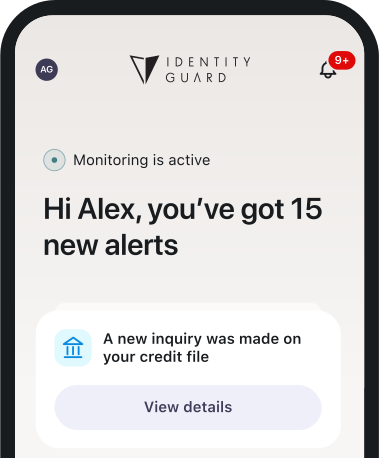

It's the smartest thing I have done in a long time - locking up my identity from evil elements online. Give the gift of protecting you and your loved ones from growing threats online. Bad actors and sinister threats from the web are taking over innocent American's identities to steal and perpetrate crimes against you. Lock up your identity and get round-the-clock protection from the leader in the identity security world. Read more about how to set up Identity Guard here.
More Less
Copyright 2025 CyberGuy.com. All rights reserved. CyberGuy.com articles and content may contain affiliate links that earn a commission when purchases are made.
🎙 Now Streaming: My New Podcast: The CyberGuy Report
Kurt’s Top Deals
Deals move fast and inventory can be limited, so don’t wait too long.
| 🔥 Editor’s pick  Summer entertaining Ninja SLUSHi Machine (26% off) Frozen drinks and slushies at home in minutes. | |
| 💰 Top deal  Outdoor essential TYPEC Solar Bug Zapper (36% off) Solar-powered bug zappers for patios and camping. |



1 comment
Here is what I do, I use one credit card for purchases online, purchase once every month (ex. medicine, cell phone bill) and phone calls. This way it something shows up it will be easy to spot