Do you ever feel overwhelmed by the constant buzzing of your phone from group chats and emails? Do you wish you could turn off specific notifications, without turning off all of your notifications? If you answered yes, then you are in the right place.
I will show you how to silence messages on your iPhone from certain conversations, and how to mute email threads that you don’t want to follow. This way, you can still receive all of your other important notifications, without being bombarded by certain conversations.
MORE: HOW TO FILTER AND SORT EMAILS ON YOUR IPHONE AND IPAD
How to hide message alerts on your iPhone
If you want to hide message alerts from a specific group chat or individual on your iPhone, here are the steps you need to follow:
- Go to the Messages app
- Select the conversation you want to silence
- In the top center, tap the name of the person or people who are in the conversation
- Toggle Hide Alerts
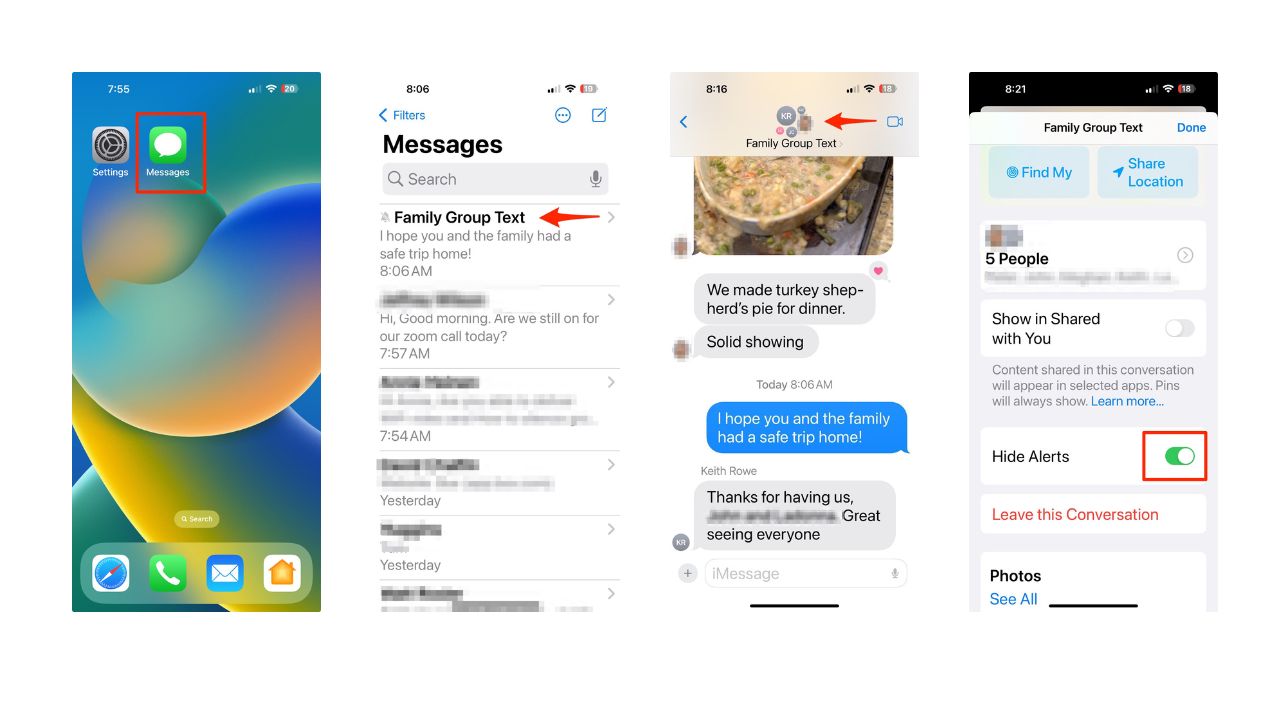
- Now you won’t receive any notifications from that conversation, unless you open the Messages app and check it manually.
MORE: 4 WAYS TO PRINT OUT, SAVE, AND SEND YOUR IPHONE’S TEXT MESSAGES
How to mute email threads on your iPhone
If you want to mute email threads from a specific sender or subject on your iPhone, here are the steps you need to follow:
- Open the Mail app on your iPhone
- Tap on the conversation you want to mute
- Tap the left-pointing arrow at the bottom of your screen
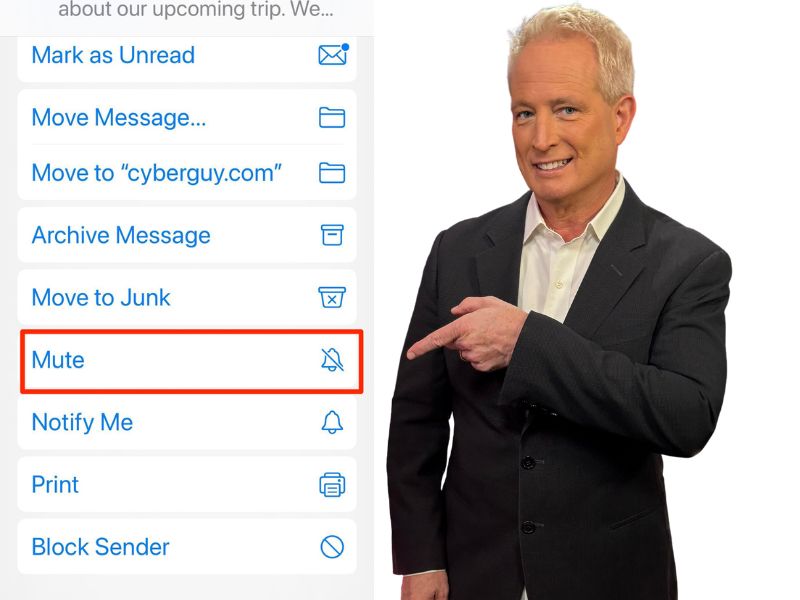
- Scroll down, then tap Mute

- Now you won’t receive any notifications from that email thread, unless you open the Mail app and check it manually.
MORE: HOW TO CREATE OR LEAVE A GROUP TEXT
Kurt’s key takeaways
Silencing group chats and emails can help you reduce distractions and focus on the things that matter to you. You can also avoid unnecessary stress and anxiety from unwanted messages. By following the simple steps we provided, you can silence messages and emails on your iPhone without missing important notifications.
How do you cope with the fear of missing out (FOMO) when you silence or mute certain conversations? Let us know in the comments below.
🎙 Now Streaming: My New Podcast: The CyberGuy Report
Kurt’s Top Deals
Deals move fast and inventory can be limited, so don’t wait too long.
| 🔥 Editor’s pick  Summer entertaining Ninja SLUSHi Machine (26% off) Frozen drinks and slushies at home in minutes. | |
| 💰 Top deal  Outdoor essential TYPEC Solar Bug Zapper (36% off) Solar-powered bug zappers for patios and camping. |