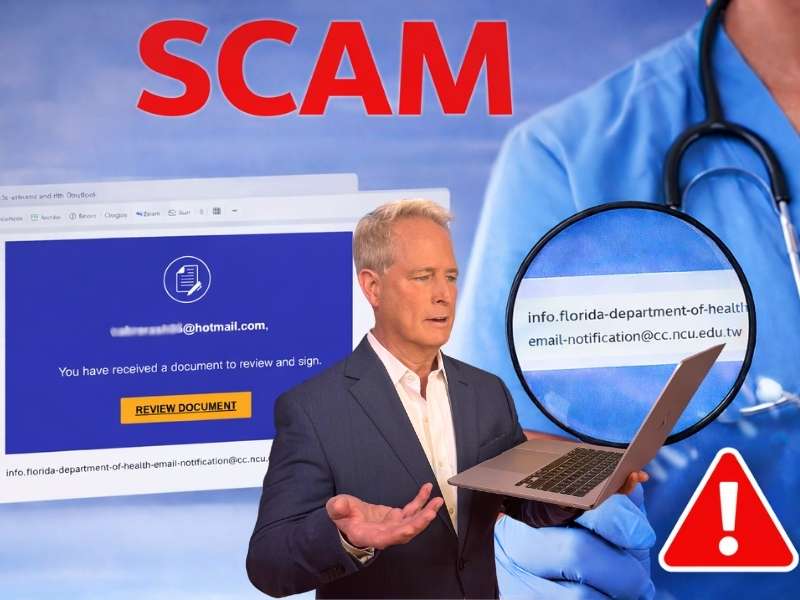
Most of us sign documents online without thinking twice. A quick DocuSign request appears in your inbox. You click the link, review the document and move on with your day. That convenience is exactly what scammers rely on. Recently, we received a message from a CyberGuy reader that shows how convincing these scams can look. In this case, the email appeared to come from a health licensing authority and asked the recipient to review a document tied to a professional license renewal.
Here is the email we received from Susie, a registered nurse in Florida who nearly fell for the scam.
“I am a Registered Nurse, and my bi-annual renewal is approaching. Last month, I received a surprising (at least to me) email with a document to DocuSign from the state Board of Health. It didn’t feel right, even though I have used DocuSign multiple times in the past. Those experiences were known transactions. I contacted the state board, and they confirmed that it IS a SCAM. I sent them screenshots, etc. and reported the message for phishing. I want to thank you, Kurt, because it was thanks to you that I questioned the veracity of this outreach. Reading the articles and tips you provide saved me a great deal of trouble. Thanks again, and all you nurses out there renewing your license, be wary.” – Susie C, Orlando, FL
Susie did exactly what security experts recommend. She paused and verified the message before clicking anything. That one step likely prevented a phishing attack.

What the suspicious DocuSign email looked like
Susie also shared a screenshot of the message she received. At first glance, the email looks familiar. The blue layout resembles real DocuSign notifications. There is even a large yellow Review Document button. But one detail stood out immediately.
The email address sending the message was:
info.florida-department-of-health-email-notification@cc.ncu.edu.tw
That address has nothing to do with a U.S. state health department.
Why DocuSign scams work so well
DocuSign is used by millions of businesses and government agencies. Because people expect these requests, they often click without hesitation. Scammers exploit that habit. A typical DocuSign phishing email tries to create urgency. It may claim a license renewal, a contract update, or a payroll form requires immediate action. Once you click the button, several things may happen:
- You may land on a fake login page designed to steal your email password.
- The site may prompt you to download a malicious file.
- The link may redirect you to several phishing pages.
In many cases, the goal is simple. Attackers want your email credentials so they can take over your account or launch more scams.

Red flags in the DocuSign scam email
A few warning signs can help you spot a fake request quickly.
Suspicious sender address
Always look closely at the sender’s domain. Government agencies rarely send messages from foreign academic domains like .edu.tw. That alone signals something is wrong.
Unexpected documents
Legitimate DocuSign requests usually follow a known interaction. For example, a contract you discussed or paperwork you expect. An unexpected document should always raise questions.
Pressure to act quickly
Many phishing emails include language that urges immediate action. The goal is to stop you from thinking. Take a moment before clicking any button.
Generic document descriptions
The message shown in the screenshot simply states that a document is ready to review. It provides no real context or explanation. Legitimate documents often include details about the transaction.
Watch the latest episode of The CyberGuy Report.

Missed this event? Sign up via the registration form and see our live recording.
See Kurt’s Prime Day picks for useful gadgets, practical upgrades and everyday tech while the deals last.
How clicking the link could compromise you
Many people assume they will recognize a fake page. In reality, phishing sites look very convincing. Some scams even use cloned DocuSign pages. Once victims enter their credentials, attackers gain access to their email accounts.
From there, criminals can:
- Reset passwords for financial services
- Send phishing emails to contacts
- Search inboxes for sensitive documents
In healthcare professions, that risk can also expose licensing information or patient-related communications.

Ways to stay safe from DocuSign phishing scams
Fortunately, a few habits can dramatically lower your risk.
1) Verify the request separately
If a document claims to come from a government agency or employer, contact them directly using a known phone number or website. Never use the contact information inside the suspicious email.
2) Hover over links before clicking
Move your cursor over the button and check the destination link. If the URL looks unfamiliar or unrelated to DocuSign, do not click it.
3) Don’t click links and use strong antivirus software
If an email seems suspicious, do not click the link or open any attachment. Strong antivirus software can help block malicious downloads, warn you about dangerous websites and catch threats before they spread across your device. Our #1 pick for antivirus is TotalAV ($19 for 5 licenses). Read more here.
4) Use a data removal service
Scammers often gather personal details from data broker sites and public records to make phishing emails seem more believable. A data removal service can help reduce your exposed information online, which may make it harder for criminals to target you with convincing messages.
Incogni, a service I trust 100% and use myself, helps automate the process by submitting removal requests to hundreds of data brokers and people-search sites on your behalf.
Incogni automatically contacts data brokers on your behalf and requests the removal of your personal information. It also continues monitoring those sites and submits new removal requests if your data reappears.
- Incogni currently removes personal data from 420+ data broker and people-search websites, and its Unlimited plan allows you to request removals from as many additional sites as you need.
- Incogni has also received third-party assurance from Deloitte, validating its marketing claims.
- The goal is simple: make it much harder for strangers, scammers, and cybercriminals to find your personal information online.
CyberGuy readers get 60% off Incogni’s annual plans using the links in this article.
The service also includes a 30-day money-back guarantee, so you can try it risk-free and see how much of your information is exposed online.
Is your personal information exposed online?
Run a free scan to see if your personal info is compromised. Results arrive by email in about an hour.
5) Access documents through official accounts
If you regularly use DocuSign, sign in directly at the official website and check your pending documents there. That approach avoids email traps entirely.
6) Report phishing attempts
Forward suspicious messages to your organization’s security team or the Federal Trade Commission phishing reporting system at ReportFraud.ftc.gov. The FTC also advises forwarding phishing emails to the Anti-Phishing Working Group at reportphishing@apwg.org. Reporting scams helps protect others from the same attack.
Related Links:
- Scams that aren’t illegal (but should be)
- Be aware of extortion scam emails claiming your data is stolen
- Tax season scams 2026: Fake IRS messages stealing identities
Kurt’s key takeaways
Scams succeed because they blend into everyday routines. Signing documents online has become normal for work, healthcare licensing and financial paperwork. That convenience also gives criminals a perfect disguise. Susie’s story shows how a small moment of doubt can stop a phishing attack before it begins. A quick call to the licensing board revealed the truth. The message was never legitimate.
Now the question is one every reader should consider. If a DocuSign email arrived in your inbox right now, would you notice the warning signs before clicking the button? Let us know your thoughts in the comments below.
FOR MORE OF MY TECH TIPS & SECURITY ALERTS, SUBSCRIBE TO MY FREE CYBERGUY REPORT NEWSLETTER HERE
Copyright 2026 CyberGuy.com. All rights reserved. CyberGuy.com articles and content may contain affiliate links that earn a commission when purchases are made.
🎙 Now Streaming: My New Podcast: The CyberGuy Report
Kurt’s Top Deals
Deals move fast and inventory can be limited, so don’t wait too long.
| 🔥 Editor’s pick  Summer entertaining Ninja SLUSHi Machine (26% off) Frozen drinks and slushies at home in minutes. | |
| 💰 Top deal  Outdoor essential TYPEC Solar Bug Zapper (36% off) Solar-powered bug zappers for patios and camping. |