



- Scammers copy your name, photo and public details to create fake Facebook profiles that look like you.
- They send friend requests to your contacts, then ask for money, passwords or personal information.
- Reporting the cloned profile quickly and warning your friends can limit the damage.
- Making your friend list and posts private makes it harder for scammers to copy your account.
If you could get a penny for every new scam online, you’d be on your way to becoming rich. If you got a penny for every person who has had their account hacked on Facebook, you’d be doubly rich. Not only do you have to contend with hackers hijacking your accounts or selling your information on the dark web, but now? Hackers are skipping the attempts to infiltrate your accounts and instead cloning your Facebook account.
What is Facebook cloning?
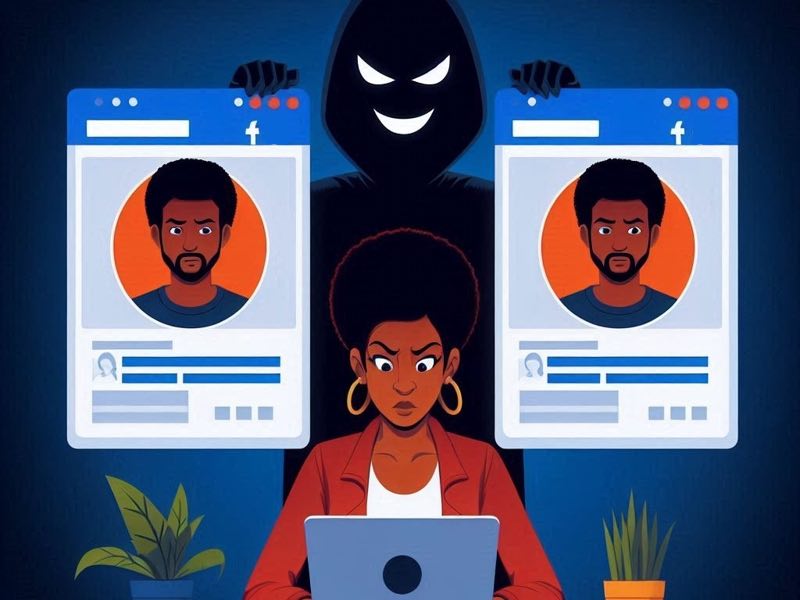
Scammers are creating fake Facebook accounts using your name, photo, and public details. These cloned profiles appear identical to yours. Then, they send friend requests to your real friends and family. Once accepted, they quickly follow up with a message. Usually, they claim to be in trouble. For example, they might say they’re locked out of an account or need urgent money. These messages try to create panic and gain sympathy. Because the account looks like yours, many people believe it’s real. As a result, your friends might send money or share private information.
What hackers commonly ask for with a cloned account:
- Money
- Additional personal information
- Password and login information
- Redirecting unsuspecting people to spam and scam websites
Yes, it seems unlikely that anyone would be duped so easily. Yet many people do get fooled. Most people also don’t hesitate to accept friend requests from people they think they already know. Due to their concern for their friend or family member, many rush in an effort to help someone they know with resources, access, or information.
What to do if someone clones your Facebook account
Even though cloning isn’t as serious as hacking, it still poses risks. Take these quick steps to protect yourself and minimize damage:
1) Tell your friends and family right away
Let them know someone cloned your Facebook account. Warn them not to accept any new friend requests from the fake profile.
2) Get as many friends and family to report the cloned account as possible
Below are the steps to take to report these cloned accounts:
- On the cloned account’s profile, click the three dots under the profile banner
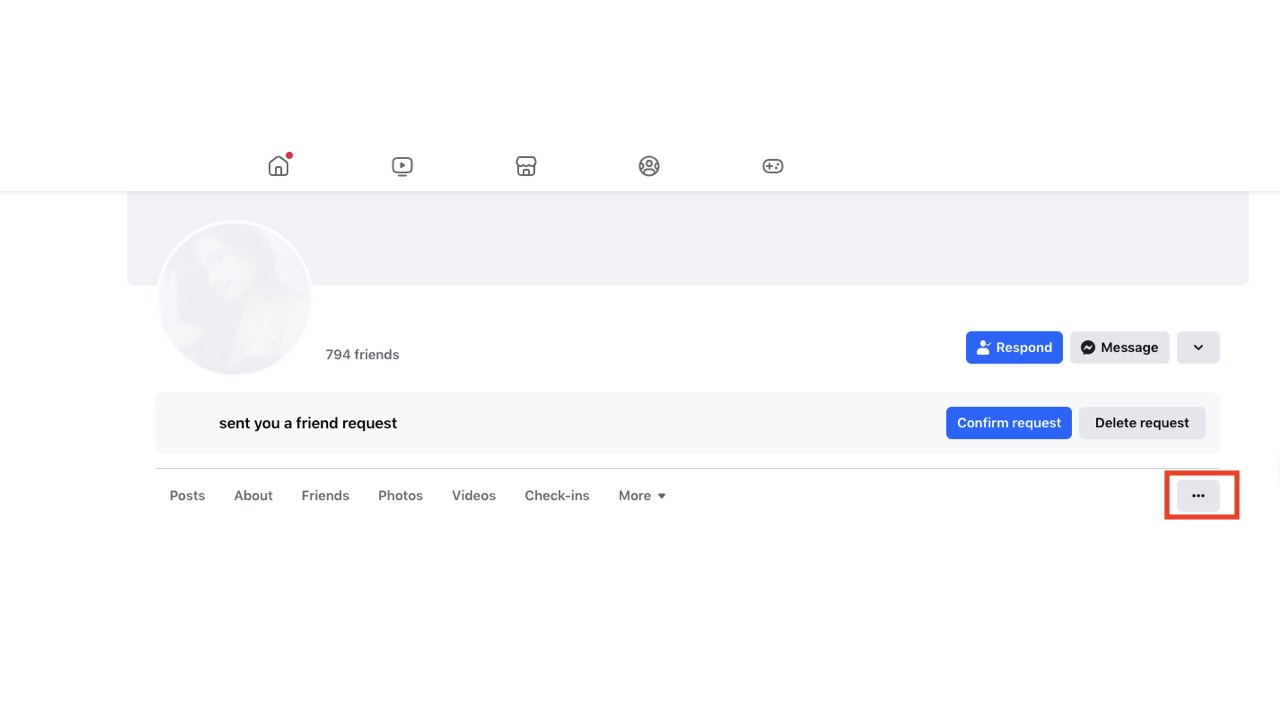
- Select ‘Report Profile’ in the drop-down menu
- Select ‘Fake account’ as the problem in the next drop-down menu
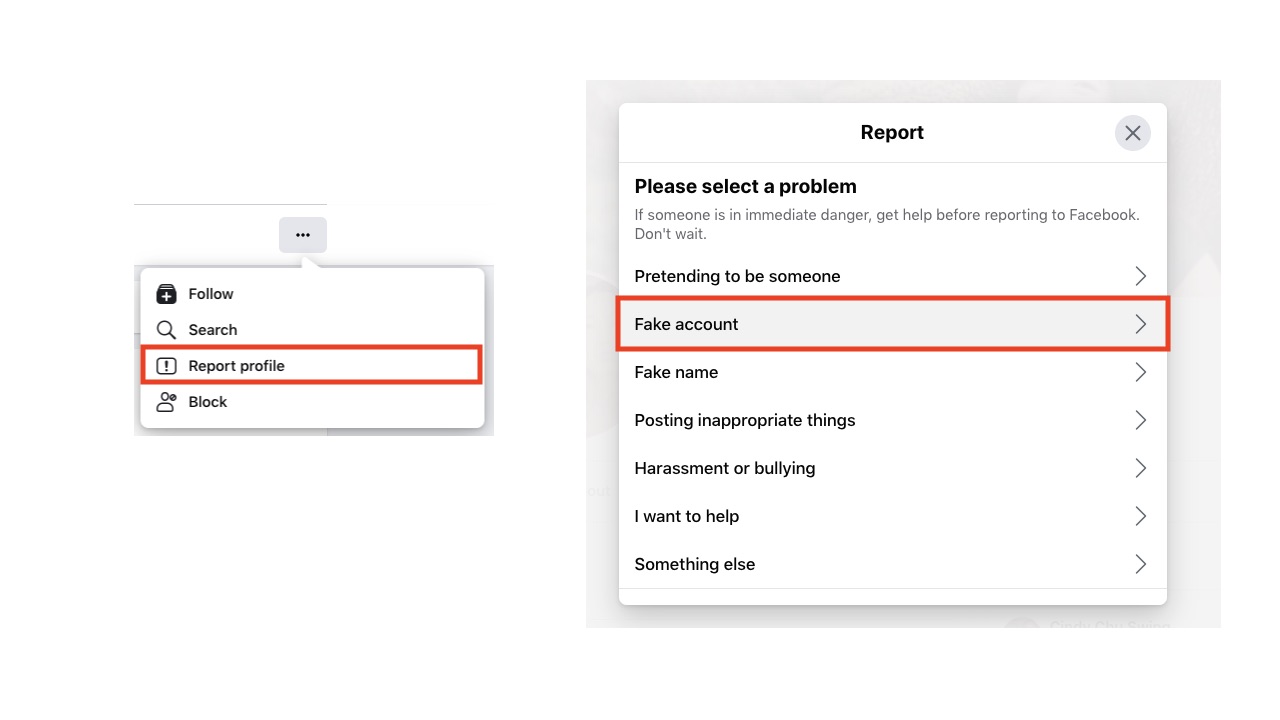
If you successfully reported the cloned profile, you should get a confirmation message showing the progress of their review of the account.
3) If your account is cloned, it doesn’t necessarily mean it is hacked, so check your settings to determine if anyone has access to your account before taking more stringent measures. To take more specific steps to secure your Facebook account from being hacked, follow the steps in 5 ways to make your Facebook account bulletproof.
Watch the latest episode of The CyberGuy Report.

Missed this event? Sign up via the registration form and see our live recording.
See Kurt’s latest Amazon picks for useful gadgets, smart home upgrades and everyday tech worth grabbing while the deals last.
How to prevent Facebook cloning?
While it is difficult to prevent someone from cloning your Facebook account, there are some steps you can take to make it more difficult.
1) First, you can check if this is already happening by entering your name in the search bar on Facebook. While there may be multiple users with the same name, cloned accounts are usually identifiable because they try to use your photo to dupe your friends and family.
2) Make your Friend List private so no one can access it. This will make it harder for people, even in your network, to know who to contact with these cloned accounts.
3) Change your privacy settings for photos, videos, and information you post so people can’t use your photos and info to create profiles. Hackers can freely use anything you set to ‘public’ when creating cloned accounts.
Related Articles:
- Can you stop Mark Zuckerberg from using your art on Facebook?
- How I was tricked and locked out of Facebook after being hacked
- Watch out for this Facebook scam targeting your credit card
Kurt’s key takeaways
As long as social media exists, there will be bad ‘actors’ working every possible angle to take advantage of people and their networks. Aside from following best practices in keeping your accounts secure, it is now important to keep your personal information and media private. With hackers now cloning Facebook accounts, you might not even know about such an account until a friend or family member alerts you. With clear communication with your social networks on Facebook and enlisting their support to report the fake account, you can take steps to secure your presence on Facebook. While there will inevitably be another scam on Facebook, we will keep you notified and on high alert so you can nip it in the bud.
Has anyone ever cloned your Facebook account? Have you received a friend request from a cloned account? Let us know in the comments below.
FOR MORE OF MY TIPS, SUBSCRIBE TO MY FREE CYBERGUY REPORT NEWSLETTER HERE
Copyright 2026 CyberGuy.com. All rights reserved. CyberGuy.com articles and content may contain affiliate links that earn a commission when purchases are made.
🎙 Now Streaming: My New Podcast: The CyberGuy Report
Kurt’s Top Deals
Deals move fast and inventory can be limited, so don’t wait too long.
| 🔥 Editor’s pick  Summer entertaining Ninja SLUSHi Machine (26% off) Frozen drinks and slushies at home in minutes. | |
| 💰 Top deal  Outdoor essential TYPEC Solar Bug Zapper (36% off) Solar-powered bug zappers for patios and camping. |


7 comments
In March of 2021 someone hacked into my facebook account and I kept changing my password I even did the 2 step verification and this person still kept hacking into!! So I gave up and deleted my account, the thing is why does it take facebook 30 days before they delete your account??!! I opened another one with only my middle name and my maiden name and this person HACKED into that one to and took it over!! I couldn’t get into it anymore and it started saying you were moving to fast so your locked out for awhile…. what does that even mean?? Sad facebook doesn’t care and there’s no one to report it to! it was someone using a Samsung S21 phone and every time had always had a weird email address always changing it. So who knows what this person did to my account!! And the people I was friends with on there! The hacker took over my account for 2 years doing GOD knows what! It was finally deleted in late 2023.
I’ve just been cloned a 2nd time. They comment on my friend’s post as me saying “inbox me”. My friends list is already private. I run my business on FB contacts so I have to keep my feed public. Not sure what else to do.
You freaked me out when I saw your comment on the side of my screen. In this day and age I took the term “cloned” literally, as in DNA, physical human biological replica.
Now I realize you were just using it as a computer metaphor. Hah.
You didn’t mention the situation where you’re in facebook and your screen freezes and a voice says Do not try to turn off your computer, etc. etc…. All you have to do is close the browser and the freeze goes away. But a lot of people don’t know this.
That situation where you’re on Facebook and suddenly your screen freezes while a voice warns you not to turn off your computer is a common browser-based scam. It’s not a real virus—just a fake alert designed to scare you into calling a bogus tech support number. The good news is, all you need to do is close your browser completely, and the problem usually goes away. Don’t click anything, don’t call the number, and when you reopen your browser, make sure you don’t restore the previous session. A lot of people don’t realize it’s just a webpage causing the freeze, not an actual issue with their computer.
I’ve NEVER had a Facebook account. I recently tried to establish an account after retiring and received a message from FB that my account has been suspended due to violations of FB community rules. I guess someone has stolen my personal data used it make a fake account? I have requested a review and still denied an account. Not sure there is any recourse??
Hi Abe, It’s possible that someone used your personal information to create a fake profile in the past, which may have triggered a flag on your name or email when you tried to sign up. I recommend submitting a Data Access Request to Facebook using this form. You can also email disabled@fb.com and appeals@fb.com to explain your situation and request a manual review. Be sure to clearly state that you’ve never had a Facebook account before and that your personal information may have been misused. While Meta isn’t always easy to reach, persistence and using the right channels can sometimes make a difference.