



Amazon never asked you.
It would have all been good if Amazon simply let us choose instead of forcing it on us assuming we have no voice. Oh wait, I just remembered, Amazon does know we have a voice and in fact, let their Amazon team listen to Alexa recordings at will until one of their guys let the cat out of the bag.
Amazon Sidewalk is the name they gave this new slippery privacy slope that allows your existing Amazon devices like Echo and Ring Video Doorbell to be shared with the people in your neighborhood.
The sharing of your Amazon devices to others in your neighborhood is meant to help “devices work better” says Amazon which may be true, but they go on to say we should not at all be worried about privacy and security. That’s a crock so I am going to show you how to Opt-Out of Amazon Sidewalk.. aka letting your neighbors have access to your internet without asking.
Don’t worry, there is a way to stop Amazon Sidewalk from sharing your internet with strangers.
First, make sure you have the latest Alexa app installed on your phone or tablet and the most recent software update to your operating system such as iOS or Android are current.

How to Opt-Out of Amazon Sidewalk in the Alexa App
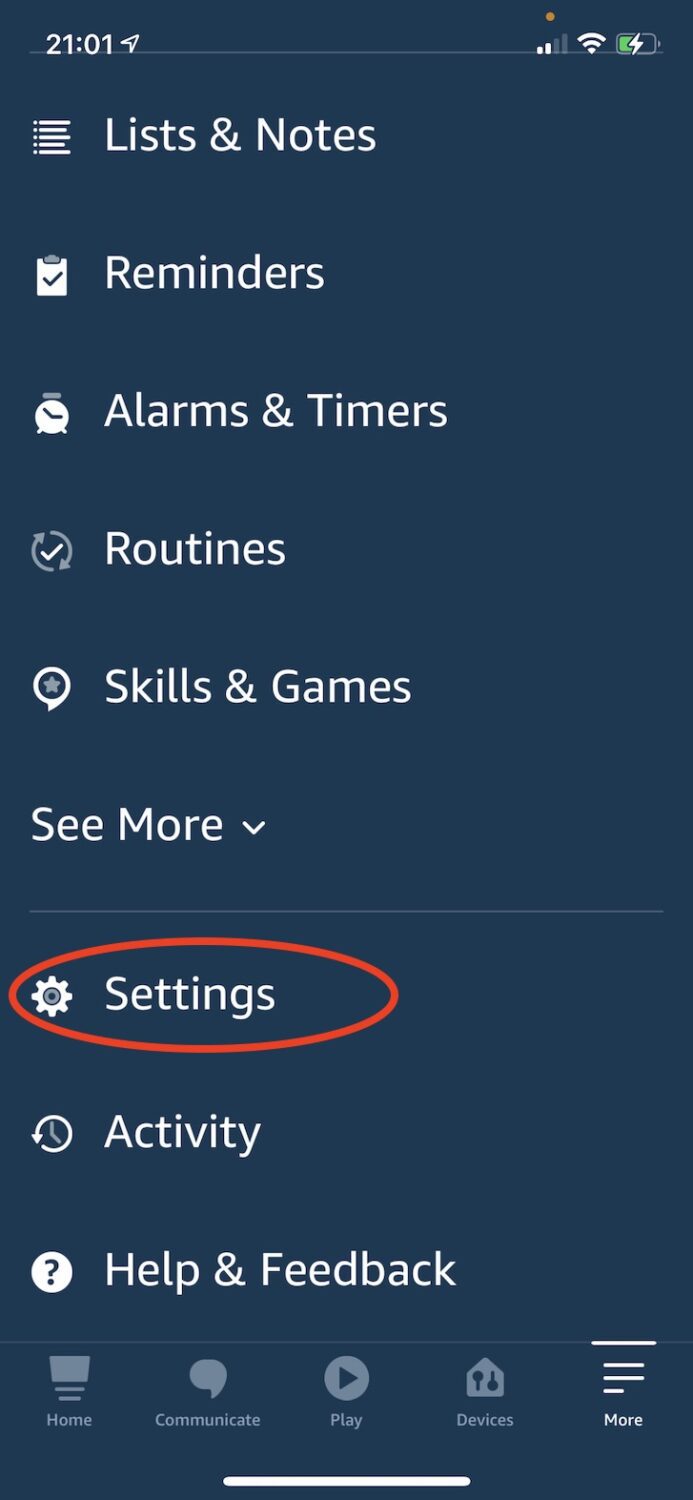
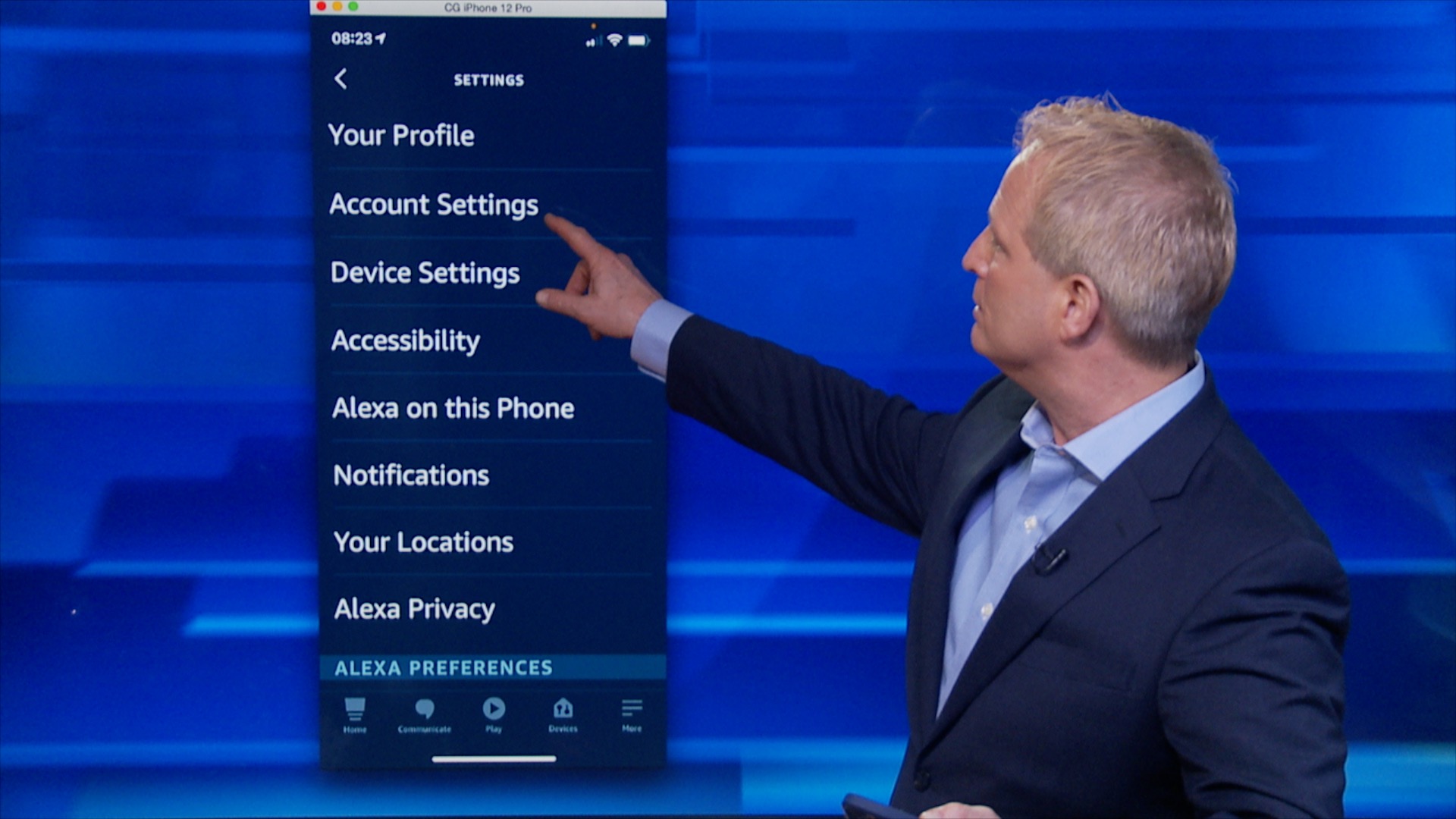
1) Launch Amazon Alexa app on your phone or tablet & tap “Settings”
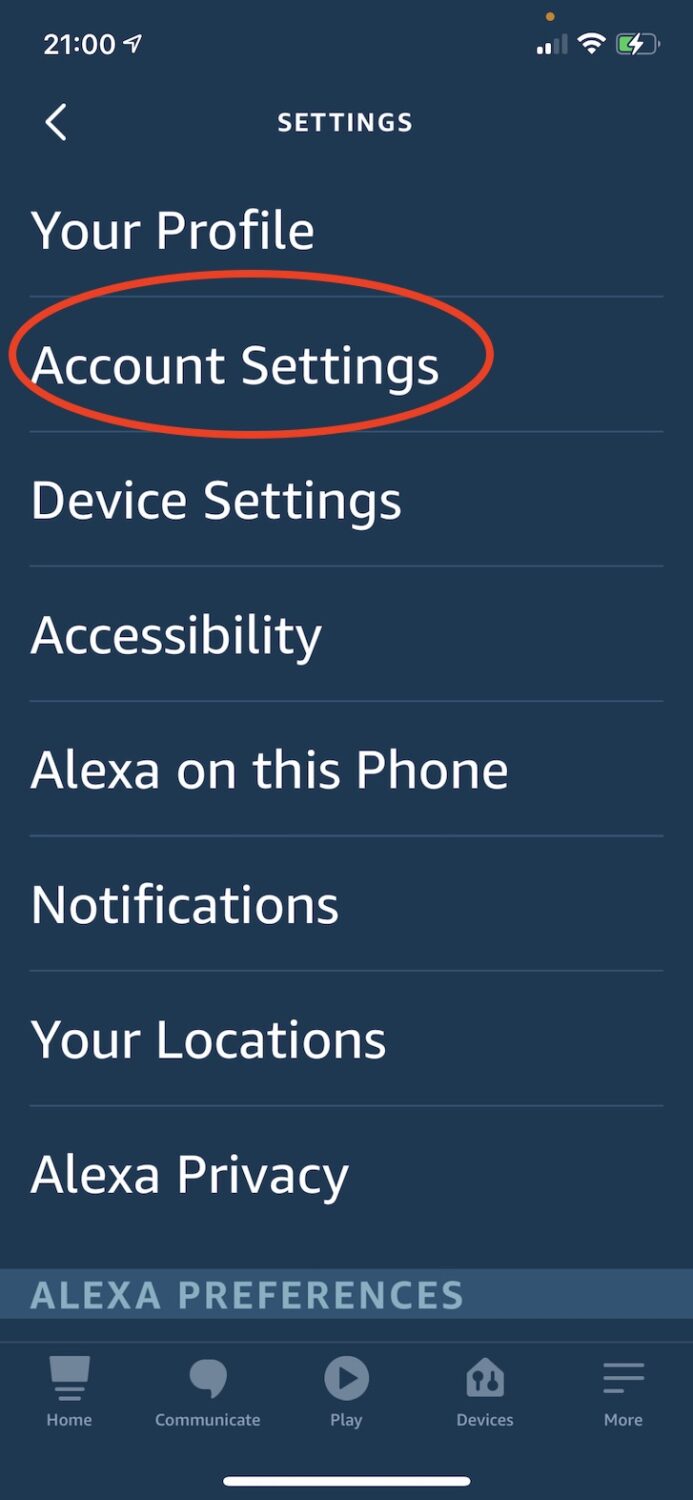
2) Click “Account Settings”
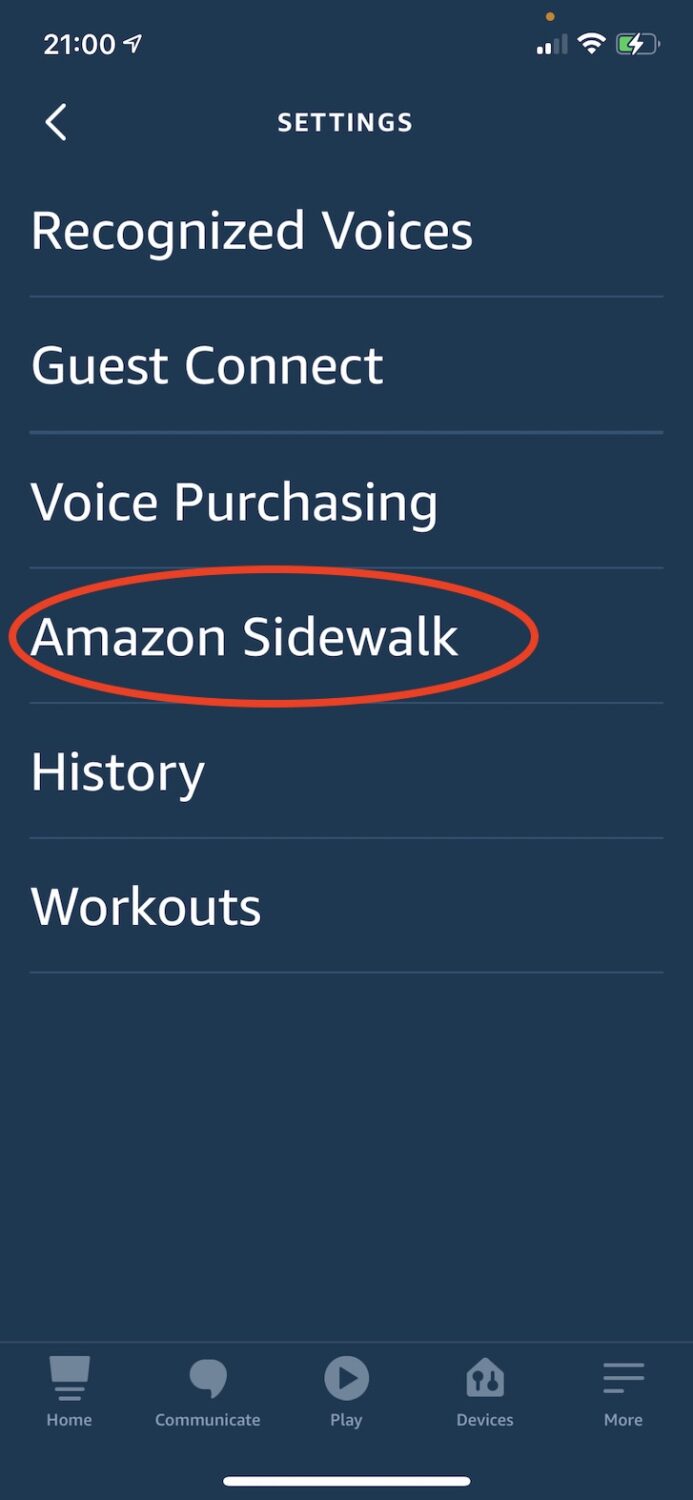
3) Click “Amazon Sidewalk”
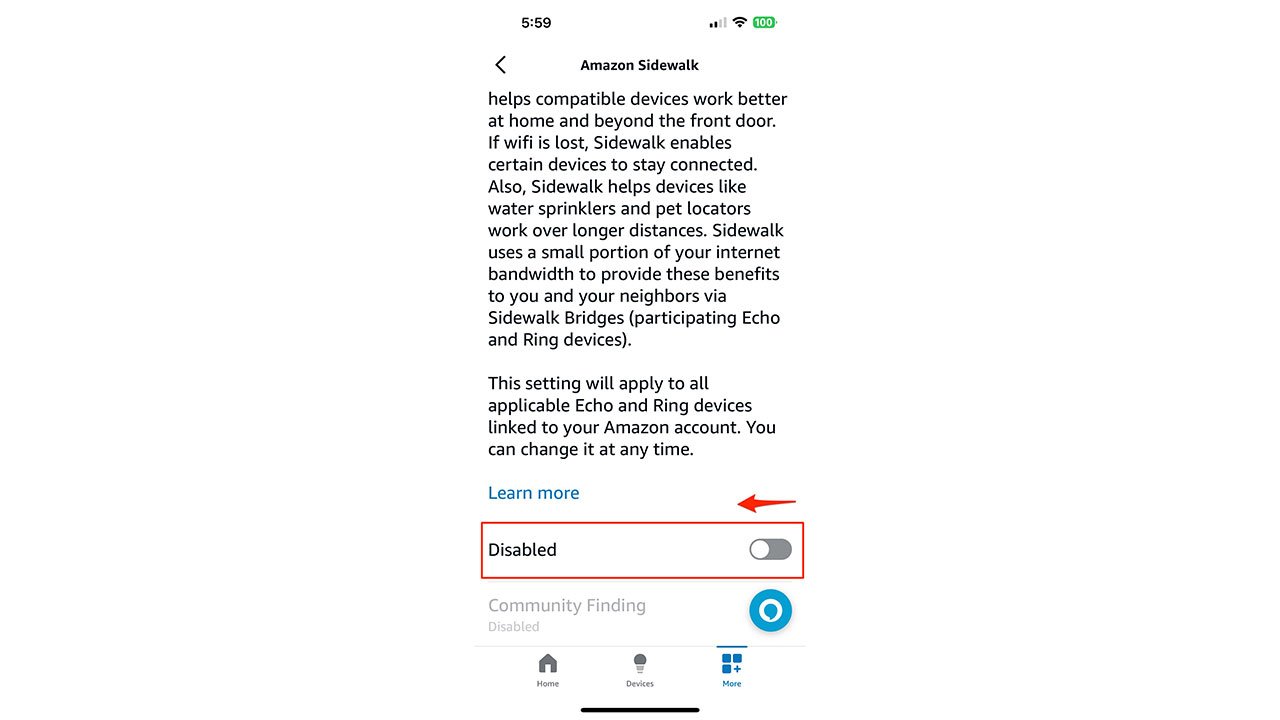
4) Scroll way down to the bottom and toggle it to the LEFT so that it reads “Disabled”
How to Opt-Out of Sidewalk on your Ring Video Doorbell or Ring devices
1) Launch Ring app
2) Tap 3-line menu in top left
3) Go to “Control Center” (towards bottom of navigation)
4) Click “Amazon Sidewalk”
A Texas mom says she spent the night in jail after speaking up online about dirty water in her town. The case was later dropped, but her story raises a troubling question: could something you post online ever put you at risk?

Missed this event? Sign up via the registration form and see our live recording.
See Kurt’s 2026 picks for practical tech and everyday upgrades.
5) Slide Sidewalk slider button to left so it reads “Turned off” (This feature is coming soon to select Ring devices so it is possible you don’t yet see this slider button)
You can always change your mind later. And wouldn’t it have been nice to be told in the first place so that you could decide whether you want this or not before Amazon made the decision for you without much of a peep?
More ways to take back your privacy:
- Best Alternatives to Big Tech Beast Google
- Map buried inside your phone reveals where you have been and photos you snapped there
- How to Give Ring a Quick Privacy Checkup
- Don’t make this one mistake when getting rid of your old phone
- Working from Home? How Your Boss May Be Watching You
- Real-life Spy Catcher Sweeps My House and Finds Everything
🎙 Now Streaming: My New Podcast: The CyberGuy Report
Kurt’s Top Deals
Deals move fast and inventory can be limited, so don’t wait too long.
| 🔥 Editor’s pick  Summer entertaining Ninja SLUSHi Machine (26% off) Frozen drinks and slushies at home in minutes. | |
| 💰 Top deal  Outdoor essential TYPEC Solar Bug Zapper (36% off) Solar-powered bug zappers for patios and camping. |


4 comments
Kurt, I really enjoy your spots on Fox and especially appreciate this “heads up” on Amazon sneakiness. Keep up the excellent work.
P.S. It is great to see that you still have your original Scandinavian family name with the double “s” spelling. I wish my family had not changed ours.
Trying to opt out of sidewalk and when I get to the third step on my Alexa app there is no sidewalk option
Make sure both your device software and the Alexa app is updated to show most recent features and controls. Always keep operating software and apps up-to-date to defend against security vulnerabilities.
Big Tech always tries to make out like they are trying to improve our lives while they slowly erode what little privacy we have left to us. Thanks Kurt for making it easy for us to opt out of this nefarious plan of Bezos to steal our privacy.